https://github.com/patmartin/dexjs
A reusable component framework for visualization and data manipulation.
https://github.com/patmartin/dexjs
Last synced: about 1 year ago
JSON representation
A reusable component framework for visualization and data manipulation.
- Host: GitHub
- URL: https://github.com/patmartin/dexjs
- Owner: PatMartin
- License: apache-2.0
- Created: 2016-03-26T23:15:20.000Z (over 10 years ago)
- Default Branch: master
- Last Pushed: 2019-03-02T08:54:53.000Z (over 7 years ago)
- Last Synced: 2025-03-31T03:13:06.739Z (over 1 year ago)
- Language: JavaScript
- Homepage: https://dexjs.net
- Size: 26.7 MB
- Stars: 19
- Watchers: 6
- Forks: 8
- Open Issues: 2
-
Metadata Files:
- Readme: README.md
- License: LICENSE
Awesome Lists containing this project
README
# Introduction
Dex.js is a javascript framework for visual components. Dex.js is a child
project of Dex for the purpose of achieving visuals which were easily
embedded in other javascript and non-javascript projects.
Dex.js takes many of the best open source visual frameworks and wraps them in a consistent
interface while also extending their capabilities and creating a way for them to
communicate and interoperate with one another.
Additionally, dex.js offers powerful filters for sifting through the noise
and gui controls for controling the finer details of how the data is presented.
# Examples
## C3


## D3


## ECharts


## Miscellaneous


# Tutorial
The best tutorials are probably the included examples. However, here we will touch
on some of the high points of dex.js.
## Data
All dex components operate upon a csv object. The csv object can be created a variety of ways.
Here are a few:
### Creating a CSV from local data
#### From a local json object:
```javascript
// From JSON
var json = {
'header' : [ 'Name', 'Gender', 'Age' ],
'data' : [[ 'Miles', 'M', 40 ],[ 'Jane', 'F', 34 ]]};
var csv = new dex.csv(json);
```
#### From local header and data arrays
```javascript
var csv = new dex.csv(['Name', 'Gender', 'Age'],
[['Miles', 'M', 40],['Jane','F',34]]);
```
#### Create csv with header and load as we go:
```javascript
var csv = new dex.csv(['Name', 'Gender', 'Age']);
csv.data.push(['Miles', 'M', 40]);
csv.data.push(['Jane','F',32]);
```
#### Create everything as we go:
```javascript
var csv = new dex.csv();
csv.header = ['Name', 'Gender', 'Age'];
csv.data.push(['Miles', 'M', 40]);
csv.data.push(['Jane','F',32]);
```
### Acquiring data
Due to the asynchronous nature of JavaScript, dex.js leverages bluebird
promises in order to provide versatile ways for loading data.
#### Reading from csv:
```javascript
var dataPromise = dex.io.readCsv('/dexjs/data/io/presidents.csv')
.then(function(csv) { renderChart(csv)});
function renderChart(csv) {
var chart = new dex.charts.d3.ParallelCoordinates({
parent: "#Chart",
csv: csv.include(["Party", "Home State", "President", "Presidency"])
}).render();
}
```
#### Reading from a tsv file:
```javascript
var dataPromise = dex.io.readTsv('/dexjs/data/io/presidents.tsv')
.then(function(csv) { renderChart(csv)});
function renderChart(csv) {
var chart = new dex.charts.d3.ParallelCoordinates({
parent: "#Chart",
csv: csv.include(["Party", "Home State", "President", "Presidency"])
}).render();
}
```
#### Reading from an XML file:
Reading from an xml file is a bit different. Each column must be
expressed as it's own xpath expression. This allows us a great deal
of flexibility.
We can read an xml of the form:
```xml
joe22
jim33
sue44
```
via:
```javascript
var dataPromise = dex.io.readXml('/dexjs/data/io/people.xml')
.then(function (csv) {
renderChart(csv)
});
```
Given an xml files in alternate forms, we can supply an apprpriate transform:
```xml
.08167
.01492
...
.01974
.00074
```
The following will create a csv with columns 'letter' and 'frequency':
```javascript
var xpaths = {
letter: "//letter/@id",
frequency: "//frequency"
};
var dataPromise = dex.io.readXml('/dexjs/data/io/letterFrequency.xml',
dex.io.transform.xml.xpath({letter:"//letter/@id",frequency:"//frequency"})
.then(function (csv) {
renderChart(csv)
});
```
#### Reading from JSON files:
Most often, we will want to read in data from JSON files and RESTful services.
By default, we accept json files which are arrays of shallow name value pairs
such as:
```javascript
[
{ name: "jack", age: 100 },
{ name: "jill", age: 99 }
]
```
Here we call a RESTful service which already returns data in the expected name/value pair form:
```javascript
var dataPromise = dex.io.readJson('https://jsonplaceholder.typicode.com/todos')
.then(function (csv) {
renderChart(csv)
});
function renderChart(csv) {
dex.charts.d3.ParallelCoordinates({
parent: "#Chart",
csv: csv
}).render();
}
```
Here is a slightly more complex example where we must supply a custom
transformation in order to map the json into the form we require:
```javascript
function transform(json) {
var transformed = [];
for (key in json.bpi)
{
var row = json.bpi[key];
row.currency = key;
transformed.push(row);
}
return new dex.csv(transformed);
}
var dataPromise = dex.io.readJson(
'https://api.coindesk.com/v1/bpi/currentprice.json', transform)
.then(function (csv) {
renderChart(csv)
});
function renderChart(csv) {
dex.charts.d3.ParallelCoordinates({
parent: "#Chart",
csv: csv
}).render();
}
```
## Visualizing the data
Now lets talk about data visualization. We first start off by supplying a
target div container for our chart.
```html
```
From there, we can visualize the data in a number of interesting ways such as
parallel coordinates:
```javascript
var chart = new dex.charts.d3.ParallelCoordinates({
parent: '#Chart',
csv: csv});
```
or via a tree (aka dendrogram):
```javascript
var chart = new dex.charts.d3.Dendrogram({
parent: '#Chart',
csv: csv});
```
or a scatterplot:
```javascript
var chart = new dex.charts.c3.Scatterplot({
parent: '#Chart',
csv: csv});
```
By now I hope you've noticed that the interfaces between different visuals
is quite consistent.
## UI Components
### Configuration Pane
The configuration pane is a special component which provides to main sections:
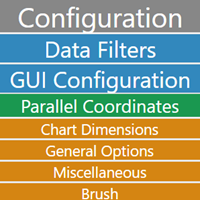
* A data pane for ordering and filtering the data
* A GUI pane for controlling the presentation of the visual.
### Data Player
dex.js offers the capability for dividing a dataset into frames via a sequence value and
combining any of the other charts via chart interaction in order to turn the data into
an interactive movie of sorts.
## Chart interaction
Charts can listen and react to each other. They do so via a publish subscribe
model. In dex.js, components communicate interesting changes via a publish operation.
For example, a data-filter component may communicate that the user has filtered
out all data outside of a certain range. Other charts and components may in turn
listen for these types of changes via subscribing and receiving and reacting
to these changes in realtime.
### Chart Interaction Example
Let's assume that we have a US map component that allows the user to select
individual states and a grid component which wants to do something with that
information.
```javascript
var pcChart = new dex.charts.d3.ParallelCoordinates({
'parent': "#ParallelCoordinates",
'margin': {'top': 40, 'bottom': 30, 'left': 50, 'right': 50},
'csv': csv
}
);
// Configure a chart.
var chord = dex.charts.d3.Chord({
'parent': '#Chord',
'margin': {'top': 10, 'bottom': 20, 'left': 10, 'right': 10},
'csv': csv
}
);
chord.subscribe(pcChart, "select", function (msg) {
// Set the csv data of the chord diagram to the contents of
// the selected data from the Parallel Coordinates diagram.
chord.attr('csv', msg.selected).update();
});
pcChart.render();
chord.render();
```