https://github.com/patricksthannon/Srtly
A simple macOS app that automatically organizes files in any chosen folder into neatly categorized subfolders
https://github.com/patricksthannon/Srtly
adhd adhd-friendly apple auto-sort automation declutter downloads-cleanup file-organizer folder-organization mac-app macos organization productivity quick-action tidy-desktop tidy-downloads
Last synced: 4 months ago
JSON representation
A simple macOS app that automatically organizes files in any chosen folder into neatly categorized subfolders
- Host: GitHub
- URL: https://github.com/patricksthannon/Srtly
- Owner: patricksthannon
- Created: 2025-07-28T21:34:39.000Z (11 months ago)
- Default Branch: EH-BRANCH1
- Last Pushed: 2025-09-16T21:41:59.000Z (9 months ago)
- Last Synced: 2025-09-16T23:23:45.521Z (9 months ago)
- Topics: adhd, adhd-friendly, apple, auto-sort, automation, declutter, downloads-cleanup, file-organizer, folder-organization, mac-app, macos, organization, productivity, quick-action, tidy-desktop, tidy-downloads
- Homepage:
- Size: 534 KB
- Stars: 30
- Watchers: 1
- Forks: 0
- Open Issues: 0
-
Metadata Files:
- Readme: README.md
Awesome Lists containing this project
- awesome - Srtly - Mac fil auto organisering (Verktyg)
README
# Srtly – Your Automatic File Organizer for Mac
[](#download)
[](https://github.com/patricksthannon/Srtly/releases/latest)
[](https://buymeacoffee.com/patricksthannon)

Srtly is a simple **AppleScript-based macOS app** that automatically organizes files in a chosen folder (like Downloads or Desktop) into neatly categorized subfolders — such as **Images**, **Videos**, **Audio**, **Documents**, **Compressed Archives**, **Code & Scripts**, **Folders** (existing folders), **Links**, and **Other**.
**Why Srtly?**
Keeping digital clutter under control can be challenging, especially for people with ADHD or anyone who struggles with organization. Srtly simplifies the process by **sorting your files with a single click**, helping you maintain a clean, manageable workspace effortlessly. Its also 100% Free (although I wouldn't mind if you bought me a coffee to support!)
**Features:**
- **Folder selection prompt**: Choose Downloads, Desktop, or any folder you want to organize.
- **Automatic categorization**: Files are sorted into relevant folders like Images, Videos, Audio, Documents, Compressed Archives, Code & Scripts, existing Folders, Links, and Other.
- **Dynamic folder creation**: Category folders are created automatically if they don’t already exist.
- **Wide file type support**: Images, documents, videos, audio, archives, apps, code files, and links.
- **Non-destructive and repeatable**: Srtly never deletes files, and it can be safely run multiple times on the same folder.
- **Designed for simplicity**: Reduces overwhelm and improves digital organization with minimal effort.
***Now in V1.2.0*** *
- QuickAction For ease of use. Instructions available in readme.txt included in the SrtlyV1.2.0.zip

***Now in V1.2.1*** *
- Added support for more file extensions
- Added Links category for .webloc, .url, .lnk files.
- Implemented move operation error handling to safely skip busy files without crashing. With summary dialog showing how many files were skipped
- Summary dialog confirms sorting completion and shows skipped files count.
- New README Instructions (PDF)
**How to Use Srtly**
1. **Download** `Srtly.zip` from this repository | [](https://github.com/patricksthannon/Srtly/releases/latest)
2. Unzip the file and run Srtly.app
_If you see an error or a popup stating "This application cannot be opened or verified," follow the instructions below._
3. **Choose a folder** to sort (Downloads or Other).
4. **Let Srtly organize your files** automatically.
5. **Enjoy a tidier digital workspace!**
**Screenshots:**


___
If you like this project, consider [buying me a coffee](https://www.buymeacoffee.com/patricksthannon) to keep me motivated! I appreciate it!

[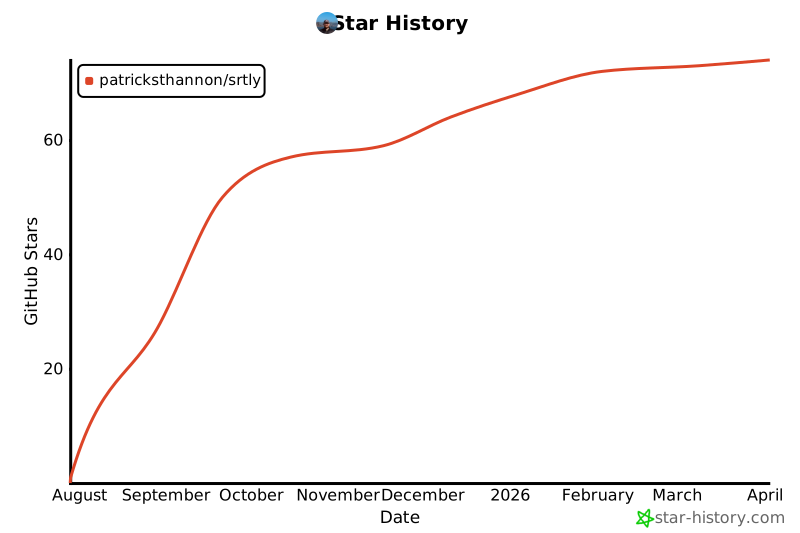](https://www.star-history.com/#patricksthannon/srtly&Date)
___
⚠ macOS Gatekeeper Notice
MacOS may block apps downloaded from the internet if they are not signed or notarized. This is normal, as the app is self-distributed and not verified by Apple.
**To open Srtly safely**:
1. Download and unzip the app as usual.
2. **Right-click (or Control-click)** the Srtly.app icon in Finder.
3. You’ll see a warning about the app being from an **unidentified developer**. Click **Open** to confirm and launch the app.