https://github.com/paulledemon/tkvideoplayer
Video player for tkinter.
https://github.com/paulledemon/tkvideoplayer
tkinter tkvideoplayer video video-player
Last synced: 8 months ago
JSON representation
Video player for tkinter.
- Host: GitHub
- URL: https://github.com/paulledemon/tkvideoplayer
- Owner: PaulleDemon
- License: mit
- Created: 2021-10-10T03:20:17.000Z (over 4 years ago)
- Default Branch: master
- Last Pushed: 2024-09-04T04:10:05.000Z (almost 2 years ago)
- Last Synced: 2025-04-07T17:12:11.929Z (about 1 year ago)
- Topics: tkinter, tkvideoplayer, video, video-player
- Language: Python
- Homepage:
- Size: 2.67 MB
- Stars: 91
- Watchers: 3
- Forks: 27
- Open Issues: 10
-
Metadata Files:
- Readme: Readme.md
- License: LICENSE
Awesome Lists containing this project
README
# TkVideoplayer
This is a simple library to play video files in tkinter. This library also provides the ability to play, pause,
skip and seek to specific timestamps.
#### Example:
```python
import tkinter as tk
from tkVideoPlayer import TkinterVideo
root = tk.Tk()
videoplayer = TkinterVideo(master=root, scaled=True)
videoplayer.load(r"samplevideo.mp4")
videoplayer.pack(expand=True, fill="both")
videoplayer.play() # play the video
root.mainloop()
```
read the documentation [here](https://github.com/PaulleDemon/tkVideoPlayer/blob/master/Documentation.md)
you can easily integrate this with **CustomTkinter** as well: refer [How to integrate with CustomTkinter?](https://github.com/PaulleDemon/tkVideoPlayer/discussions/23#discussioncomment-4475005)
> Please immediately upgrade to the latest version if you are using version 1.3 or below
#### Sample video player made using tkVideoPlayer:
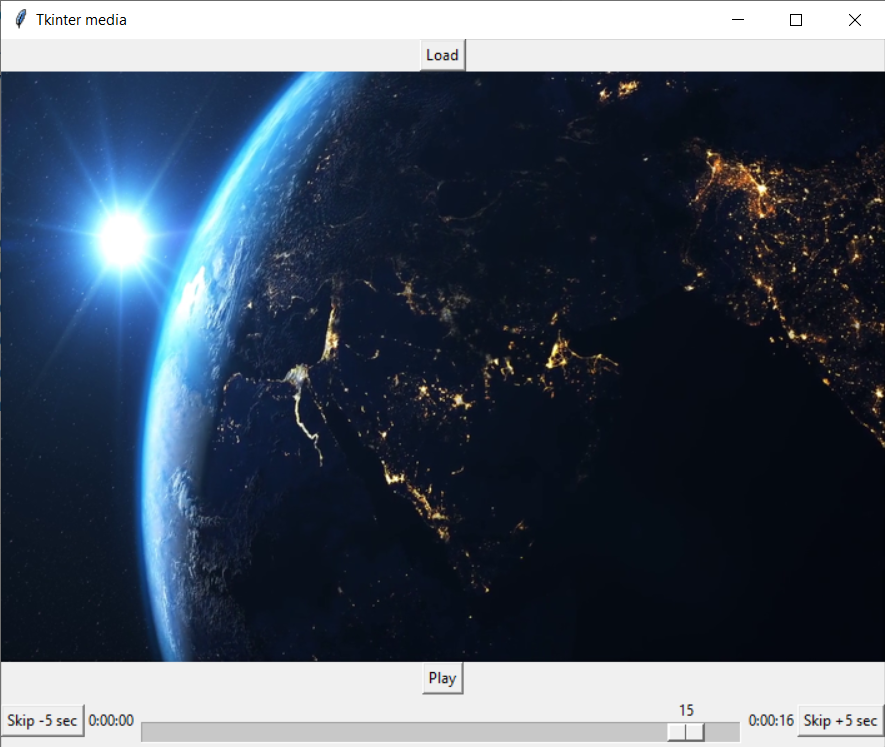
> Note the above is a video player made using this library. The UI doens't come along with the library. Refer example on how to build the video player [here](https://github.com/PaulleDemon/tkVideoPlayer/blob/master/examples/sample_player.py)
**Other libraries you might be interested in:**
* [tkstylesheet](https://pypi.org/project/tkstylesheet/) - Helps you style your tkinter application using stylesheets.
* [tkTimePicker](https://pypi.org/project/tkTimePicker/) - An easy-to-use timepicker.
* [PyCollision](https://pypi.org/project/PyCollision/) - Helps you draw hitboxes for 2d games.