https://github.com/paulomarconi/monitorpy
Simple system tray Python application to control monitor's brightness and contrast.
https://github.com/paulomarconi/monitorpy
brightness-control brightness-slider contrast-control contrast-slider ddc-ci monitor-control multiple-monitors python system-tray-app windows10 windows11
Last synced: 4 months ago
JSON representation
Simple system tray Python application to control monitor's brightness and contrast.
- Host: GitHub
- URL: https://github.com/paulomarconi/monitorpy
- Owner: paulomarconi
- License: mit
- Created: 2025-09-23T00:32:10.000Z (9 months ago)
- Default Branch: master
- Last Pushed: 2025-09-23T01:41:46.000Z (9 months ago)
- Last Synced: 2025-09-23T03:34:30.263Z (9 months ago)
- Topics: brightness-control, brightness-slider, contrast-control, contrast-slider, ddc-ci, monitor-control, multiple-monitors, python, system-tray-app, windows10, windows11
- Language: Python
- Homepage:
- Size: 60.5 KB
- Stars: 0
- Watchers: 0
- Forks: 0
- Open Issues: 0
-
Metadata Files:
- Readme: README.md
- License: LICENSE
Awesome Lists containing this project
README
# MonitorPy
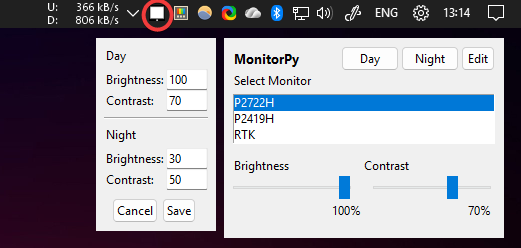
MonitorPy is a simple system tray Python application for Windows 10/11 that allows you to control your monitor's brightness and contrast directly from the tray.
## Features
- Adjust brightness and contrast for connected monitors.
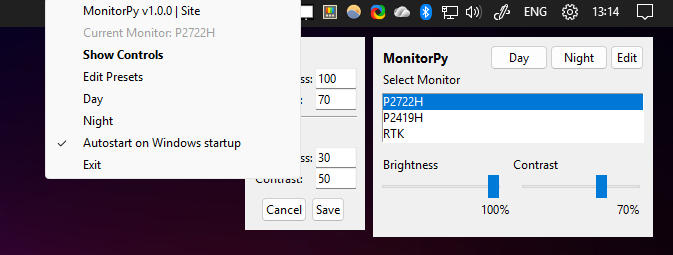
- System tray icon with quick access menu.
- Select between multiple monitors.
- Reset brightness and contrast to default values.
- Lightweight and easy to use.
## Requirements
- Python 3.8+
The following dependencies are used only if you run `Monitory.py` or build the standalone executable.
- [monitorcontrol](https://pypi.org/project/monitorcontrol/)
- [pystray](https://pypi.org/project/pystray/)
- [pillow](https://pypi.org/project/Pillow/)
- [pyinstaller](https://pypi.org/project/pyinstaller/)
## Usage
- Download and run the standalone `MonitorPy.exe` file from the **Releases** section. To uninstall, just delete the file.
- Download `MonitorPy.py`, install the dependencies with:
```sh
pip install -r requirements.txt
```
and run
```sh
python MonitorPy.py
```
- To build the standalone executable, use PyInstaller:
```sh
pyinstaller MonitorPy.spec
```
## How it works
- The app discovers all connected monitors supporting DDC/CI.
- You can select a monitor and adjust its brightness and contrast using sliders.
- The tray icon provides quick access to show controls, reset values, and exit.
## Troubleshooting
- If you see "No DDC/CI" next to a monitor, it means the monitor does not support DDC/CI or is not detected.
- Make sure you have the required permissions and drivers for monitor control.
## License
MIT License
## Author
paulomarconi