https://github.com/pavelkim/check_certificates
Monitor your HTTPS SSL Certificate's expiration.
https://github.com/pavelkim/check_certificates
bash certificate expiration https monitoring ssl
Last synced: 6 months ago
JSON representation
Monitor your HTTPS SSL Certificate's expiration.
- Host: GitHub
- URL: https://github.com/pavelkim/check_certificates
- Owner: pavelkim
- License: gpl-3.0
- Created: 2020-07-18T16:38:08.000Z (almost 6 years ago)
- Default Branch: master
- Last Pushed: 2024-08-25T02:15:12.000Z (almost 2 years ago)
- Last Synced: 2024-08-25T18:10:01.979Z (almost 2 years ago)
- Topics: bash, certificate, expiration, https, monitoring, ssl
- Language: Shell
- Homepage:
- Size: 97.7 KB
- Stars: 5
- Watchers: 1
- Forks: 0
- Open Issues: 6
-
Metadata Files:
- Readme: README.md
- License: LICENSE
Awesome Lists containing this project
README
# check_certificates
Use this script to automate HTTPS SSL Certificate monitoring. It curl's remote server on 443 port and then checks remote SSL Certificate expiration date. You can use it with Zabbix, Nagios/Icinga or other.
# Releases
Latest release: [Download](https://github.com/pavelkim/check_certificates/releases/latest/download/check_certificates.sh)
Docker Hub: [Visit](https://hub.docker.com/repository/docker/pavelkim/check_certificates/general)
GitHub Registry: [Visit](https://github.com/pavelkim/check_certificates/pkgs/container/check_certificates%2Fcheck_certificates)
# Usage
The script takes on input a file with a list of hostnames:
```bash
Usage: check_certificates.sh [-h] [-v] [-s] [-l] [-n] [-A n] [-G] -i input_filename -d domain_name -b backend_name
-b, --backend-name Domain list backend name (pastebin, gcs, etc.)
-i, --input-filename Path to the list of domains to check
-d, --domain Domain name to check
-s, --sensor-mode Exit with non-zero if there was something to print out
-l, --only-alerting Show only alerting domains (expiring soon and erroneous)
-n, --only-names Show only domain names instead of the full table
-A, --alert-limit Set threshold of upcoming expiration alert to n days
-G, --generate-metrics Generates a Prometheus metrics file to be served by nginx
-v, --verbose Enable debug output
-h, --help Show help
```
# Docker container
You can run a container either in daemon mode, or single start.
An example environment is provided under the `./docker/` directory. Take a look into `docker-compose.yml`. Manual setup is easy too, though.
## Create directories
```bash
mkdir -pv "/opt/check_certificates/etc/check_certificates"
mkdir -pv "/opt/check_certificates/htdocs"
```
## Create configuration files
```bash
cat << EOF > /opt/check_certificates/etc/check_certificates/.config
PROMETHEUS_EXPORT_FILENAME="/htdocs/metrics"
EOF
```
```bash
cat << EOF > /opt/check_certificates/etc/check_certificates/domains.txt
example.com
example.org
google.com
EOF
```
## Start a docker container
```bash
docker run \
--name check_certificates-daemon \
--detach \
--rm \
-ti \
-v "/opt/check_certificates/etc/check_certificates:/etc/check_certificates" \
-v "${PWD}/docker/usr/share/nginx/htdocs:/htdocs" \
-e CHECK_INTERVAL=$(( 60 * 60 * 2 )) \
ghcr.io/pavelkim/check_certificates/check_certificates:1.9.1 \
-i /etc/check_certificates/domains.txt \
-G
```
Environment variable `CHECK_INTERVAL` sets the sleep interval between the checks. Currently it doesn't work like a schedule (like cron would). It just waits for N seconds between checks. So, if each your check takes ~7min, the "schedule" will shift for that time.
This will result with a recurrent checks every `$(( 60 * 60 * 2 ))` seconds (2 hours).
Prometheus metrics will appear in a static file: `/opt/check_certificates/htdocs/metrics`. If you want them to be served by nginx or something like that, just make sure `metrics` file is reachable by nginx container.
# Supported domain list backends
Domain list backends allow you to manage configuration in a centralised manner.
## PasteBin source
You can use a PasteBin paste as a source of domain names to be checked. We encorage you to register on PasteBin and create all your pastes related to `check_certificates` as Private or at least as Unlisted.
1. Create a paste with a valid structure ([example](https://pastebin.com/FJFvdiPg))
1. Obtain devkey and userkey ([documentation](https://pastebin.com/doc_api#7))
1. Fill out variables in `.config` file
### Paste structure
```json
{
"check_ssl": [
"example.com",
"google.com",
"mail.com",
"imaginary-domain-9000.com"
]
}
```
### .config file variables
```bash
PASTEBIN_USERKEY=youruserkey
PASTEBIN_DEVKEY=yourdevkey
PASTEBIN_PASTEID=pasteid
```
# Input file format
Example of an input file contents:
```
example.com
google.com
mail.com
imaginary-domain-9000.com
```
# Output data format
Output fields:
```
Hostname Valid Not Before Valid Not After Expires in N Days Outcome
```
Full output (default) example:
```
imaginary-domain-9000.com error error error error error error
google.com 2020-06-30 20:43:12 2020-09-22 20:43:12 66 ok
example.com 2018-11-28 00:00:00 2020-12-02 12:00:00 136 ok
mail.com 2018-01-15 00:00:00 2021-01-14 12:00:00 179 ok
```
Domain names only output (with parameters `-n -l -A 90`) example:
```
imaginary-domain-9000.com
google.com
```
# Prometheus metrics
The script can generate a static file with Prometheus metrics that is to be served by an external web server (eg. nginx or httpd).
Use `-G` or `--generate-metrics` parameters to enable this feature.
## .config file variables
```bash
PROMETHEUS_EXPORT_FILENAME="/path/to/htdocs/metrics"
```
## Metrics example
```prometheus
# HELP check_certificates_expiration Days until HTTPs SSL certificate expires
# TYPE check_certificates_expiration gauge
check_certificates_expiration{domain="example.com",outcome="ok"} 20
check_certificates_expiration{domain="example.de",outcome="ok"} 193
check_certificates_expiration{domain="imaginary-domain-9000.com",outcome="error"} 0
```
## nginx configuration example
Note: if you're running your nginx in a container, make sure your metrics file is accessable for nginx within the container (use volumes or something).
```nginx
server {
listen 127.0.0.1:80;
listen [::1]:80;
listen 127.0.0.1:443 ssl;
listen [::1]:443 ssl;
ssl_certificate /etc/pki/tls/certs/localhost.crt;
ssl_certificate_key /etc/pki/tls/private/localhost.key;
server_name localhost;
access_log /var/log/nginx/localhost-access.log main;
error_log /var/log/nginx/localhost-error.log;
location /check_certificates/metrics {
alias /opt/check_certificates/metrics;
allow 127.0.0.1/32;
deny all;
}
}
```
## prometheus.yml example
```yaml
global:
scrape_interval: 30s
scrape_configs:
- job_name: 'check_certificates'
scrape_interval: 1h
scheme: https
metrics_path: "check_certificates/metrics"
params:
format: ['prometheus']
static_configs:
- targets: ['localhost']
```
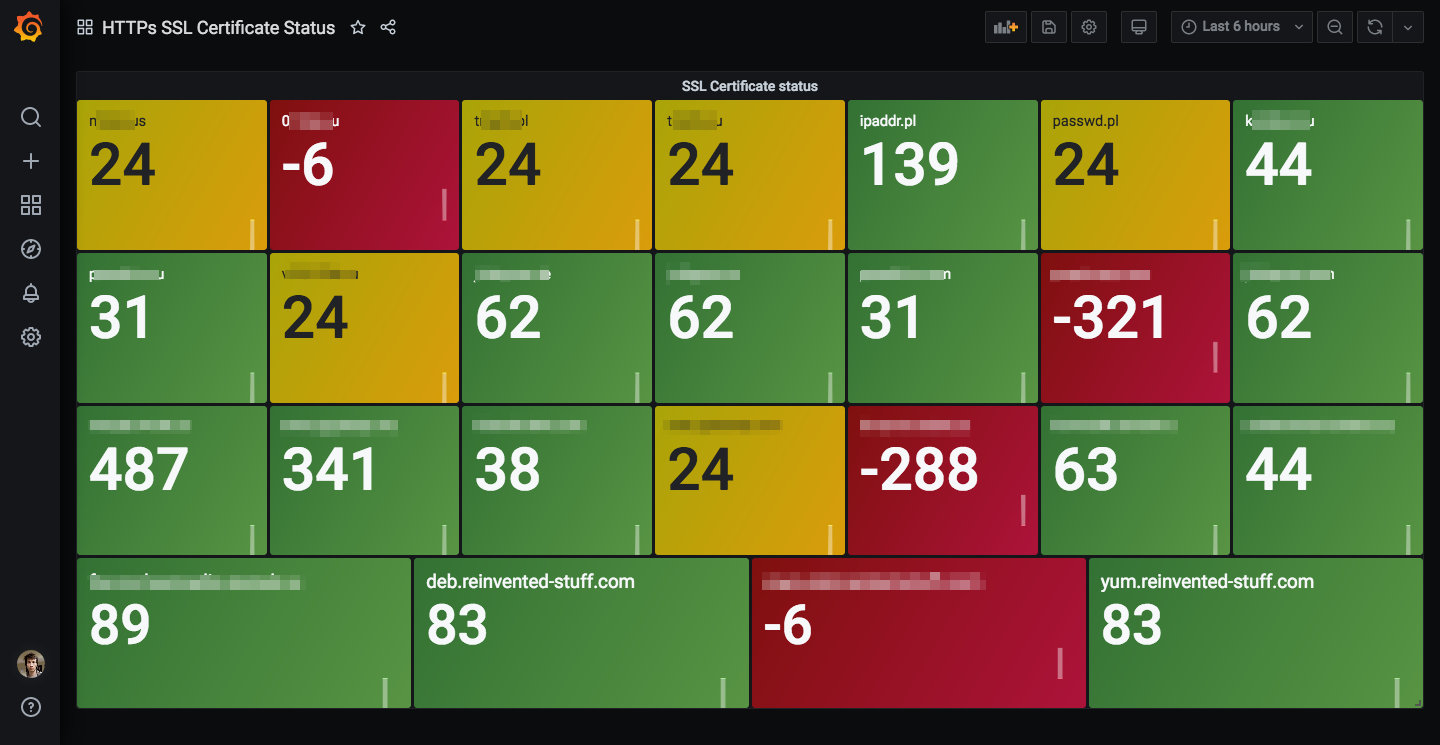
## Grafana dashboard
Dashboard can be imported by id `15298`.
More informatin: https://grafana.com/grafana/dashboards/15298
# Application examples
## Monitoring in Cron
_NOTE_: Take a look into the Docker application examples with recurrent checks support built-in.
The following example of a crontab will provide you with email notfications in 14 days prior to SSL certificate expiration (or in case of other errors). Before that you'll receive no emails. Keep in mind that you'll need to have your Cron and MTA configured properly.
/etc/cron.d/check_certificates:
```java
HOME=/opt/check_certificates
MAILTO="john.doe@example.com"
30 11 * * * nobody bash ./check_certificates.sh -l -A 14 -i corp_domains.txt
35 11 * * * nobody bash ./check_certificates.sh -l -A 14 -d "example.com"
```
## Sensor script for Zabbix/Nagios/Icinga etc.
You could use `--sensor-mode` along with other parameters to make the script exit with non-zero code if your remote host has an expiring certificate.
For Zabbix you can create a simple check to monitor your remote SSL certificate. For Nagios/Icinga you can configure a separate service check.
```bash
./check_certificates.sh \
--sensor-mode \
--only-names \
--only-alerting \
--alert-limit 14 \
--domain example.com
```
The script executed as displayed above will return 0 in case if `example.com` has SSL certificate valid for 15 or more days. In case of error (DNS, firewall, etc.) or if certificate will expire in less then 14 days, the script will return 1.
# Supported platforms
Currently tested on the following platforms:
1. CentOS 7, bash 4.2.46, openssl 1.0.2k
2. CentOS 8, bash 4.4.19, openssl 1.1.1c
3. Mac OS 10.13.6, bash 3.2.57, openssl 1.1.1d
4. Mac OS 12.5, bash 5.1.16, OpenSSL 3.0.7