https://github.com/pavloniym/foodometer
Telegram Bot for business lunch payment queue management
https://github.com/pavloniym/foodometer
docker javascript nodejs sequelize sqlite telegram-bot
Last synced: 3 months ago
JSON representation
Telegram Bot for business lunch payment queue management
- Host: GitHub
- URL: https://github.com/pavloniym/foodometer
- Owner: pavloniym
- License: mit
- Created: 2018-03-03T17:54:31.000Z (over 8 years ago)
- Default Branch: master
- Last Pushed: 2018-03-20T09:43:15.000Z (over 8 years ago)
- Last Synced: 2025-07-02T23:36:03.771Z (about 1 year ago)
- Topics: docker, javascript, nodejs, sequelize, sqlite, telegram-bot
- Language: JavaScript
- Homepage: https://hub.docker.com/r/pavelshar/foodometer/
- Size: 205 KB
- Stars: 1
- Watchers: 1
- Forks: 0
- Open Issues: 0
-
Metadata Files:
- Readme: README.md
- License: LICENSE
Awesome Lists containing this project
README
# Foodometer
Have business lunch with your colleagues, and the boss doesn't pay your meals' bills?
So you pay lunch bills in turn and are tired of keeping the order of payment in mind.
Ask Foodometer **who pays today**!

[][hub]
[][hub]
[][hub]
### Telegram Bot
This Telegram Bot developed using nodejs, sqlite3 and [node-telegram-bot-api](https://github.com/yagop/node-telegram-bot-api) framework.
To run your own foodometer you should follow next steps:
1. Create your own telegram bot - search for **@BotFather** and follow instructions
2. Run foodometer's docker-container with bot token and webhook url
> You will need SSL certificate on your host machine to set telegram's webhook
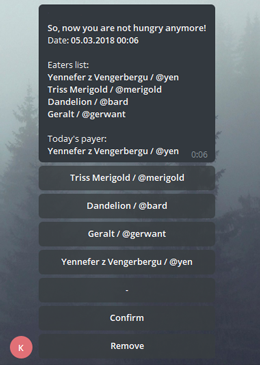
To work with foodometer you should create a group and invite **only** your foodometer bot there. Bot will register group creator as participant. Any other invited users will be registered as participants too.
`/meal` - create new meal instance with list of group participants. Chose eaters, get payer and confirm meal!
`/clear` - remove all previous meals and start from clean sheet
### Docker container
Docker container is built on top of [Chloe image](https://github.com/PavelShar/Chloe) - so you can login into foodometer's container via SSH and `SSH_PASSWORD` environment variable is also included.
To run foodometer bot all you need is to execute this command:
```
docker run --name foodometer -d -p 8880:80 -e WEB_HOOK= -e BOT_TOKEN= -e LOCALE=en pavelshar/foodometer:latest
```
`BOT_TOKEN` - obtained token from [@BotFather](https://telegram.me/BotFather)
`WEB_HOOK` - external https hook for server interaction
`LOCALE` - bot locale - `en` and `ru` are supported
> Be accurate with port mappings: your internal `8880` should be mapped with your external `WEB_HOOK`
*Thanks [messagesstickers.com](http://messagesstickers.com/) for foodometer sticker*
[hub]: https://hub.docker.com/r/pavelshar/foodometer/