https://github.com/pbeart/google-analytics-cookie-parser
A WIP forensics tool written in Python, for parsing Google Analytics cookies.
https://github.com/pbeart/google-analytics-cookie-parser
cookies firefox forensics google-analytics python
Last synced: 12 months ago
JSON representation
A WIP forensics tool written in Python, for parsing Google Analytics cookies.
- Host: GitHub
- URL: https://github.com/pbeart/google-analytics-cookie-parser
- Owner: pbeart
- License: gpl-3.0
- Created: 2019-09-15T23:04:01.000Z (almost 7 years ago)
- Default Branch: master
- Last Pushed: 2019-10-10T19:22:35.000Z (over 6 years ago)
- Last Synced: 2025-06-30T22:51:33.432Z (12 months ago)
- Topics: cookies, firefox, forensics, google-analytics, python
- Language: Python
- Size: 286 KB
- Stars: 7
- Watchers: 3
- Forks: 1
- Open Issues: 3
-
Metadata Files:
- Readme: README.md
- License: LICENSE
Awesome Lists containing this project
README

# google-analytics-cookie-parser
A WIP forensics tool for Windows written in Python, for parsing Google Analytics cookies.
## Always manually verify any results from this tool which you wish to use as evidence.
### [Download latest version here](https://github.com/pbeart/google-analytics-cookie-parser/releases/latest)
## Instructions for GUI use:
#### Loading cookies
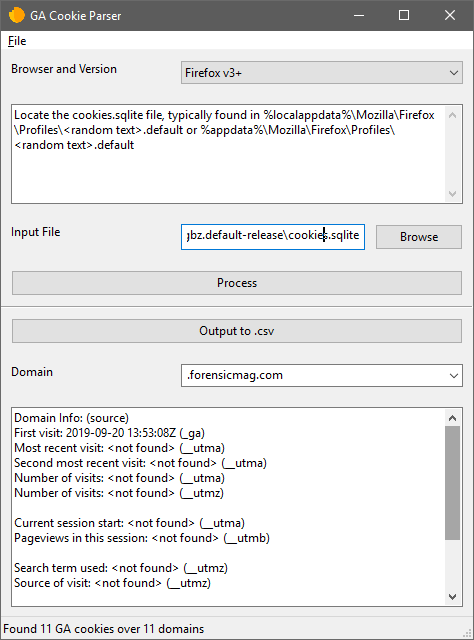
+ Select the browser and browser version you're using from the dropdown at the top
+ Find the cookies file using the instructions for your browser
+ Click 'Process'
#### Viewing and exporting
+ You can view information for a given domain by selecting that domain with the Domain dropdown after loading a cookie file
+ You can also export all Google Analytics cookies in a parsed format to .csv files in a chosen directory by clicking the 'Output to .csv' button
## Instructions for CLI use:
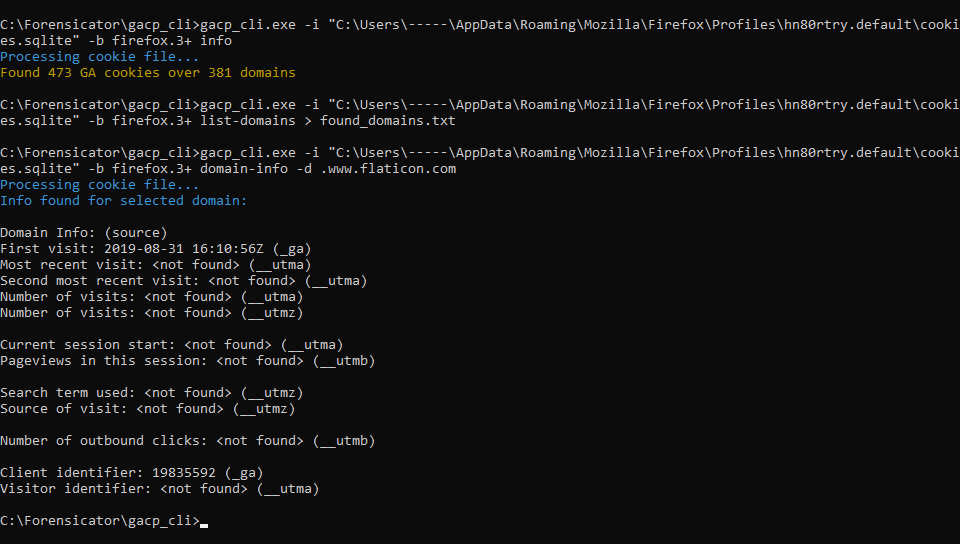
+ Every command requires both an input file path (`-i` or `--input`) and a browser name (`-b` or `--browser`) to be specified. Currently, `-b`/`--browser` can only be `firefox.3+` or `csv`
#### Viewing cookie info
+ The `info` command, which does not require any additional parameters, will show the number of GA cookies found and the number of unique domains for which any cookies were found

#### Listing domains
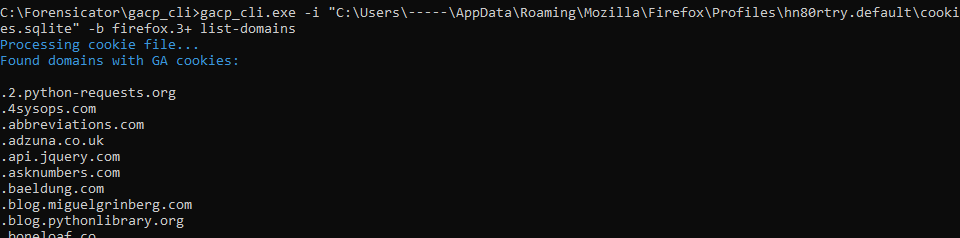
+ The `list-domains` command, which does not require any additional parameters, will list all domains for which GA cookies were found
#### Viewing domain information
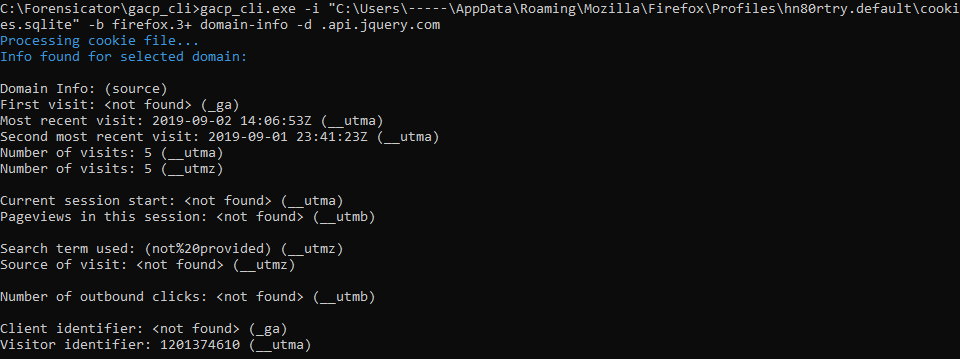
+ The `domain-info` command, which requires the additional parameter `-d` or `--domain`, will list a parsed version of all available information for the given domain. **The domain should be given in the format in which it is found with `list-domains`**
#### Exporting all cookie information to .csv
+ The `export-csv` command, which requires the additional parameter `-o` or `--output` which should be a directory path of the output directory, will export all found cookie data to .csv files in the given directory. The `-f` or `--force-overwrite` option can be given to automatically overwrite files if they exist without prompting the user.

## GACP currently supports:
* Reading and parsing cookies.sqlite from Firefox v3+ and any browser from which you can retrieve cookies as a .csv file
* Analysing and parsing all relevant Google Analytics cookies (\_ga, \_\_utma, \_\_utmb, \_\_utmz)
* Presenting all available information for a given domain
* Exporting GA cookie information to a .csv file
### GACP is currently only tested on Firefox v3+ and .csv, and as always any critical evidence should be double-checked by manually inspecting the relevant cookies
## Acknowledgements
I would like to thank Kevin Ripa, for being such an excellent instructor and mentor, and providing the inspiration to create this tool.