https://github.com/pbrus/binary-doppler-beaming
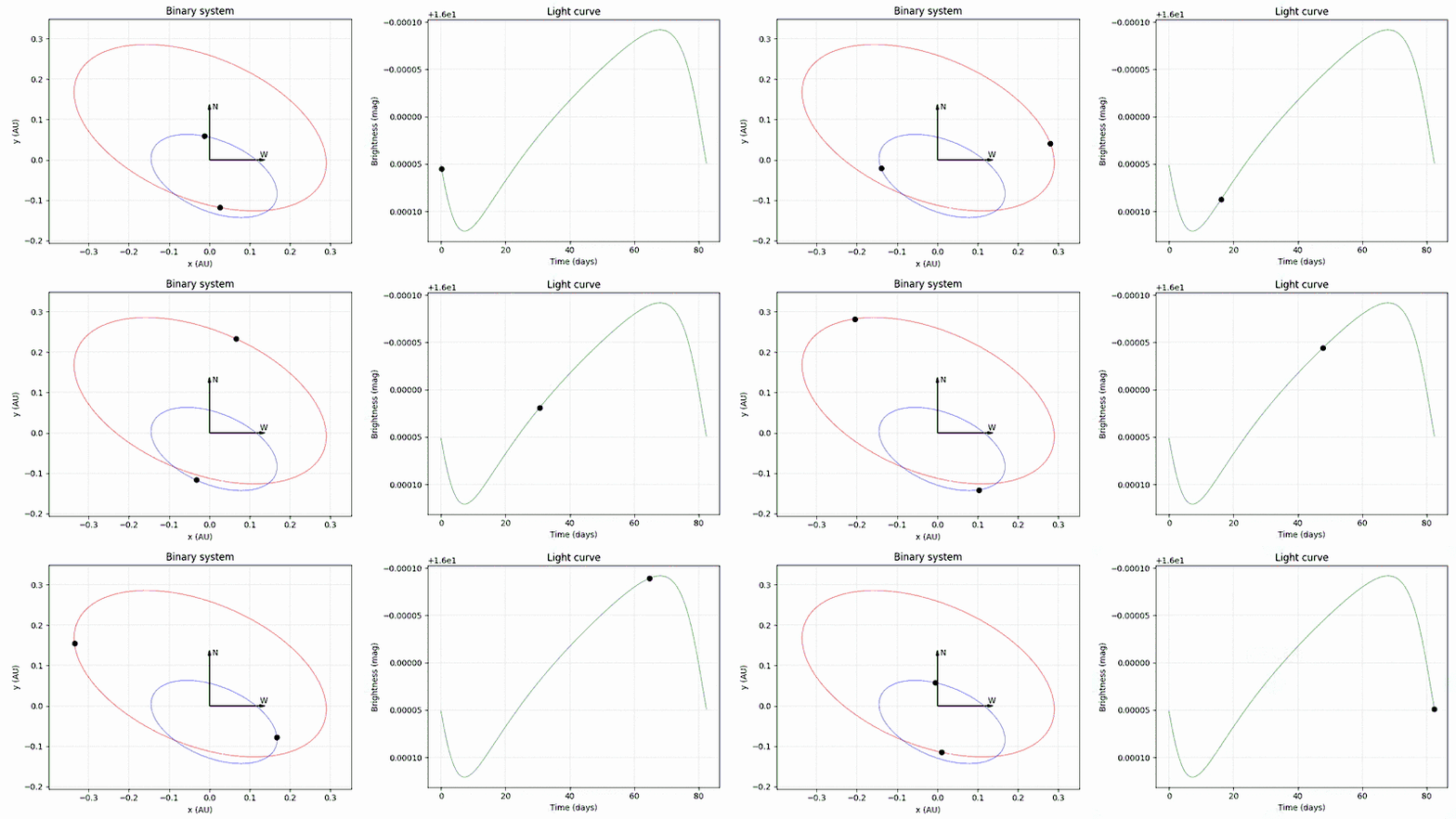
This software generates a light curve caused by the mutual motions of stars in a binary system. Depending on stars, orbits parameters and locus the light curve changes the shape and amplitude.
https://github.com/pbrus/binary-doppler-beaming
beaming binary doppler light-curve-models photometry
Last synced: about 2 months ago
JSON representation
This software generates a light curve caused by the mutual motions of stars in a binary system. Depending on stars, orbits parameters and locus the light curve changes the shape and amplitude.
- Host: GitHub
- URL: https://github.com/pbrus/binary-doppler-beaming
- Owner: pbrus
- License: mit
- Created: 2018-05-12T06:46:57.000Z (about 8 years ago)
- Default Branch: master
- Last Pushed: 2019-05-24T14:25:18.000Z (about 7 years ago)
- Last Synced: 2025-12-16T01:19:03.341Z (6 months ago)
- Topics: beaming, binary, doppler, light-curve-models, photometry
- Language: Python
- Homepage:
- Size: 45.9 KB
- Stars: 2
- Watchers: 1
- Forks: 1
- Open Issues: 0
-
Metadata Files:
- Readme: README.md
- License: LICENSE
Awesome Lists containing this project
README
# Binary-doppler-beaming
[](https://travis-ci.org/pbrus/binary-doppler-beaming)
[](https://www.python.org/)
[](https://badge.fury.io/py/bidobe)
[](https://github.com/pbrus/binary-doppler-beaming/blob/master/LICENSE)
This software generates a light curve of a binary system which is caused by the photometric beaming. For more details see [arXiv:0708.2100](https://arxiv.org/pdf/0708.2100.pdf). You can set up any configuration of a binary system seen from Earth.
## Installation
To install the package please type from the command line:
```bash
$ sudo pip3 install bidobe
```
or alternatively:
```bash
$ git clone https://github.com/pbrus/binary-doppler-beaming
$ cd binary-doppler-beaming
$ sudo python3 setup.py install
```
## Usage
All you need are the `doppler_beaming.py` script and the `binary.conf` file. Edit the last one and configure your own binary system (see comments inside this file to find out which units are used):
```python
[OBJECTS]
mass1 = 1
mass2 = 2
temperature1 = 6000
temperature2 = 8000
radius1 = 1.0
radius2 = 1.5
distance = 1000
[ORBITS]
sum_major_axis = 8e10
eccentricity = 0.4
longitude_node = 70.0
inclination = 60.0
periastron_argument = 110.0
...
```
Now you can run the `doppler_beaming.py`:
```bash
$ python3 doppler_beaming.py
```
The main module *bidobe* (**bi**nary **do**ppler **be**aming) provides the interface to display, save to files and animate orbits, radial velocities and light curves. Moreover, it allows to convert [SI](https://en.wikipedia.org/wiki/International_System_of_Units) units from and to astronomical units. For example:
```python
orbit1_position = orbit1.convert_m_to_au(orbit1_position)
```
converts position in meters to position in [AU](https://en.wikipedia.org/wiki/Astronomical_unit)s. The following commands:
```python
plot_projected_orbits(orbit1_position, orbit2_position, "AU", "AU")
plot_projected_orbits(orbit1_position, orbit2_position, "AU", "AU", "orbits.eps")
animate_projected_orbits(orbit1_position, orbit2_position, "AU", "AU")
```
can be used to display orbits projected on the sky, save them to *orbits.eps* file and animate them on the screen, respectively.
I encourage to visit my website to see more detailed description of this project. The current link can be found on my [GitHub profile](https://github.com/pbrus).
## License
**Binary-doppler-beaming** is licensed under the [MIT license](http://opensource.org/licenses/MIT).