https://github.com/pcbowers/sanity-plugin-tags
A multi-tag input for sanity studio.
https://github.com/pcbowers/sanity-plugin-tags
javascript plugin react react-hooks sanity sanity-studio typescript
Last synced: 6 months ago
JSON representation
A multi-tag input for sanity studio.
- Host: GitHub
- URL: https://github.com/pcbowers/sanity-plugin-tags
- Owner: pcbowers
- License: mit
- Created: 2022-03-27T04:11:16.000Z (over 4 years ago)
- Default Branch: main
- Last Pushed: 2024-12-04T15:21:30.000Z (over 1 year ago)
- Last Synced: 2025-11-05T17:13:41.400Z (8 months ago)
- Topics: javascript, plugin, react, react-hooks, sanity, sanity-studio, typescript
- Language: TypeScript
- Homepage: https://sanity.io/plugins/tags
- Size: 1.99 MB
- Stars: 24
- Watchers: 3
- Forks: 19
- Open Issues: 15
-
Metadata Files:
- Readme: README.md
- License: LICENSE
Awesome Lists containing this project
README
# sanity-plugin-tags
> This is a **Sanity Studio v3** plugin.
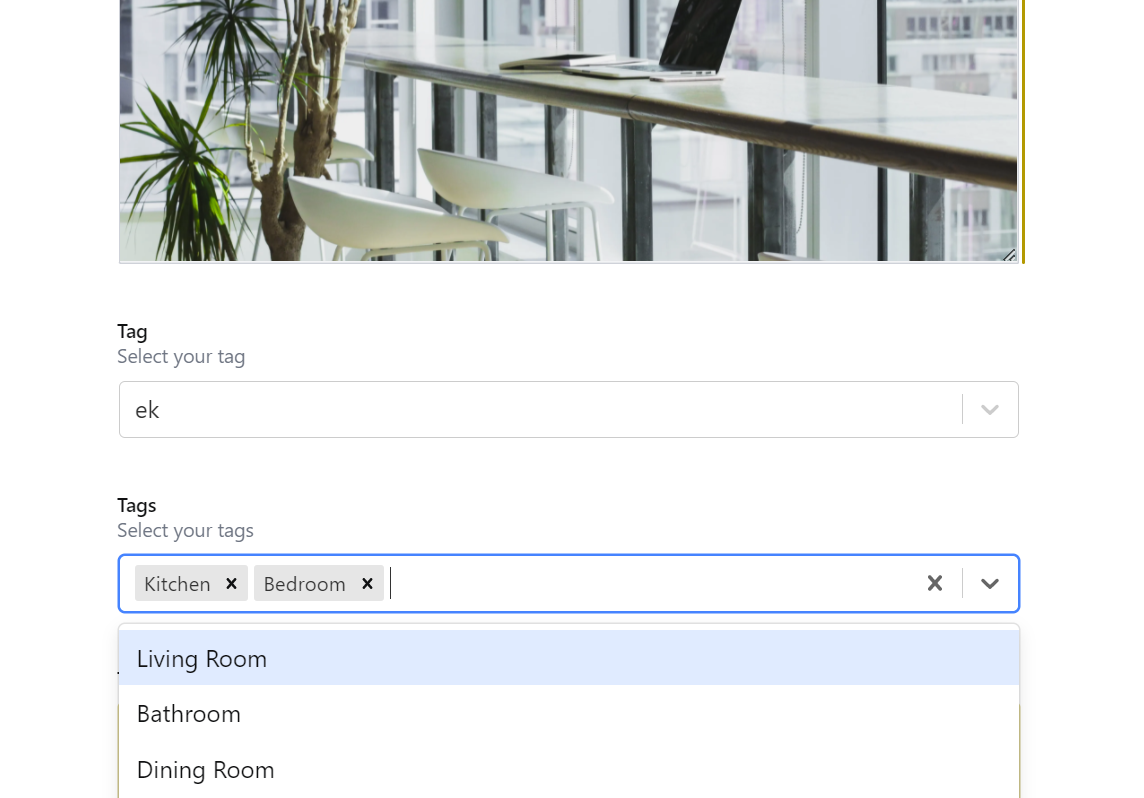
A multi-tag input for sanity studio. Fully featured with autocomplete capabilities, live updates, predefined tag options, style and component customizability, and much more.
## Install
Sanity v3: `npm install sanity-plugin-tags`
Sanity v2: `sanity install tags`
## Use
Add it as a plugin in `sanity.config.ts` (or .js):
```ts
import {defineConfig} from 'sanity'
import {tags} from 'sanity-plugin-tags'
export default defineConfig({
//...
plugins: [tags({})],
})
```
Simply use 'tag' or 'tags' as a type (single or multi select respectively) in your fields. If you want autocompletion, set the `includeFromRelated` option to the name of your field.
That's it! It will even update the autocompletion list live as changes are made to other documents!
Dive into the [Options Section](#options) for more advanced use cases like predefined tags and the `onCreate` hook.
```javascript
{
name: 'myTags',
title: 'Tags',
type: 'tags',
options: {
includeFromRelated: 'myTags'
...
}
}
```
## Options
```typescript
{
name: string,
type: "tags" | "tag",
options: {
predefinedTags?: Tag | Tag[] | () => Tag[] | Tag | () => Promise
includeFromReference?: false | string
includeFromRelated?: false | string
customLabel?: string
customValue?: string
allowCreate?: boolean
onCreate?: (inputValue: string) => Tag | Promise
checkValid?: (inputValue: string, currentValues: string[]) => boolean
reactSelectOptions?: {
[key: string]: any
}
},
//... all other Sanity Properties
},
```
### What is a Tag?
A tag is simply an object with a label and value. Example:
```json
{
"label": "My Tag",
"value": "my-tag"
}
```
This can be used for all sorts of things: categorization, single select, and much more. Essentially, if you want to limit people to a single or multi list of strings, tags will fit your use case perfectly.
### predefinedTags
`default: []`
This option allows you to add any tags that you would like to the autocomplete list. This can take any form from a single tag to an array of tags, to a function that dynamically returns a tag or tags.
```javascript
{
// ...
predefinedTags: { label: "My Tag", value: 'my-tag' }
// ...
}
```
```javascript
{
// ...
predefinedTags: [
{label: 'My Tag 1', value: 'my-tag-1'},
{label: 'My Tag 2', value: 'my-tag-2'},
]
// ...
}
```
```javascript
{
// ...
predefinedTags: async () => client.fetch(...)
// ...
}
```
### includeFromReference
`default: false`
If you already have a sanity schema that contains a tag-like structure and want to add them to the autocomplete list, set this option to the name of your sanity schema document. This option applies no filters. If you would like to filter, use the `predefinedTags` option.
```javascript
{
// ...
includeFromReference: 'category'
// ...
}
```
### includeFromRelated
`default: false`
This option is similar to `includeFromReference`, but it allows you to add to the autocomplete list from a field in the related document. Typically, you would set this option to the name of the current field to allow autocompletion for tags that were already selected previously.
```javascript
{
// ...
includeFromRelated: 'category'
// ...
}
```
### customLabel
`default: 'label'`
If you want to change the label key for your tags, set this option. Useful when you want to use the default label key to store some other value.
_Note: If you set this option, all tags specified by `predefinedTags` and the structure returned by `onCreate` **must** use this custom label_
```javascript
{
// ...
customLabel: 'myLabelKey'
// ...
}
```
### customValue
`default: 'value'`
If you want to change the value key for your tags, set this option. Useful when you want to use the default value key to store some other value.
_Note: If you set this option, all tags specified by `predefinedTags` and the structure returned by `onCreate` **must** use this custom value_
```javascript
{
// ...
customValue: 'myValueKey'
// ...
}
```
### allowCreate
`default: true`
By default, new tags can be created inline from this input. If you implement the input with a reference, this does not work. See [Parts](#parts) for more information.
```javascript
{
// ...
allowCreate: false
// ...
}
```
### onCreate
`default: (value) => ({ [customLabel]: value, [customValue]: value})`
If you want to edit the label or value of the tag when a new one is created before saving it, use this hook. You do **not** need to specify this property if you set `customLabel` or `customValue` and like the default value. If you do specify it, make sure it returns an object that contains the custom label key and the custom value key. This hook provides an easy solution for 'slugifying' the label.
```javascript
{
// ...
onCreate: (value) => ({
label: value,
value: value.toLowerCase().replace(/\W/g, '-'),
})
// ...
}
```
### checkValid
`default: (inputValue: string, currentValues: string[]) => !currentValues.includes(inputValue) && !!inputValue && inputValue.trim() === inputValue`
This allows you to check the validity of a tag when creation is allowed. `inputValue` contains the string of the input while `currentValues` contains an array of strings that represent all of the values of any options available to select as well as any already-selected options.
```javascript
{
// ...
checkValid: (input, values) => {
return (
!!input &&
input.trim() === input &&
!values.includes(input.trim().toLowerCase().replace(/\W/g, '-'))
)
}
// ...
}
```
### reactSelectOptions
`default: {}`
The input component uses [React Select](https://react-select.com/home) under the hood. If you want to change and override any of the options passed to the select component, specify this option. Specify this option at your own risk!
If you want to override React Select's components see [Parts](#parts) for more information.
```javascript
{
// ...
reactSelectOptions: {
closeMenuOnSelect: false
}
// ...
}
```
## Develop & test
## Contribute
I love feedback, and any help is appreciated! Feel free to install the plugin, submit an issue, or open a PR.
This plugin uses [@sanity/plugin-kit](https://github.com/sanity-io/plugin-kit)
with default configuration for build & watch scripts.
See [Testing a plugin in Sanity Studio](https://github.com/sanity-io/plugin-kit#testing-a-plugin-in-sanity-studio)
on how to run this plugin with hotreload in the studio.
## Acknowledgements
This plugin is based off of [sanity-plugin-autocomplete-tags](https://github.com/rosnovsky/sanity-plugin-autocomplete-tags), though it enhances it by adding a couple additional options while improving support for default sanity values like `initialValues` and `readOnly`.