https://github.com/pdawg-bytes/metro-ui-demo-winforms
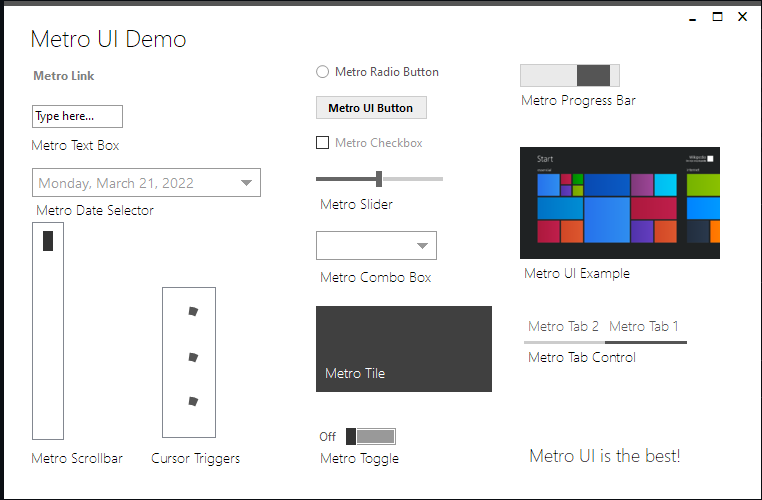
This Metro UI Demo was written in WinForms .NET. It's using the ModernMetroUI package to recreate Metro UI components such as Tiles, Toggles, Combo Boxes, etc. This was a quick weekend project so don't expect any updates :)
https://github.com/pdawg-bytes/metro-ui-demo-winforms
Last synced: 5 months ago
JSON representation
This Metro UI Demo was written in WinForms .NET. It's using the ModernMetroUI package to recreate Metro UI components such as Tiles, Toggles, Combo Boxes, etc. This was a quick weekend project so don't expect any updates :)
- Host: GitHub
- URL: https://github.com/pdawg-bytes/metro-ui-demo-winforms
- Owner: Pdawg-bytes
- Created: 2022-03-21T00:28:26.000Z (over 4 years ago)
- Default Branch: main
- Last Pushed: 2022-03-21T20:59:08.000Z (over 4 years ago)
- Last Synced: 2025-02-28T07:57:21.795Z (over 1 year ago)
- Language: C#
- Size: 1.09 MB
- Stars: 4
- Watchers: 2
- Forks: 0
- Open Issues: 0
-
Metadata Files:
- Readme: README.md
Awesome Lists containing this project
README
# Metro UI Demo WinForms
This is a WinForms app that aims to recreate the Metro UI components using the ModernMetroUI NuGet package. It's written with .NET 4.7 and C#. This was a quick weekend project but feel free to try it out!
# Building
To build this project, just open MetroUI.sln, then "Build Solution" in the Build tools. I used the MSIX Packaging tools to package a desktop app, so it won't be any different from what you see in your build.
# Installing
To install this app from the releases, download "Metro UI Demo.zip" then extract it. Next, run "Install.ps1" with PowerShell. (Make sure to have developer mode turned on! The app cerificate isn't trusted fully so it needs to be manually installed.) Then, make your way through the install until the app is installed. After this, it should show up as "Metro UI Demo" in your start menu. Enjoy!
# Screenshot