https://github.com/pdil/pdcolorpicker
🎨 A simple, fast color picker for iOS apps.
https://github.com/pdil/pdcolorpicker
cocoapods color-picker ios swift
Last synced: over 1 year ago
JSON representation
🎨 A simple, fast color picker for iOS apps.
- Host: GitHub
- URL: https://github.com/pdil/pdcolorpicker
- Owner: pdil
- License: mit
- Created: 2017-08-09T01:31:44.000Z (almost 9 years ago)
- Default Branch: master
- Last Pushed: 2023-10-21T03:35:03.000Z (almost 3 years ago)
- Last Synced: 2025-04-07T11:02:15.579Z (over 1 year ago)
- Topics: cocoapods, color-picker, ios, swift
- Language: Swift
- Homepage:
- Size: 13.2 MB
- Stars: 31
- Watchers: 2
- Forks: 6
- Open Issues: 1
-
Metadata Files:
- Readme: README.md
- Changelog: CHANGELOG.md
- Contributing: .github/CONTRIBUTING.md
- License: LICENSE.md
- Code of conduct: .github/CODE_OF_CONDUCT.md
Awesome Lists containing this project
README

----
[](https://github.com/pdil/PDColorPicker/releases)
[](http://cocoapods.org/pods/PDColorPicker)
[](https://github.com/Carthage/Carthage)
[](https://cocoapods.org/pods/PDColorPicker)
[](http://cocoapods.org/pods/PDColorPicker)
| Branch | Status | Coverage |
| ------ | ------ | -------- |
| `master` (v0.8.5) | [](https://travis-ci.org/pdil/PDColorPicker) | [](https://codecov.io/gh/pdil/PDColorPicker/branch/master) |
| `develop` | [](https://travis-ci.org/pdil/PDColorPicker/branches) | [](https://codecov.io/gh/pdil/PDColorPicker/branch/develop) |
🎨 **PDColorPicker** is an open source iOS library that lets developers include a color picker in their apps, allowing users to easily select colors in a variety of formats. This library is open for collaboration with the community so anyone is invited to submit issues or pull requests.
| Demo | Table of Contents |
| ----------------- | ----------------- |
| [ ](https://giphy.com/gifs/10ofmG3LCZMImI/fullscreen) | [📄 Requirements](README.md#-requirements)
[💻 Installation](README.md#-installation)
- [CocoaPods](README.md#cocoapods)
- [Carthage](README.md#carthage)
- [Manual](README.md#manual-not-recommended)
[📲 Drag and Drop](README.md#-drag-and-drop)
[🎨 **PDColorPicker** in other apps](README.md#-pdcolorpicker-in-other-apps)
[🙋♂️ Author](README.md#%EF%B8%8F-author)
[⚖️ License](README.md#%EF%B8%8F-license) |
----
## 📄 Requirements
* iOS 9.0 or later (iOS 11.0+ for drag and drop)
* Xcode 10.2 or later
* Swift 5 or later
## 💻 Installation
### Cocoapods
`PDColorPicker` is available through [CocoaPods](http://cocoapods.org).
If you have not done so already, run `pod setup` from the root directory of your application.
To install `PDColorPicker`, simply add the following line to the Podfile:
```ruby
pod 'PDColorPicker'
```
This line should be added to the app's target so that it looks something like this:
```ruby
use_frameworks!
target 'TARGET_NAME' do
pod 'PDColorPicker'
# other pods...
end
```
> **Older Swift Versions**
>
> If the project is not built for Swift 4.2, install from the `swift-3.2`, `swift-4.1` or the `swift-4.2` branches:
> ```ruby
> pod 'PDColorPicker', :git => 'https://github.com/pdil/PDColorPicker.git', :branch => 'swift-4.2'
> ```
> Note that this build may not include all of the latest features of `PDColorPicker`.
Build the CocoaPods frameworks by running the following command in the Terminal from the root project directory:
```
$ pod install
```
Open the newly created `.xcworkspace` file and build the project to make `PDColorPicker` available.
**Note**: Be sure to always work inside the `.xcworkspace` file and **not** the `.xcodeproj` file, otherwise Xcode will not be able to locate the dependencies and `PDColorPicker` will not be accessible.
### Carthage
`PDColorPicker` is available through [Carthage](https://github.com/carthage/carthage).
If you haven't installed Carthage yet, use Homebrew to install it:
```
$ brew update
$ brew install carthage
```
Create a Cartfile inside the root project directory with the following line (or add this line if you already have a Cartfile):
```
github "pdil/PDColorPicker"
```
> **Older Swift Versions**
>
> If the project is not built for Swift 4.2, install from the `swift-3.2`, `swift-4.1` or the `swift-4.2` branches:
> ```
> github "pdil/PDColorPicker" "swift-4.2"
> ```
> Note that this build may not include the latest features of `PDColorPicker`.
Build the Carthage frameworks by running the following command in the Terminal from the root project directory:
```
$ carthage update
```
This will build the framework inside the `Carthage/build` folder.
Lastly, add the framework to your project:
* In Xcode, select the project in the Project Navigator in Xcode (blue icon).
* Open the "General" tab on the top bar.
* Drag `PDColorPicker.framework` from the `Carthage/build` folder into the "Embedded Binaries" section.
### Manual (not recommended)
* Download the `.swift` files inside [PDColorPicker/Classes](https://github.com/pdil/PDColorPicker/tree/master/PDColorPicker/Classes) and add them to your project.
* Add the files to the appropriate target(s) within the project.
* Import `PDColorPicker` as you normally would.
## 📝 Usage
```swift
import UIKit
import PDColorPicker // 1.
class MyViewController: UIViewController, Dimmable {
// ...
func presentColorPicker() {
// 2.
let colorPickerVC = PDColorPickerViewController(initialColor: .blue, tintColor: .black)
// 3.
colorPickerVC.completion = {
[weak self] newColor in
self?.undim() // 7.
guard let color = newColor else {
print("The user tapped cancel, no color was selected.")
return
}
print("A new color was selected! HSBA: \(String(describing: color))")
}
// 4.
dim() // see Dimmable documentation for extra options
// 5.
present(colorPickerVC, animated: true)
}
// ...
}
```
1. Import the `PDColorPicker` framework.
2. Instantiate a new `PDColorPickerViewController`.
3. Set the completion handler of the color picker, indicating what the presenting view controller should do with the color result. **Note**: this can also be set in the `PDColorPickerViewController` initializer.
4. Implement the `Dimmable` protocol and dim the presenting view controller (optional but highly recommended).
5. Present the color picker as a modal view controller.
6. Use the color picker to select a color. When **Save** or **Cancel** is tapped, the completion handler specified in the initializer will automatically provide the new color. If the user taps cancel, `nil` is returned.
7. Be sure to undim the view once the completion handler is called.
### Bonus
To achieve the white status bar while the presenting view controller is dimmed, set `UIViewControllerBasedStatusBarAppearance` to `YES` in your `Info.plist`.
You can also copy the code here into the plist file:
```
UIViewControllerBasedStatusBarAppearance
```
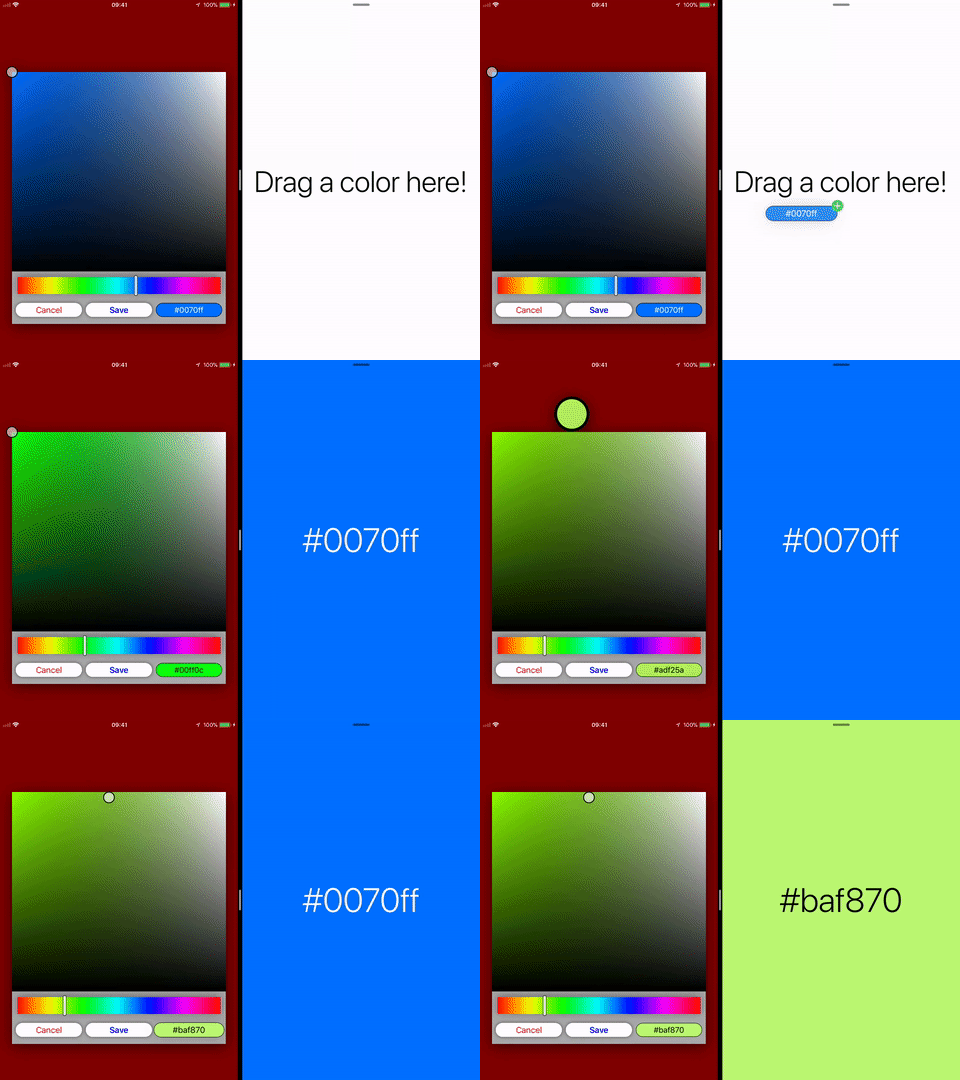
## 📲 Drag and Drop
Drag and drop is also supported in projects that target iOS 11.0 or later.
[ ](https://giphy.com/gifs/6TNPgdZ3W4qMo/fullscreen)
See `PDColorReceiverExample` for an example on how to consume a color that is dragged into your app. The drag and drop implementation of `PDColorPicker` exposes a basic `UIColor` so that it can be read by apps that don't necessarily import `PDColorPicker`.
Of course, if the destination app imports `PDColorPicker`, it will have access to the convenient `PDColor` class which it could instantiate with the received `UIColor`:
```swift
func dropInteraction(_ interaction: UIDropInteraction, performDrop session: UIDropSession) {
session.loadObjects(ofClass: UIColor.self) {
guard let color = $0.first as? UIColor else { return }
let pdColor = PDColor(color: color)
print(pdColor.hex)
}
}
```
## 🎨 `PDColorPicker` in other apps
Here is a list of apps that use **PDColorPicker** to let their users select colors:
* 🌮 [FoodEase](https://foodease.xyz)
* 🎨 [Paint Shapes](https://itunes.apple.com/us/app/paint-shapes/id1366164052)
If your app is using **PDColorPicker**, [let me know](mailto:dilorenzo@hey.com?subject=PDColorPicker) and I'll add it to this list (include an emoji to represent your app in the list, the app name, and a web or download URL)!
## 🙋♂️ Author
Paolo Di Lorenzo
[](mailto:dilorenzo@hey.com?subject=PDColorPicker)
[](https://dilorenzo.pl)
[](https://twitter.com/dilorenzopl)
[](https://stackoverflow.com/users/7264964/paolo)
## ⚖️ License
[](https://github.com/pdil/PDColorPicker/blob/master/LICENSE.md)
PDColorPicker is available under the MIT license. See the [LICENSE](https://github.com/pdil/PDColorPicker/blob/master/LICENSE.md) file for more info.