https://github.com/pdimens/shortle
A Pretty Ok Short-Read Assembly Workflow
https://github.com/pdimens/shortle
Last synced: 1 day ago
JSON representation
A Pretty Ok Short-Read Assembly Workflow
- Host: GitHub
- URL: https://github.com/pdimens/shortle
- Owner: pdimens
- Created: 2023-01-17T01:16:17.000Z (over 3 years ago)
- Default Branch: main
- Last Pushed: 2023-01-18T21:32:16.000Z (over 3 years ago)
- Last Synced: 2025-10-10T19:35:47.957Z (10 months ago)
- Language: Python
- Size: 20.5 KB
- Stars: 0
- Watchers: 1
- Forks: 0
- Open Issues: 0
-
Metadata Files:
- Readme: README.md
Awesome Lists containing this project
README
# shortle
A Pretty Ok Short-Read Assembly Workflow
## How to use me
1. You'll need some reads
- Preferably paired-end
- Preferably one file each for foward and reverse reads
2. You'll need conda/mamba (recommended: mamba) and to install the main conda environment, provided by `shortle.yaml` in the main directory of this repository. The remaining software is provided in `workflow/envs/redundans.yaml`, which will be used by Snakemake, so you don't need to worry about it.
```bash
conda env create -f shortle.yaml
```
This command will create an environment called `shortle`. Activate it with:
```bash
conda activate shortle
```
3. You'll need to modify the first few lines that specify the forward/reverse read information in `Snakefile` to match your data. You'll also want to modify any parameters for `sparseassembler`, `dbg2olc` and `abyss` as you see fit. The values there are from previous projects and reflect _those_ data. Adjust your `k` paramters accordingly (or wing it).
4. You'll need to run it once with the specific command to end it prematurely (at the purge_haplotigs stage):
```bash
snakemake -j 20 --use-conda purge_haplotigs/mapped2.bam.gencov
```
where `j` is how many cores you are willing to reserve for the Snakemake workflow.
5. Inspect `purge_haplotigs/mapped2.bam.histogram.png` to figure out your cutoffs as described [here](https://bitbucket.org/mroachawri/purge_haplotigs/src/master/): 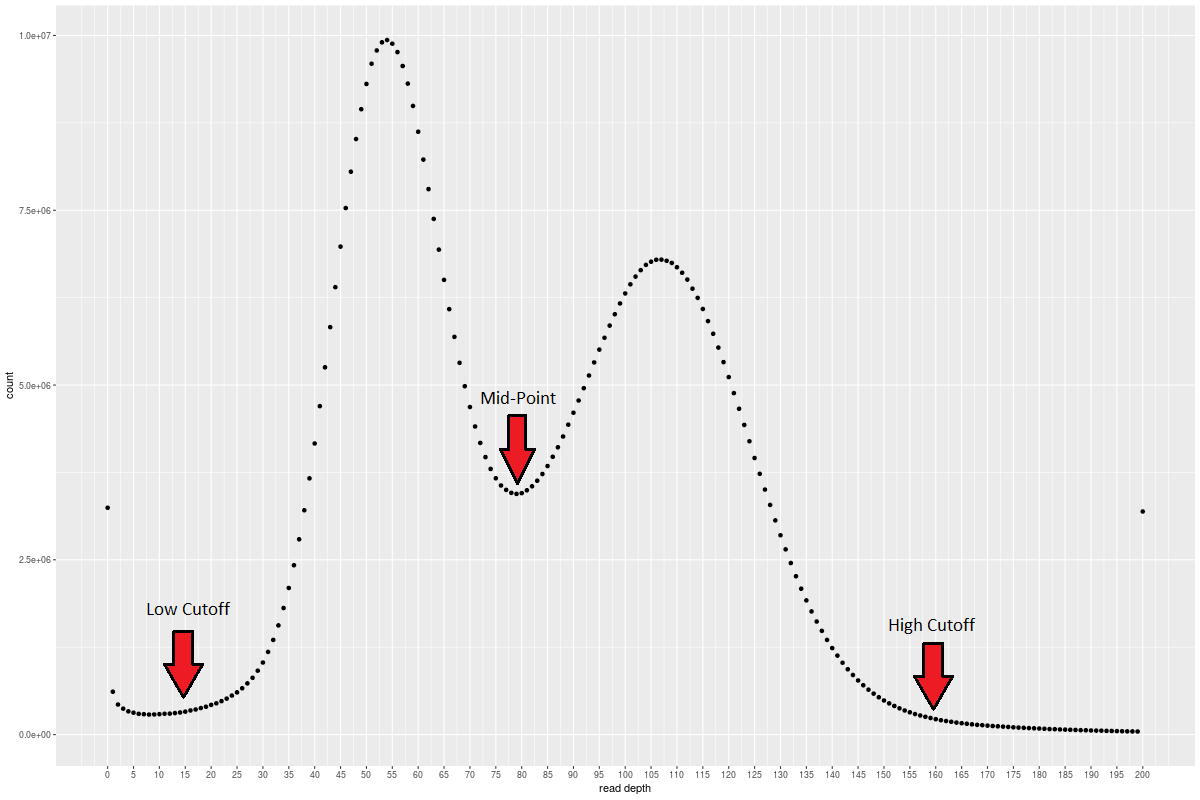
6. Modify `rule purge_haplotigs_suspects` to match your chosen cutoffs and rerun the entire workflow:
```bash
snakemake -j 20 --use-conda
```
7. Your resulting assembly will be in `polish_2`