https://github.com/peapodtechnologies/firebasedeviceflow
Firebase authentication via OAuth2 Device Flow for Node.js CLI applications on limited input devices.
https://github.com/peapodtechnologies/firebasedeviceflow
cli device-flow firebase firebase-auth iot oauth2 typescript
Last synced: about 1 year ago
JSON representation
Firebase authentication via OAuth2 Device Flow for Node.js CLI applications on limited input devices.
- Host: GitHub
- URL: https://github.com/peapodtechnologies/firebasedeviceflow
- Owner: PeaPodTechnologies
- License: mit
- Created: 2020-10-28T05:50:01.000Z (over 5 years ago)
- Default Branch: master
- Last Pushed: 2021-11-09T06:53:56.000Z (over 4 years ago)
- Last Synced: 2024-03-28T05:43:25.695Z (over 2 years ago)
- Topics: cli, device-flow, firebase, firebase-auth, iot, oauth2, typescript
- Language: TypeScript
- Homepage: https://www.npmjs.com/package/@peapodtech/firebasedeviceflow
- Size: 346 KB
- Stars: 4
- Watchers: 2
- Forks: 0
- Open Issues: 1
-
Metadata Files:
- Readme: README.md
- License: LICENSE
Awesome Lists containing this project
README
# Firebase Device Flow
[](https://forthebadge.com) [](https://forthebadge.com)
Firebase authentication via [OAuth2 'Device Flow'](https://www.oauth.com/oauth2-servers/device-flow/) for Node.js CLI applications on limited input devices (i.e. IoT).
[](https://travis-ci.com/UTAgritech/FirebaseDeviceFlow)
## Provider Setup
### Google
[Docs](https://developers.google.com/identity/protocols/oauth2/limited-input-device)
1. Create new **OAuth client ID** credentials in the [GCP Credentials page](https://console.cloud.google.com/apis/credentials). For the Application Type, select "TVs and Limited Input devices".
2. Copy the Client ID and Client Secret values into either an `.env` file, or input directly into the config object (see `test.ts`).
### GitHub
[Docs](https://docs.github.com/en/free-pro-team@latest/developers/apps/authorizing-oauth-apps#device-flow)
1. Create a new GitHub OAuth app [(guide)](https://docs.github.com/en/developers/apps/building-oauth-apps/creating-an-oauth-app).
2. Copy the Client ID and Client Secret values into either an `.env` file, or input directly into the config object (see `test.ts`).
3. Set the Client ID and Client Secret fields in the Firebase Console under *Authentication* > *Sign-in method* > *Sign-in providers* > *GitHub*
4. Finally, copy the *Authorization callback URL* from the Firebase Console to your GitHub OAuth app's settings.
## Example Usage
See [test.ts](./test.ts).
3. Import `FirebaseDeviceFlow`.
4. Initialize your Firebase app.
5. Pass Firebase app reference and OAuth config object to `DeviceFlowUI` constructor. If any parameters are absent from the OAuth config object, the relevant auth provider will be excluded from the UI.
6. Execute `DeviceFlowUI.signIn()`. This will return a **Promise\**.
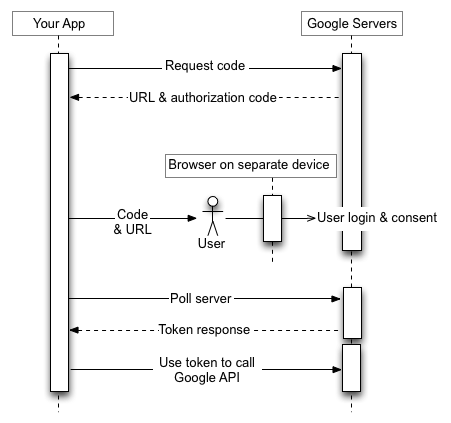
## How It Works
Google has a great resource on ["OAuth 2.0 for TV and Limited-Input Device Applications"](https://developers.google.com/identity/protocols/oauth2/limited-input-device#obtaining-oauth-2.0-access-tokens).
# Development
Build and test with the usual `npm run build`, `npm run test`. For testing, you will have to initialize your own Firebase app and provider support.
## Requirements
- Node.js and `npm`
- Dependencies (install with `npm install`)
## Todo
- [X] Convert to Typescript
- [X] Change package structure for easier import (currently `import { DeviceFlowUI } from 'FirebaseDeviceFlow/dist/FirebaseDeviceFlow';`)
- [X] Fix testing
- [ ] 'Slow down' error code handling?
- [ ] Add more providers?
[](https://firebase.google.com/)
# FAQ
## I'm getting X error, wtf is going on?
Make sure you've done the following:
1. **All** per-provider setup (outlined above)