https://github.com/pecigonzalo/wordpress-aws
Demo repository of HA Wordpress deployment on AWS
https://github.com/pecigonzalo/wordpress-aws
aws docker wordpress
Last synced: about 2 months ago
JSON representation
Demo repository of HA Wordpress deployment on AWS
- Host: GitHub
- URL: https://github.com/pecigonzalo/wordpress-aws
- Owner: pecigonzalo
- License: mit
- Created: 2019-07-17T02:12:09.000Z (almost 7 years ago)
- Default Branch: master
- Last Pushed: 2019-07-17T03:31:26.000Z (almost 7 years ago)
- Last Synced: 2025-03-01T17:48:22.842Z (over 1 year ago)
- Topics: aws, docker, wordpress
- Language: HCL
- Homepage:
- Size: 39.1 KB
- Stars: 0
- Watchers: 2
- Forks: 1
- Open Issues: 0
-
Metadata Files:
- Readme: README.md
- License: LICENSE
Awesome Lists containing this project
README
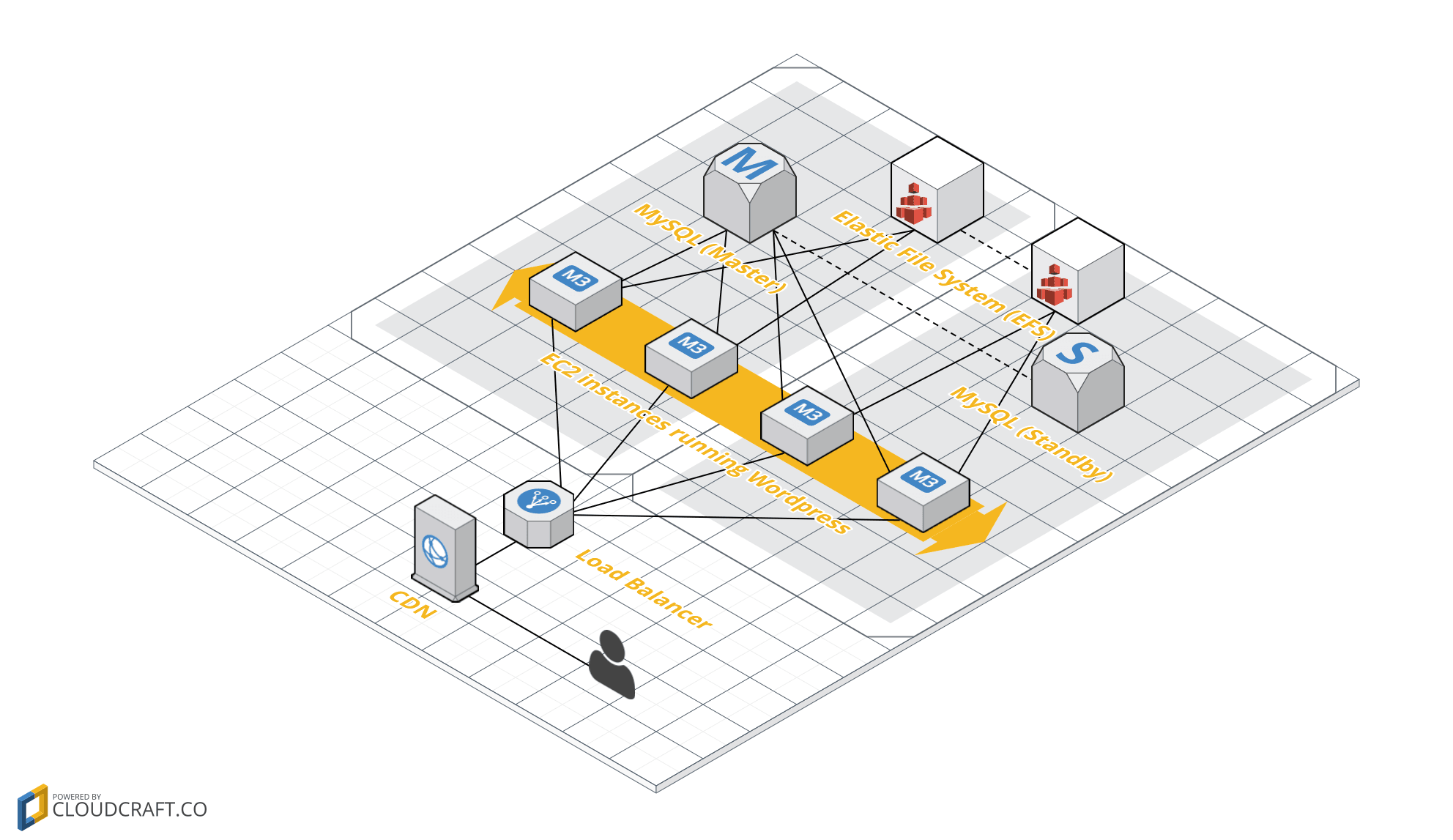
# Wordpress AWS Demo Stack
This projects creates a demo Wordpress stack, its not meant to be production ready, but rather demo AWS and cloud technologies.
### Architecture
## Instructions
- Check and apply the `base` which will create base resources required for this
- Configure required or desired variables in `local.auto.tfvars`
- Run `make plan` and review the plan output
- If plan looks correct, run `make apply`
- Wait for the site to respond
- This might take a moment the first time the instances are bootstrapping
- Get default credentials with `terraform output`
- Site URL will be shown in the output, append `/wp-admin` to enter the admin interface
- Remember to change your default WP credentials!
- You can iterate over changes using `make replan` and `make reapply`
- Use `make destroy` to destroy created resources
## Inputs
| Name | Description | Type | Default | Required |
|------|-------------|:----:|:-----:|:-----:|
| chamber\_key\_arn | Chamber KMS Key ARN | string | n/a | yes |
| chamber\_key\_id | Chamber KMS Key ID | string | n/a | yes |
| internal\_dns\_zone\_id | Input from ./base output | string | n/a | yes |
| private\_subnet\_ids | Input from ./base output | list | n/a | yes |
| public\_subnet\_ids | Input from ./base output | list | n/a | yes |
| vpc\_id | Input from ./base output | string | n/a | yes |
| image\_id | AMI ID to use | string | `"ami-0c15064daa40f95b5"` | no |
| instance\_type | The instance type to use, e.g t2.small | string | `"t3.small"` | no |
| name | Name of this wordpress stack | string | `"demo"` | no |
| ssh\_key\_name | The aws ssh key name. | string | `""` | no |
| tags | Additional tags (e.g. `map('BusinessUnit','XYZ')` | map | `` | no |
| wordpress\_admin\_email | Wordpress Admin email | string | `"null@null.com"` | no |
| wordpress\_site\_title | Wordpress Site default Title | string | `"Demo Wordpress Site"` | no |
| wordpress\_version | Wordpress Docker image version | string | `"5.2"` | no |
## Outputs
| Name | Description |
|------|-------------|
| cf\_dns\_name | Cloudfront DNS Name |
| lb\_dns\_name | Loadbalancer DNS Name |
| wordpress\_password | Wordpress password |
| wordpress\_url | Wordpress Site URL |
| wordpress\_user | Wordpress username |
## Notes
- Terraform is not configured with `remote-state`, if you wish to copy this to a production deployt, I recommend enabling that
- You can install default plugins using the `wp-cli` in `user_data/bootstrap.sh`
- SSM Is used a backend to store secrets and pass them to the container
- Some of the `user_data/bootstrap.sh` logic could be baked in a Docker image, but this allows us to reuse the official Wordpress image as is
- `wp-cli` can be used to further tweak and configure the initial deployment, installing plugins/etc
- To ensure this can be easily reused, the setup uses `80` on the LB, but `443` and the default CloudFront certificate on its distribution. If you have a private domain, you can easily integrate your domain to this setup, change `user_data/bootstrap.sh` as documented and `cloudfront.tf` to use `HTTPS` while traffic is outside the VPC (Cloudfront -> ALB)
- Many settings have been set to a static value for this setup (cloudfront protocol targets, ports, timeouts, etc) this can be easily transformed to vars to reuse this code
- This stack can be easily transfered to EKS/ECS-EC2/DockerSwarm/EB/etc
## Tech Stack
- Terraform
- Cloud-Init
- Chamber
- AWS
- EC2 ASG
- CloudFront
- RDS - MySQL
- ALB
- VPC
- Subnets
- Security Groups
- SSM Parameter Store
- Wordpress
- Docker
## References
- https://d1.awsstatic.com/whitepapers/wordpress-best-practices-on-aws.pdf
- https://cloudonaut.io/wordpress-on-aws-you-are-holding-it-wrong/
- https://cloudonaut.io/wordpress-on-aws-smooth-and-pain-free/
- https://aws.amazon.com/blogs/startups/how-to-accelerate-your-wordpress-site-with-amazon-cloudfront/
- Public modules ideas
- https://github.com/cloudposse
- https://github.com/terraform-aws-modules
## License
MIT (see [LICENSE](LICENSE))