https://github.com/pedrohenriquebr/topsis-react
TOPSIS React
https://github.com/pedrohenriquebr/topsis-react
algorithm css html5 js material-ui react web yarn
Last synced: 3 months ago
JSON representation
TOPSIS React
- Host: GitHub
- URL: https://github.com/pedrohenriquebr/topsis-react
- Owner: pedrohenriquebr
- Created: 2021-03-13T02:38:23.000Z (over 5 years ago)
- Default Branch: master
- Last Pushed: 2021-04-27T12:01:13.000Z (about 5 years ago)
- Last Synced: 2025-02-17T15:19:34.252Z (over 1 year ago)
- Topics: algorithm, css, html5, js, material-ui, react, web, yarn
- Language: JavaScript
- Homepage: https://pedrohenriquebr.github.io/topsis-react/
- Size: 8.58 MB
- Stars: 0
- Watchers: 2
- Forks: 1
- Open Issues: 1
-
Metadata Files:
- Readme: README.md
Awesome Lists containing this project
README
# TOPSIS React
## Overview
The Technique for Order of Preference by Similarity to Ideal Solution (TOPSIS) is a multi-criteria decision analysis method. This project is a web application that implements the TOPSIS algorithm, allowing users to analyze and rank alternatives based on multiple criteria.
## Features
- Implements the **TOPSIS** (Technique for Order of Preference by Similarity to Ideal Solution) algorithm for multi-criteria decision analysis.
- Supports data import from **spreadsheets** (e.g., .xlsx).
- Allows for **manual data entry** and modification of alternatives.
- Enables users to define and **assign weights** to various criteria.
- Differentiates between **benefit criteria** (where higher values are better) and **cost criteria** (where lower values are better).
- Calculates and displays a **ranked list of alternatives** based on the TOPSIS analysis.
- Provides a user interface with **internationalization support** (e.g., English, Portuguese).
## Getting Started
To get a local copy up and running, follow these simple steps.
### Prerequisites
Make sure you have Node.js and Yarn installed on your system.
- Node.js: [https://nodejs.org/](https://nodejs.org/)
- Yarn: [https://yarnpkg.com/](https://yarnpkg.com/)
### Installation
1. Clone the repo:
```sh
git clone https://github.com/pedrohenriquebr/topsis-react.git
```
2. Navigate to the project directory:
```sh
cd topsis-react
```
3. Install Yarn packages:
```sh
yarn install
```
### Running the Application
To run the app in development mode:
```sh
yarn start
```
Open [http://localhost:3000](http://localhost:3000) to view it in the browser. The page will reload if you make edits.
## Guide with Example
### Prepare the Dataset on Spreadsheet
Create your spreadsheet with the necessary data.
Add a column named "Name" for the alternatives.

> If your language is Portuguese, this column will be "Nome".
### Set the Weights
Set the weight for each criterion according to your preferences.

> The sum of the weights must be equal to 100.
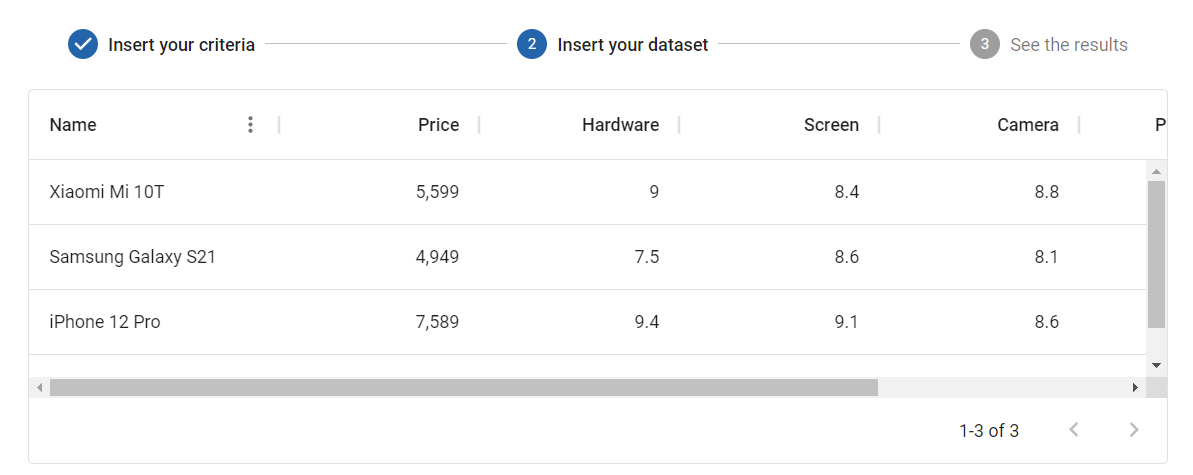
### Loading the Dataset
Click the "Load" button and select your spreadsheet.
You can also add a row manually.
### See Results
Finally, view the results: the top ranking with the best alternatives.

## Contributing
Contributions are what make the open source community such an amazing place to learn, inspire, and create. Any contributions you make are **greatly appreciated**.
If you have a suggestion that would make this better, please fork the repo and create a pull request. You can also simply open an issue with the tag "enhancement".
Don't forget to give the project a star! Thanks again!
1. Fork the Project.
2. Create your Feature Branch (`git checkout -b feature/AmazingFeature`).
3. Commit your Changes (`git commit -m 'Add some AmazingFeature'`).
4. Push to the Branch (`git push origin feature/AmazingFeature`).
5. Open a Pull Request.
## License
Distributed under the MIT License. See `LICENSE` for more information.
*Note: It is recommended to add a `LICENSE` file to the root of your repository. You can create one with the MIT License text, which can be found at [https://opensource.org/licenses/MIT](https://opensource.org/licenses/MIT).*