https://github.com/percival33/sokoban
College assignment to create Sokoban game using SDL
https://github.com/percival33/sokoban
cpp game sdl2
Last synced: over 1 year ago
JSON representation
College assignment to create Sokoban game using SDL
- Host: GitHub
- URL: https://github.com/percival33/sokoban
- Owner: Percival33
- License: mit
- Created: 2022-02-08T21:03:48.000Z (over 4 years ago)
- Default Branch: main
- Last Pushed: 2022-06-27T16:17:27.000Z (about 4 years ago)
- Last Synced: 2025-01-23T06:44:58.106Z (over 1 year ago)
- Topics: cpp, game, sdl2
- Language: C++
- Homepage:
- Size: 1.71 MB
- Stars: 0
- Watchers: 1
- Forks: 0
- Open Issues: 0
-
Metadata Files:
- Readme: README.md
- License: LICENSE.txt
Awesome Lists containing this project
README
# Sokoban game :video_game:
Table of Contents
## About The Project
This was a college project, to implement own version of classic [sokoban](https://en.wikipedia.org/wiki/Sokoban) game. To achive GUI utility, SDL library was used with given template.
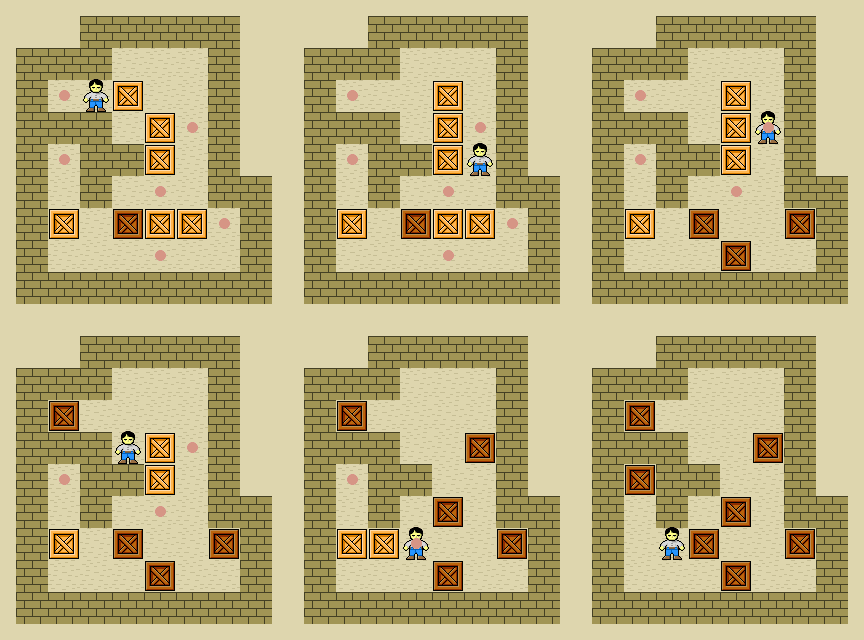
### Goal of game
push all crates to designated places in the least amount of moves.
### Built With
This project was built with
* [cmake](https://cmake.org/)
* [SDL](https://www.libsdl.org/)
## Getting Started
To get a local copy up and running follow these simple example steps.
### Prerequisites
This is an example of how to list things you need to use the software and how to install them.
* SDL
* CMake
### Installation
1. Download and compile [SDL](https://www.libsdl.org/download-2.0.php).
2. Download and setup [cmake](https://cmake.org/download/)
3. Clone the repo & change directory
```sh
git clone https://github.com/Percival33/sokoban.git
cd sokoban
```
4. Move SDL folder to sokoban directory & rename it to `SDL2`
5. Create `build` directory
```sh
mkdir build
cd build
```
6. Run cmake to compile project
```sh
cmake ../.
cmake --build .
```
7. Start game
```sh
./sokoban
```
## Usage
### How to play?
To start game, run the program. Then use arrow keys to move around board. To push crate you need to move player onto crate's position.
After moving all crates to final positions, final screen is showing up and game freezes for 3 seconds.
To play on different level replace name of your level on line **21** of **src/game.cpp**. See this [link](https://github.com/Percival33/sokoban/blob/6f37e4799461fe58ff5209c991d976a23e4bdef1/src/game.cpp#L21)
```cpp
const char LEVEL_NAME[] = "level2";
```
### Keyboard shortcuts:
* `ESC` to end game
* `n` to restart game
* `arrow keys` to move around
### Level customization
To create your own level, create `your_level_name.txt` file. See [level1.txt](levels/level1.txt) as reference.
Structure of file:
```
n m
BOARD
x y
```
where:
* `n`- number of rows
* `m` - number of columns
* `BOARD`:
'x' - crate destination position
'c' - crate position
'#' - wall
* `x` - x postion of player, number 1 <= x <= m
* `y` - y position of player, number 1 <= y <= n
### Game screenshots


## Roadmap
- [x] Add images
- [x] About project section
- [x] Add level customization
- [x] Finish installation section
- [x] Update Usage section
See the [open issues](https://github.com/Percival33/sokoban/issues) for a full list of proposed features (and known issues).
## Contributing
Contributions are what make the open source community such an amazing place to learn, inspire, and create. Any contributions you make are **greatly appreciated**.
If you have a suggestion that would make this better, please fork the repo and create a pull request. You can also simply open an issue with the tag "enhancement".
Don't forget to give the project a star! Thanks again!
1. Fork the Project
2. Create your Feature Branch (`git checkout -b feature/AmazingFeature`)
3. Commit your Changes (`git commit -m 'Add some AmazingFeature'`)
4. Push to the Branch (`git push origin feature/AmazingFeature`)
5. Open a Pull Request
## License
Distributed under the MIT License. See `LICENSE.txt` for more information.
## Acknowledgments
Use this space to list resources you find helpful and would like to give credit to. I've included a few of my favorites to kick things off!
* [Assets author - Kenny](https://www.kenney.nl)
* [readme template](https://github.com/othneildrew/Best-README-Template)
[starting-position-screenshot]: images/start_position.png
[last-postion-screenshot]: images/last_chest.png