https://github.com/permafrost-dev/node-ray-cli
Debug your CLI scripts with Ray to fix problems faster
https://github.com/permafrost-dev/node-ray-cli
Last synced: over 1 year ago
JSON representation
Debug your CLI scripts with Ray to fix problems faster
- Host: GitHub
- URL: https://github.com/permafrost-dev/node-ray-cli
- Owner: permafrost-dev
- License: mit
- Created: 2021-06-25T16:16:00.000Z (about 5 years ago)
- Default Branch: main
- Last Pushed: 2024-05-13T04:23:28.000Z (about 2 years ago)
- Last Synced: 2025-01-23T15:32:15.223Z (over 1 year ago)
- Language: TypeScript
- Size: 156 KB
- Stars: 1
- Watchers: 2
- Forks: 1
- Open Issues: 8
-
Metadata Files:
- Readme: README.md
- Changelog: CHANGELOG.md
- Contributing: .github/CONTRIBUTING.md
- Funding: .github/FUNDING.yml
- License: LICENSE
- Security: .github/SECURITY.md
Awesome Lists containing this project
README
# node-ray-cli

Debug cli scripts with Ray to fix problems faster




---
## Overview
This npm package provides a `ray` script that lets you control [Spatie's Ray app](https://myray.app) from the command line. It allows you to easily debug your CLI scripts.
## Installation
Install the package normally with `npm`:
```bash
npm install node-ray-cli
```
...install it globally to be able to access it from any script/directory:
```bash
npm install -g node-ray-cli
```
...or run it without installing using `npx`:
```bash
npx node-ray-cli --help
```
## Usage
`ray `
If no command name is specified, `send` is assumed.

When calling commands that send modifiable payloads, the payload uuid is sent to stdout **if** the `--show-uuid` option flag is provided. For example, you may modify the color of a payload after it has been sent by using the `color` command:
```bash
ray 'hello world' --show-uuid # writes "ae625128-ed3a-2b92-1a3f-2e0ebf7a2ad1" to stdout
ray color ae625128-ed3a-2b92-1a3f-2e0ebf7a2ad1 green
```
...or remove the payload from Ray entirely:
```bash
ray 'hello world' --show-uuid # writes "ae625128-ed3a-2b92-1a3f-2e0ebf7a2ad1" to stdout
ray remove ae625128-ed3a-2b92-1a3f-2e0ebf7a2ad1
```
Some other usage examples:
```bash
ray 'hello world' --blue
ray pause
ray html 'hello world'
ray file message.txt
```
## Disabling node-ray-cli
The `ray` command can be disabled by setting the `NODE_RAY_DISABLED` environment variable to `"1"`:
```bash
export NODE_RAY_DISABLED="1"
```
## Available option flags
There are several option flags that can be used with any command:
| Flag | Description |
| --- | --- |
| `--hide` | Display the payload as collapsed by default |
| `--if=value` | Don't send the payload if `value` is `"false"`, `0`, or `"no"` |
| `--large` | Display large text |
| `--show-uuid` | Write the payload uuid to stdout |
| `--small` | Display small text |
| `--blue` | Display the payload as blue |
| `--gray` | Display the payload as gray |
| `--green` | Display the payload as green |
| `--orange` | Display the payload as orange |
| `--purple` | Display the payload as purple |
| `--red` | Display the payload as red |
## Command reference
| Command | Description |
| --- | --- |
| `clear` | Clear the current screen |
| `clear-all` | Clear the current and all previous screens |
| `color ` | Change the color of a payload that has already been sent |
| `confetti` | Display confetti in Ray! |
| `file ` | Show the contents of `filename` |
| `hide-app` | Hide the Ray app |
| `html ` | Display rendered html |
| `image ` | Display an image from a URL or file |
| `json ` | Display formatted JSON |
| `notify ` | Display a desktop notification |
| `pause` | Pause code execution |
| `remove ` | Remove a payload |
| `send ` | Send a payload to Ray |
| `show-app` | Show the Ray app |
| `size ` | Change the text size of a payload that has already been sent _(sizes are 'large' or 'small')_ |
| `text ` | Display a text string with whitespace preserved |
| `xml ` | Display formatted XML |
## Example Bash Script
```bash
#!/bin/bash
RAYUUID=$(ray "arg count: $#" --show-uuid)
ray color $RAYUUID blue
if [ $# -eq 0 ]; then
echo "no filename provided"
exit 1
fi
FILENAME="$1"
ray "$FILENAME"
ray file "$FILENAME" --purple --small --hide
ray show-app
if [ ! -e "$FILENAME" ]; then
ray send "file missing: $FILENAME" --red
exit 1
fi
ray pause
cat "$FILENAME" | wc -l
```
## Development Setup
```bash
npm install
npm run build:dev
node dist/index.js --help
```
## Testing
`node-ray-cli` uses Jest for unit tests. To run the test suite:
`npm run test`
---
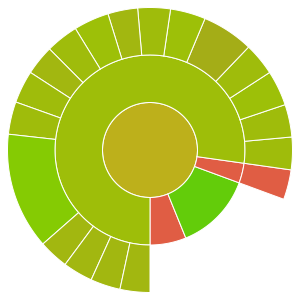
Code Coverage

---
## Changelog
Please see [CHANGELOG](CHANGELOG.md) for more information on what has changed recently.
## Contributing
Please see [CONTRIBUTING](.github/CONTRIBUTING.md) for details.
## Security Vulnerabilities
Please review [our security policy](../../security/policy) on how to report security vulnerabilities.
## Credits
- [Patrick Organ](https://github.com/patinthehat)
- [All Contributors](../../contributors)
## License
The MIT License (MIT). Please see [License File](LICENSE) for more information.