https://github.com/perone/redisplay
Redis monitor using Arduino and OLED displays.
https://github.com/perone/redisplay
Last synced: 9 months ago
JSON representation
Redis monitor using Arduino and OLED displays.
- Host: GitHub
- URL: https://github.com/perone/redisplay
- Owner: perone
- License: mit
- Created: 2015-01-08T22:03:55.000Z (over 11 years ago)
- Default Branch: master
- Last Pushed: 2015-01-14T22:01:13.000Z (over 11 years ago)
- Last Synced: 2025-04-09T01:16:59.038Z (over 1 year ago)
- Language: Arduino
- Size: 3.54 MB
- Stars: 17
- Watchers: 2
- Forks: 0
- Open Issues: 0
-
Metadata Files:
- Readme: README.md
- License: LICENSE
Awesome Lists containing this project
README
# Redisplay
Redisplay is a project that uses OLED displays to monitor
Redis activity. This project is the first prototype
towards a general platform for tiny physical and remote
monitors called **Stat Cubes**. It is still under development
and it will be redesigned in future to support different
services with a new hardware wireless platform.
## Video
[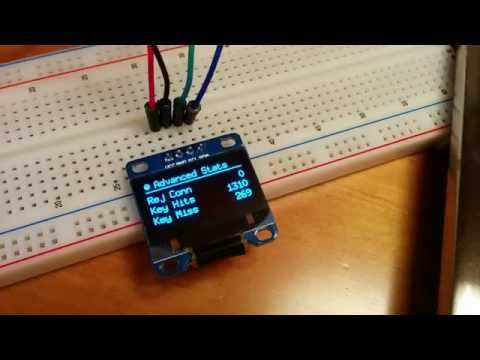](https://www.youtube.com/watch?v=qURaP4wivrg)
## Architecture
The archictecure as it is today is very simple and is described
in the image below. There is an application gathering information
from the Redis server and then it serializes it using JSON
and send it over Serial (FTDI/USB) to the Arduino which in
turn is responsible for drawing the panels in the OLED display.
JSON is somehow overkill to send over the limited buffer that
Arduino has for Serial, but it was designed intentionally because
the Serial isn't going to be used in future for Stat Cubes.

## Screenshots of the panels
]
]
]
]
]
]
## Arduino Requirements
To compile the Arduino (firmware) code, you'll need to
install [u8glib](https://code.google.com/p/u8glib/) and
[ArduinoJson](https://github.com/bblanchon/ArduinoJson).
## Arduino Installation
Just clone the repository inside a directory in your Arduino
sketchbook directory.
## Python Requirements
Use **pip** to install dependencies:
```shell
~# pip install -r monitor/pip_requirements.txt
```
## Python Installation
To test it without a Redis server, use the Python code
``/monitor/redisplay_test.py``, to test with a real Redis
server, just use the ``/monitor/redisplay_monitor.py``.