https://github.com/perrywerneck/pw3270
3270 Emulator for gtk
https://github.com/perrywerneck/pw3270
3270 gnome gtk gtk3 linux-app linux-desktop terminal tn3270
Last synced: about 1 year ago
JSON representation
3270 Emulator for gtk
- Host: GitHub
- URL: https://github.com/perrywerneck/pw3270
- Owner: PerryWerneck
- License: lgpl-3.0
- Created: 2018-11-09T15:00:12.000Z (over 7 years ago)
- Default Branch: master
- Last Pushed: 2025-02-10T05:41:21.000Z (over 1 year ago)
- Last Synced: 2025-04-09T07:09:51.940Z (about 1 year ago)
- Topics: 3270, gnome, gtk, gtk3, linux-app, linux-desktop, terminal, tn3270
- Language: C
- Homepage: https://softwarepublico.gov.br/social/pw3270/
- Size: 5.12 MB
- Stars: 67
- Watchers: 10
- Forks: 13
- Open Issues: 15
-
Metadata Files:
- Readme: README.md
- Changelog: CHANGELOG
- License: LICENSE
- Authors: AUTHORS
Awesome Lists containing this project
README
## GTK Based 3270 terminal emulator
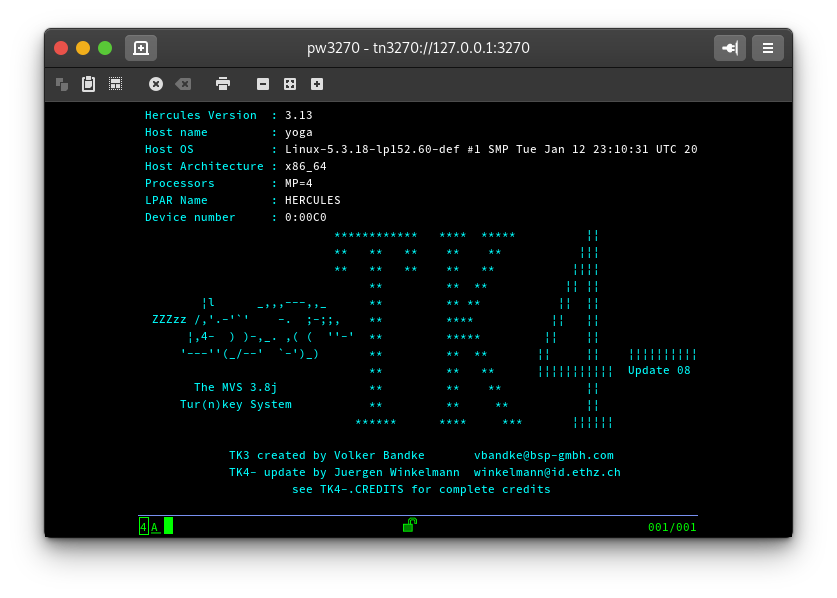
pw3270 is a modern, GTK-based, completely free tn3270 emulator.
Created originally for Banco do Brasil, it's now an official Brazilian Government Public Software project, and is used worldwide.
[](https://www.gnu.org/licenses/gpl-3.0)

[](https://build.opensuse.org/package/show/home:PerryWerneck:pw3270/pw3270)
## Installation
You can download installation package for supported linux distributions in [Open Build Service](https://software.opensuse.org/download.html?project=home%3APerryWerneck%3Apw3270&package=pw3270), the flatpak version from flathub and windows installer from [Releases](../../releases).
[ ](https://software.opensuse.org/download.html?project=home%3APerryWerneck%3Apw3270&package=pw3270)
[ ](https://flathub.org/apps/details/br.app.pw3270.terminal)
[ ](../../releases)
Alternative windows installers for stable and unstable versions are already available on Dropbox and one drive.
[ ](https://www.dropbox.com/sh/2qy3s6b5s4o4bws/AAAubHE8SBG7r6CJSKPflKN0a?dl=0)
[ ](https://onedrive.live.com/?id=D8B46DA0372A6F1A%212208&cid=D8B46DA0372A6F1A)
## Building for Linux
```shell
git clone https://github.com/PerryWerneck/pw3270.git
cd pw3270
./autogen.sh
make all
sudo make install
```
## Building for Windows
### Cross-compiling on SuSE Linux (Native or WSL)
1. Get pw3270 sources
```shell
git clone https://github.com/PerryWerneck/pw3270.git
```
2. Add obs repositories
```shell
./win/bundle.cross --install-repositories
```
3. Install required packages
```shell
./win/bundle.cross --install-requires
```
4. Build NSI installer
```shell
./win/bundle.cross --nsi
```
### Windows native with MSYS2
1. Build and install [libv3270](../../../libv3270)
2. Install required packages
```shell
pacman -S mingw-w64-x86_64-imagemagick mingw-w64-x86_64-optipng mingw-w64-x86_64-inkscape
```
2. Get pw3270 sources from git
```
git clone https://github.com/PerryWerneck/pw3270.git ./pw3270
```
3. Build library using the mingw shell
```
cd pw3270
./autogen.sh
make all
```
## Building for macOS
### Using homebrew
1. Build and install [libv3270](../../../libv3270)
2. Install additional dependencies
```shell
$ brew install adwaita-icon-theme imagemagick
```
3. Configure and build
```shell
$ ./autogen.sh
$ make all
````
4. Create app bundle
```shell
$ cd mac
$ ./bundle
````
### Using jhbuild
1. Install jhbuild and GTK-OSX
https://wiki.gnome.org/Projects/GTK/OSX/Building
2. build
```shell
jhbuild --moduleset=https://raw.githubusercontent.com/PerryWerneck/pw3270/master/mac/pw3270.modules build pw3270
```