https://github.com/petenelson/wp-rest-api-log
WordPress plugin for logging REST API requests and responses
https://github.com/petenelson/wp-rest-api-log
elasticpress elasticsearch logging rest-api wordpress wordpress-plugin wp-api
Last synced: 5 months ago
JSON representation
WordPress plugin for logging REST API requests and responses
- Host: GitHub
- URL: https://github.com/petenelson/wp-rest-api-log
- Owner: petenelson
- License: gpl-2.0
- Created: 2015-07-03T20:10:02.000Z (about 11 years ago)
- Default Branch: develop
- Last Pushed: 2025-01-02T16:27:12.000Z (over 1 year ago)
- Last Synced: 2025-01-02T17:33:45.165Z (over 1 year ago)
- Topics: elasticpress, elasticsearch, logging, rest-api, wordpress, wordpress-plugin, wp-api
- Language: PHP
- Homepage: https://wordpress.org/plugins/wp-rest-api-log/
- Size: 953 KB
- Stars: 78
- Watchers: 10
- Forks: 29
- Open Issues: 20
-
Metadata Files:
- Readme: readme.md
- License: license.txt
Awesome Lists containing this project
README
# REST API Log #
**Contributors:** [gungeekatx](https://profiles.wordpress.org/gungeekatx/)
**Tags:** wp rest api, rest api, wp api, api, json, json api, log, logging, elasticpress, elasticsearch
**Donate link:** https://github.com/petenelson/wp-rest-api-log
**Requires at least:** 4.7
**Tested up to:** 6.2
**Stable tag:** 1.7.0
**License:** GPLv2 or later
**License URI:** http://www.gnu.org/licenses/gpl-2.0.html
[](https://codeclimate.com/github/petenelson/wp-rest-api-log)
[](https://travis-ci.org/petenelson/wp-rest-api-log)
WordPress plugin to log REST API requests and responses
## Description ##
WordPress plugin to log [REST API](http://v2.wp-api.org/) requests and responses (for v2 of the API).
Includes:
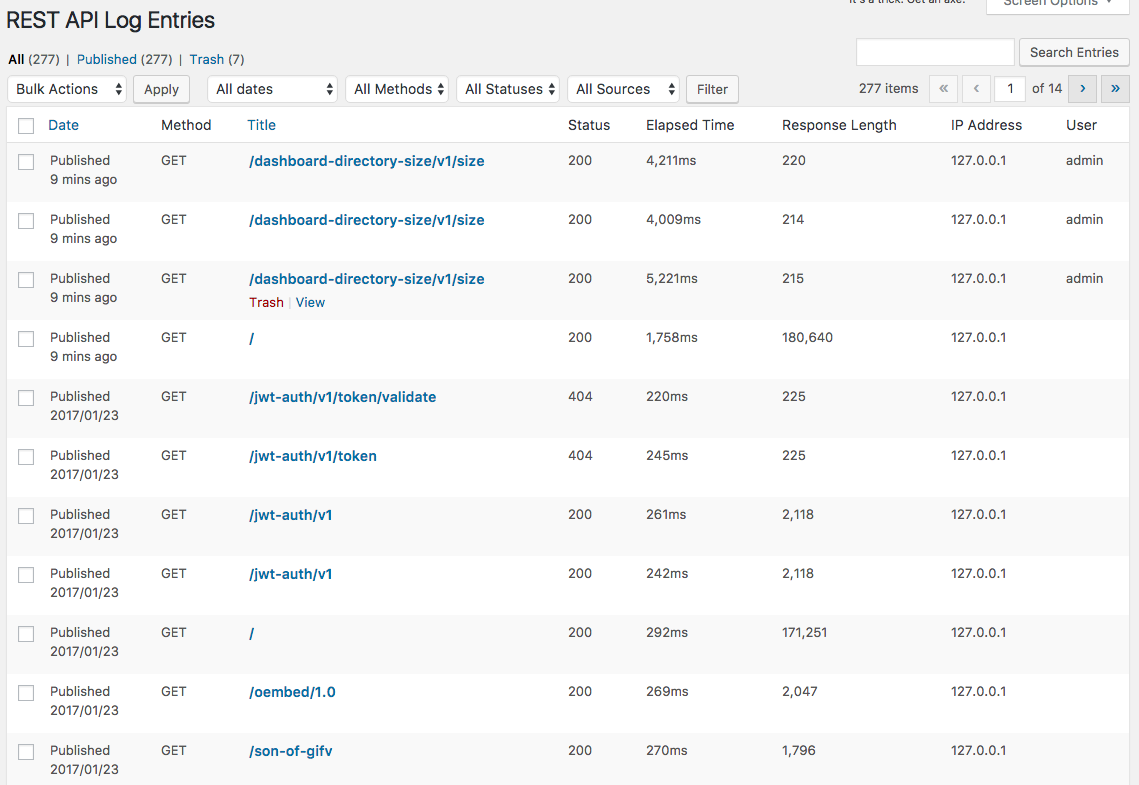
* WordPress admin page to view and search log entries
* API endpoint to access log entries via JSON
* Filters to customize logging
* Custom endpoint logging
* ElasticPress logging
Find us on [GitHub](https://github.com/petenelson/wp-rest-api-log)!
Roadmap
* Better search capabilities for log entries via the REST API endpoint
## Installation ##
1. Upload the wp-rest-api-log directory to the `/wp-content/plugins/` directory
2. Activate the plugin through the 'Plugins' menu in WordPress
3. Go to Settings -> REST API Log to enable or disable logging
4. Go to Tools -> REST API Log to start viewing log entries
## Changelog ##
### v1.7.0 May 8, 2023 ###
* Fixed bugs related to Method and Status filtering.
* Removed deprecated FILTER_SANITIZE_STRING calls.
* Updated highlight.js version
* Updated clipboard.js version
### v1.6.9 September 9, 2022 ###
* Updated highlight.js version
* Updated clipboard.js version
### v1.6.8 October 30, 2020 ###
* Updated the Purge All Entries functionality in the admin to purge batches of 25 at a time.
* Updated CLI purge command with a progress bar.
* Fixed ClipboardJS error (props itowhid06)
### v1.6.7 March 31, 2019 ###
* Added admin notice about running the plugin on a production server
* Set the default purge days to 7
* Updated clipboard.js version
### v1.6.6 November 9, 2018 ###
* Moved taxonomy registration to a separate file, made taxonomies not public to prevent them from automatically showing in Yoast SEO sitemaps
* Updated highlight.js version
* Updated minimum WP version to 4.7
* Updated unit test framework
### v1.6.5 July 26, 2017 ###
* Fixed some escaping issues in admin and new-line characters when saving to database (props davidanderson)
* Updated highlight.js and clipboard.js versions
### v1.6.4 May 26, 2017 ###
* Fixed an issue with the URL in the settings tabs (props davidanderson)
### v1.6.3 March 28, 2017 ###
* Updated logging for multidimensional query parameters (props mnelson4)
### v1.6.2 March 10, 2017 ###
* Fixed bug in HTTPS download URLs.
* Fixed bug in download URL permissions.
### v1.6.0 March 9, 2017 ###
* Added ability to download request and response fields as JSON files, as well as copy to clipboard.
* Added button on settings page to Purge All Log Entries.
* Tweaked some of the ElasticPress routes that skip logging.
### v1.5.2 February 21, 2017 ###
* Fixed a bug with ElasticPress logging getting stuck in a loop regarding the _nodes/plugins URL.
### v1.5.1 February 15, 2017 ###
* Removed hidden custom taxonomies from the navigation menu admin (props [phh](https://github.com/phh) for the pull request).
### v1.5.0 February 2, 2017 ###
* Added logging for the user making the request (props [drsdre](https://github.com/drsdre) for the pull request).
* Added Settings and Log links from the Plugins page.
* Updated term fetching when viewing log entries for fewer database queries and better performance.
* Updated highlight.js to 9.9.0
### v1.4.0 January 23, 2017 ###
* Added the ability to filter routes for logging, either include or exclude specific routes.
### v1.3.0 December 5, 2016 ###
* Added support for logging HTTP_X_FORWARDED_FOR, useful for servers behind a proxy or load balancer.
* Changed plugin name to REST API Log
* Changed the wp-rest-api-log post type 'public' setting to false to prevent it from showing up in searches.
* Updated Highlight JS version to 9.7.0
* Updated the internal process for granting administrator role access to the custom post type
* Bug fix: Header values with colons were not being stored correctly.
* Bug fix: Use proper HTML escaping when viewing log entries.
### v1.2.0 July 6, 2016 ###
* Added support for [ElasticPress](https://wordpress.org/plugins/elasticpress/) logging
* Fixed undefined constant error on Help page (props vinigarcia87)
### v1.1.1 May 15, 2016 ###
* Fixed error during activation (props pavelevap)
### v1.1.0 April 28, 2016 ###
* Added cron job to cleanup old log entries
* Added setting to exclude the WP core /oembed API endpoint
* Don't diplay log entries in the Insert Link modal
### v1.0.0-beta2 April 10, 2016 ###
* Switched from custom tables to built-in WordPress tables using a custom post type (wp-rest-api-log)
* Method, status, and source are now tracked using taxonomies
* Viewing log entries now uses the standard WordPress admin UI, includes filters for method, status, and source
* Added admin settings with the option to enable or disable logging
* Added WP-CLI support: wp rest-api-log
* Added .pot file to support translations
**NOTE: if you are upgrading from the previous version, you can run the "wp rest-api-log migrate" WP-CLI command to migrate your existing logs into the new custom post type**
### v1.0.0-beta1 July 9, 2015 ###
* Initial release
## Upgrade Notice ##
### v1.7.0 May 8, 2023 ###
* Fixed bugs related to Method and Status filtering.
* Removed deprecated FILTER_SANITIZE_STRING calls.
* Updated highlight.js version
* Updated clipboard.js version
## Frequently Asked Questions ##
### How do I use ElasticPress logging? ###
[ElasticPress](https://wordpress.org/plugins/elasticpress/) is a plugin than interfaces WordPress to the [ElasticSearch](https://www.elastic.co/products/elasticsearch) search service. Because ElasticSearch has its own REST API for indexing and searching data, it was a natural fit to extend logging support via this REST API Logging plugin.
You can go into Settings > ElasticPress to enable logging for requests & responses. You can also disable REST API logging if you only need ElasticPress logging.
## Screenshots ##
### 1. Sample list of log entries ###
### 2. Sample log entry details ###
