https://github.com/peterujah/nano-stamp
Nano Stamp is Php Class to create a custom stamp using the GD Graphics Library. It simplifies the process of generating stamps, such as circular and square designs, accompanied by dynamic text and styling.
https://github.com/peterujah/nano-stamp
php phpclass png stamp
Last synced: about 1 year ago
JSON representation
Nano Stamp is Php Class to create a custom stamp using the GD Graphics Library. It simplifies the process of generating stamps, such as circular and square designs, accompanied by dynamic text and styling.
- Host: GitHub
- URL: https://github.com/peterujah/nano-stamp
- Owner: peterujah
- License: mit
- Created: 2023-08-27T16:45:33.000Z (almost 3 years ago)
- Default Branch: main
- Last Pushed: 2023-08-28T06:59:19.000Z (almost 3 years ago)
- Last Synced: 2025-03-24T07:43:56.989Z (over 1 year ago)
- Topics: php, phpclass, png, stamp
- Language: PHP
- Homepage: https://github.com/peterujah/nano-stamp/
- Size: 106 KB
- Stars: 0
- Watchers: 1
- Forks: 1
- Open Issues: 0
-
Metadata Files:
- Readme: README.md
- License: LICENSE
Awesome Lists containing this project
README
# Nano Stamp
Nano Stamp is Php Class to create a custom stamp using the GD Graphics Library. It simplifies the process of generating stamps, such as circular and square designs, accompanied by dynamic text and styling.
## Installation
Installation is available via Composer:
```md
composer require peterujah/nano-stamp
```
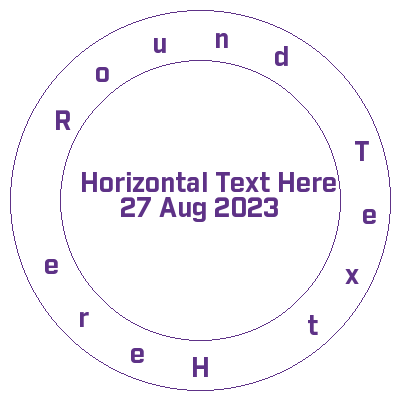
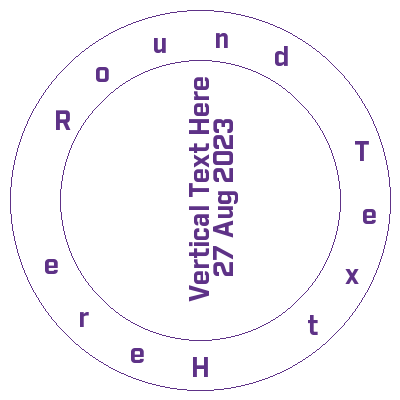
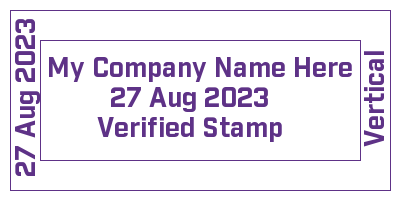
## Example Stamp
## Initialize class
```php
use Peterujah\NanoBlockTech\Stamp\Circle;
use Peterujah\NanoBlockTech\Stamp\Square;
use Peterujah\NanoBlockTech\Stamp\Colors;
use Peterujah\NanoBlockTech\Stamp\Stamp;
```
To draw a square stamp initialize with a square instance
```php
$shape = new Stamp(new Square(400, 200));
```
To draw a round stamp initialize with a circle instance
```php
$shape = new Stamp(new Circle(400, 400));
```
Use your stamp shape container instance
```php
$stamp = $shape->getContainerInstance();
```
Set your text font path
```php
$stamp->setFont(__DIR__ . '/font/industry-bold.ttf');
```
Set your background color or use the default transparent background
```php
$stamp->setBackgroundColor(Colors::ALPHA_WHITE);
```
Drow your border with RGB color array
```php
$stamp->drawBorder(Colors::VIOLET);
```
### For Square Shape Stamp
Adjust the `right` and `top` to fit your text
```php
$stamp->drawCenterText("My Company Name Here",[
"fontSize" => 20,
"color" => Colors::VIOLET,
"right" => 125,
"top" => -30,
]);
$stamp->drawCenterText("27 Aug 2023", [
"fontSize" => 20,
"color" => Colors::VIOLET,
"right" => 80,
"top" => 30,
]);
$stamp->drawCenterText("Verified Stamp", [
"fontSize" => 20,
"color" => Colors::VIOLET,
"right" => 80,
"top" => 90,
]);
$stamp->drawRightText("Vertical", [
"fontSize" => 20,
"color" => Colors::VIOLET,
"top" => 110,
"right" => 55,
]);
$stamp->drawLeftText("27 Aug 2023", [
"fontSize" => 20,
"color" => Colors::VIOLET,
"top" => 170,
"left" => 230,
]);
```
### For Circle Shape Stamp
Adjust the `left` and `top` to fit your text
Drow round text
```php
$stamp->drawRoundText("Round Text Here", 20, Colors::VIOLET, true);
```
Drow a center text
```php
$stamp->drawCenterText("Horizontal Text Here", [
"fontSize" => 20,
"color" => Colors::VIOLET,
"top" => 200,
"left" => 60,
]);
$stamp->drawCenterText("27 Aug 2023", [
"fontSize" => 20,
"color" => Colors::VIOLET,
"top" => 250,
"left" => 60,
]);
```
To draw a vertical center text only available for circle shape stamp
```php
$stamp->drawVerticalText("Vertical Text Here", [
"fontSize" => 20,
"color" => Colors::VIOLET,
"top" => 220,
"left" => 10,
]);
$stamp->drawVerticalText("27 Aug 2023", [
"fontSize" => 20,
"color" => Colors::VIOLET,
"top" => 170,
"left" => 15,
]);
```
Now save, download or preview generated stamp
Flag `D = Download, S = Save, I = Display `
```php
$stamp->create('stamp_image.png', "S");
```
### More Methods
To add an image overlay
```php
$stamp->drawCenterImage(__DIR__ . "/company-logo.png", [
"top" => 0,
"left" => 0,
"width" => 50,
"height" => 50
]);
```