https://github.com/pezi/dart_periphery
dart_periphery is a Dart port of the native c-periphery library
https://github.com/pezi/dart_periphery
flutter raspberry-pi
Last synced: 10 months ago
JSON representation
dart_periphery is a Dart port of the native c-periphery library
- Host: GitHub
- URL: https://github.com/pezi/dart_periphery
- Owner: pezi
- License: bsd-3-clause
- Created: 2021-02-07T05:14:50.000Z (over 5 years ago)
- Default Branch: main
- Last Pushed: 2025-08-05T17:55:35.000Z (11 months ago)
- Last Synced: 2025-08-19T13:20:35.509Z (10 months ago)
- Topics: flutter, raspberry-pi
- Language: Dart
- Homepage:
- Size: 10.4 MB
- Stars: 47
- Watchers: 2
- Forks: 12
- Open Issues: 7
-
Metadata Files:
- Readme: README.md
- Changelog: CHANGELOG.md
- License: LICENSE
Awesome Lists containing this project
README
# dart_periphery
[](https://pub.dartlang.org/packages/dart_periphery)
[](https://pub.dev/packages/dart_periphery/score)
[](https://github.com/pezi/dart_periphery/graphs/contributors)
[](https://opensource.org/license/bsd-3-clause)
## 📣 Important hints
Added RISC-V support, thanks to [Ali Tariq](https://github.com/alitariq4589) from [10xEngineers](https://10xEngineers.ai) for providing remote access to a Banana Pi BPI-F3 16GB on [Cloud-V](https://cloud-v.co), which enabled building the RISC-V variant of the c-periphery library.
The repository’s [Wiki](https://github.com/pezi/dart_periphery/wiki) is now enabled.
## 📖 Introduction
**dart_periphery** is a Dart port of the native [c-periphery library](https://github.com/vsergeev/c-periphery) (v2.4.3)
for Linux Peripheral I/O (GPIO, LED, PWM, SPI, I2C, MMIO and Serial peripheral I/O). This package
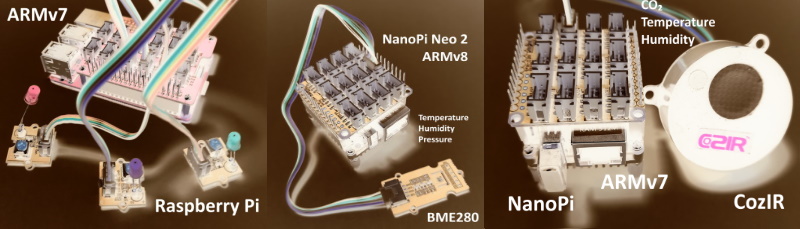
is designed for System on Chips (SoCs) such as Raspberry Pi, NanoPi, Banana Pi, and others.
### What is c-periphery?
Abstract from the project web site:
>c-periphery is a small C library for
>
>* GPIO,
>* LED,
>* PWM,
>* SPI,
>* I2C,
>* MMIO (Memory Mapped I/O)
>* Serial peripheral I/O
>
>interface access in userspace Linux. c-periphery simplifies and consolidates the native Linux APIs to these interfaces. c-periphery is useful in embedded Linux environments (including Raspberry Pi, BeagleBone, etc. platforms) for interfacing with external peripherals. c-periphery is re-entrant, has no dependencies outside the standard C library and Linux, compiles into a static library for easy integration with other projects, and is MIT licensed
**dart_periphery** binds the c-periphery library with the help of the [dart:ffi](https://dart.dev/guides/libraries/c-interop) mechanism.
Nevertheless, **dart_periphery** tries to be close as possible to the original library.
See the following [documentation](https://github.com/vsergeev/c-periphery/tree/master/docs). Thanks to **Vanya Sergeev** for his great job!
## 🤔 Why c-periphery?
The number of GPIO libraries/interfaces is shrinking:
* The widely used wiringpi library is [deprecated](https://hackaday.com/2019/09/18/wiringpi-library-to-be-deprecated).
* GPIO sysfs is [deprecated](https://www.raspberrypi.org/forums/viewtopic.php?t=274416).
**dart_periphery**
* [GPIO](#gpio) example / [API](https://pub.dev/documentation/dart_periphery/latest/dart_periphery/GPIO-class.html)
* [I2C](#i2c) example / [API](https://pub.dev/documentation/dart_periphery/latest/dart_periphery/I2C-class.html)
* [SPI](#spi) example / [API](https://pub.dev/documentation/dart_periphery/latest/dart_periphery/SPI-class.html)
* [Serial](#serial) example / [API](https://pub.dev/documentation/dart_periphery/latest/dart_periphery/Serial-class.html)
* [PWM](#pwm) example / [API](https://pub.dev/documentation/dart_periphery/latest/dart_periphery/PWM-class.html)
* [Led](#led) (onboard leds) example / [API](https://pub.dev/documentation/dart_periphery/latest/dart_periphery/Led-class.html)
* [MMIO](#mmio) (Memory Mapped I/O) example / [API](https://pub.dev/documentation/dart_periphery/latest/dart_periphery/MMIO-class.html)
* [ADC](#adc) (Analog Digital Converter) example / [API-Grove](https://pub.dev/documentation/dart_periphery/latest/dart_periphery/GroveBaseHat-class.html), [API-NanoHatHub](https://pub.dev/documentation/dart_periphery/latest/dart_periphery/NanoHatHub-class.html), [PCF8591](https://github.com/pezi/dart_periphery/blob/main/example/i2c_pcf8591.dart)
* DAC (Digital Analog Converter) example / [PCF8591](https://github.com/pezi/dart_periphery/blob/main/example/i2c_pcf8591.dart)
## 🪧 Examples
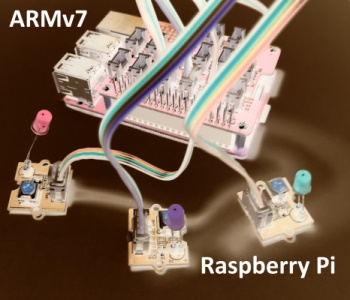
### GPIO
``` dart
import 'package:dart_periphery/dart_periphery.dart';
import 'dart:io';
void main() {
var config = GPIOconfig();
config.direction = GPIOdirection.gpioDirOut;
print('Native c-periphery Version : ${getCperipheryVersion()}');
print('GPIO test');
var gpio = GPIO(18, GPIOdirection.gpioDirOut);
var gpio2 = GPIO(16, GPIOdirection.gpioDirOut);
var gpio3 = GPIO.advanced(5, config);
print('GPIO info: ' + gpio.getGPIOinfo());
print('GPIO native file handle: ${gpio.getGPIOfd()}');
print('GPIO chip name: ${gpio.getGPIOchipName()}');
print('GPIO chip label: ${gpio.getGPIOchipLabel()}');
print('GPIO chip name: ${gpio.getGPIOchipName()}');
print('GPIO chip label: ${gpio.getGPIOchipLabel()}');
for (var i = 0; i < 10; ++i) {
gpio.write(true);
gpio2.write(true);
gpio3.write(true);
sleep(Duration(milliseconds: 200));
gpio.write(false);
gpio2.write(false);
gpio3.write(false);
sleep(Duration(milliseconds: 200));
}
gpio.dispose();
gpio2.dispose();
gpio3.dispose();
}
```
### I2C
``` dart
import 'package:dart_periphery/dart_periphery.dart';
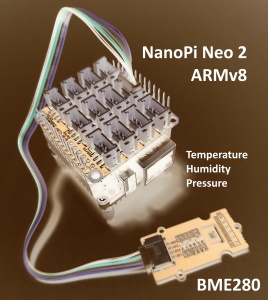
/// https://wiki.seeedstudio.com/Grove-Barometer_Sensor-BME280/
/// Grove - Temp&Humi&Barometer Sensor (BME280) is a breakout board for Bosch BMP280 high-precision,
/// low-power combined humidity, pressure, and temperature sensor.
void main() {
// Select the right I2C bus number /dev/i2c-?
// 1 for Raspbery Pi, 0 for NanoPi (Armbian), 2 Banana Pi (Armbian)
var i2c = I2C(1);
try {
print('I2C info:' + i2c.getI2Cinfo());
var bme280 = BME280(i2c);
var r = bme280.getValues();
print('Temperature [°] ${r.temperature.toStringAsFixed(1)}');
print('Humidity [%] ${r.humidity.toStringAsFixed(1)}');
print('Pressure [hPa] ${r.pressure.toStringAsFixed(1)}');
} finally {
i2c.dispose();
}
}
```
___
``` dart
import 'package:dart_periphery/dart_periphery.dart';
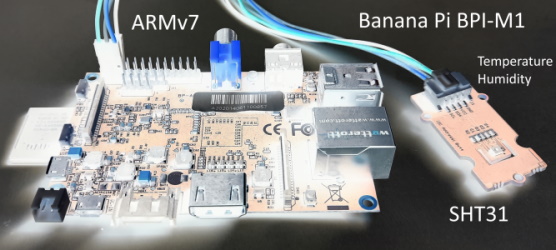
/// Grove - Temp&Humi Sensor(SHT31) is a highly reliable, accurate,
/// quick response and integrated temperature & humidity sensor.
void main() {
// Select the right I2C bus number /dev/i2c-?
// 1 for Raspbery Pi, 0 for NanoPi (Armbian), 2 Banana Pi (Armbian)
var i2c = I2C(1);
try {
var sht31 = SHT31(i2c);
print(sht31.getStatus());
print('Serial number ${sht31.getSerialNumber()}');
print('Sensor heater active: ${sht31.isHeaterOn()}');
var r = sht31.getValues();
print('SHT31 [t°] ${r.temperature.toStringAsFixed(2)}');
print('SHT31 [%°] ${r.humidity.toStringAsFixed(2)}');
} finally {
i2c.dispose();
}
}
```
### SPI
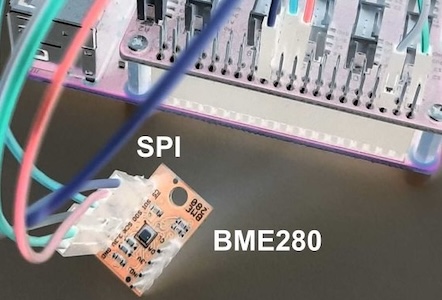
``` dart
import 'package:dart_periphery/dart_periphery.dart';
void main() {
var spi = SPI(0, 0, SPImode.mode0, 1000000);
try {
print('SPI info:' + spi.getSPIinfo());
var bme280 = BME280.spi(spi);
var r = bme280.getValues();
print('Temperature [°] ${r.temperature.toStringAsFixed(1)}');
print('Humidity [%] ${r.humidity.toStringAsFixed(1)}');
print('Pressure [hPa] ${r.pressure.toStringAsFixed(1)}');
} finally {
spi.dispose();
}
}
````
### Serial
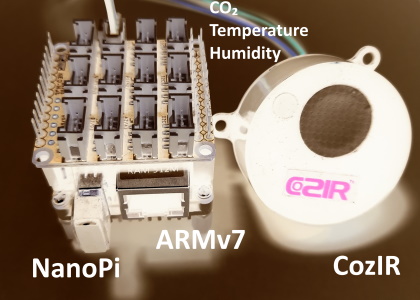
``` dart
import 'package:dart_periphery/dart_periphery.dart';
import 'dart:io';
///
/// [COZIR CO2 Sensor](https://co2meters.com/Documentation/Manuals/Manual_GC_0024_0025_0026_Revised8.pdf)
///
void main() {
print('Serial test - COZIR CO2 Sensor');
var s = Serial('/dev/serial0', Baudrate.b9600);
try {
print('Serial interface info: ' + s.getSerialInfo());
// Return firmware version and sensor serial number - two lines
s.writeString('Y\r\n');
var event = s.read(256, 1000);
print(event.toString());
// Request temperature, humidity and CO2 level.
s.writeString('M 4164\r\n');
// Select polling mode
s.writeString('K 2\r\n');
// print any response
event = s.read(256, 1000);
print('Response ${event.toString()}');
sleep(Duration(seconds: 1));
for (var i = 0; i < 5; ++i) {
s.writeString('Q\r\n');
event = s.read(256, 1000);
print(event.toString());
sleep(Duration(seconds: 5));
}
} finally {
s.dispose();
}
}
```
### Led
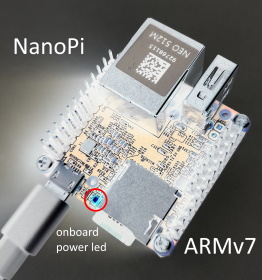
``` dart
import 'package:dart_periphery/dart_periphery.dart';
import 'dart:io';
void main() {
/// Nano Pi power led - see 'ls /sys/class/leds/'
var led = Led('nanopi:red:pwr');
try {
print('Led handle: ${led.getLedInfo()}');
print('Led name: ${led.getLedName()}');
print('Led brightness: ${led.getBrightness()}');
print('Led maximum brightness: ${led.getMaxBrightness()}');
var inverse = !led.read();
print('Original led status: ${(!inverse)}');
print('Toggle led');
led.write(inverse);
sleep(Duration(seconds: 5));
inverse = !inverse;
print('Toggle led');
led.write(inverse);
sleep(Duration(seconds: 5));
print('Toggle led');
inverse = !inverse;
led.write(inverse);
sleep(Duration(seconds: 5));
print('Toggle led');
led.write(!inverse);
} finally {
led.dispose();
}
}
```
### PWM
Ensure that PWM is correctly enabled. e.g. see the following [documentation](https://github.com/dotnet/iot/blob/main/Documentation/raspi-pwm.md) for the Raspberry Pi.
``` dart
import 'package:dart_periphery/dart_periphery.dart';
import 'dart:io';
void main() {
var pwm = PWM(0, 0);
try {
print(pwm.getPWMinfo());
pwm.setPeriodNs(10000000);
pwm.setDutyCycleNs(8000000);
print(pwm.getPeriodNs());
pwm.enable();
print("Wait 20 seconds");
sleep(Duration(seconds: 20));
pwm.disable();
} finally {
pwm.dispose();
}
}
```
### MMIO
**Memory Mapped I/O**: Turns on a led at pin 18 on a Raspberry Pi using MMIO. This direct register
access example is derived from [elinux.org](https://elinux.org/RPi_GPIO_Code_Samples#Direct_register_access).
``` dart
import 'package:dart_periphery/dart_periphery.dart';
import 'dart:io';
const int bcm2708PeriBase = 0x3F000000; // Raspberry Pi 3
const int gpioBase = bcm2708PeriBase + 0x200000;
const int blockSize = 4 * 1024;
class MemMappedGPIO {
MMIO mmio;
MemMappedGPIO(this.mmio);
// #define INP_GPIO(g) *(gpio+((g)/10)) &= ~(7<<(((g)%10)*3))
void setPinInput(final int pin) {
var offset = (pin ~/ 10) * 4;
var value = mmio[offset];
value &= (~(7 << (((pin) % 10) * 3)));
mmio[offset] = value;
}
// #define OUT_GPIO(g) *(gpio+((g)/10)) |= (1<<(((g)%10)*3))
void setPinOutput(final int pin) {
setPinInput(pin);
var offset = (pin ~/ 10) * 4;
var value = mmio[offset];
value |= (1 << (((pin) % 10) * 3));
mmio[offset] = value;
}
// #define GPIO_SET *(gpio+7) - sets bits which are 1 ignores bits which are 0
void setPinHigh(int pin) {
mmio[7 * 4] = 1 << pin;
}
// #define GPIO_CLR *(gpio+10) - clears bits which are 1 ignores bits which are 0
void setPinLow(int pin) {
mmio[10 * 4] = 1 << pin;
}
// #define GET_GPIO(g) (*(gpio+13)&(1< getFlutterPiArgs();
```
returns the command line parameter list of the `flutter-pi` command. The last parameter contains
the asset directory.
## 🔬 Tested SoC hardware
* [Raspberry Pi 3 Model B](https://www.raspberrypi.org/products/raspberry-pi-3-model-b-plus/), OS: [Raspberry Pi OS](https://www.raspberrypi.com/software/)
* [Raspberry Pi Zero 2 W](https://www.raspberrypi.com/products/raspberry-pi-zero-2-w/), OS: [Raspberry Pi OS](https://www.raspberrypi.com/software/)
* [NanoPi](https://wiki.friendlyelec.com/wiki/index.php/NanoPi_NEO) with a Allwinner H3, Quad-core 32-bit CPU, OS: [Armbian](https://www.armbian.com/nanopi-neo-core-2-lts/)
* [NanoPi M1](https://wiki.friendlyelec.com/wiki/index.php/NanoPi_M1) with a Allwinner H3, Quad-core 32-bit CPU: OS [Armbian](https://www.armbian.com/nanopi-m1/)
* [NanoPi Neo2](https://wiki.friendlyelec.com/wiki/index.php/NanoPi_NEO2) with a Allwinner H5, Quad-core 64-bit CPU, OS: [Armbian](https://www.armbian.com/nanopi-neo-2/)
* [Banana Pi BPI-M1](https://en.wikipedia.org/wiki/Banana_Pi#Banana_Pi_BPI-M1) with a Allwinner A20 Dual-core, OS: [Armbian](https://www.armbian.com/bananapi/)
* [Banana Pi BPI-F3 16GB](https://wiki.banana-pi.org/Banana_Pi_BPI-F3) with a [SpacemiT K1 8 core RISC-V](https://docs.banana-pi.org/en/BPI-F3/SpacemiT_K1), OS: [Armbian Dev](https://www.armbian.com/bananapi-f3), [Wiki](https://github.com/pezi/dart_periphery/wiki/BPI_F3) article
## 🖥 Supported devices (sensors, actuators, extensions hats and displays)
* [SGP30](https://github.com/pezi/dart_periphery/blob/main/example/i2c_sgp30.dart): tVOC and eCO2 Gas Sensor
* [BME280](https://github.com/pezi/dart_periphery/blob/main/example/i2c_bme280.dart): Temperature, humidity and pressure sensor.
* [BME680](https://github.com/pezi/dart_periphery/blob/main/example/i2c_bme680.dart): Temperature, humidity pressure and gas (Indoor Airy Quality) sensor.
* [SHT31](https://github.com/pezi/dart_periphery/blob/main/example/i2c_sht31.dart): Temperature and humidity sensor.
* [SHT4x](https://github.com/pezi/dart_periphery/blob/main/example/i2c_sht4x.dart): Temperature and humidity sensor.
* [AHT10/AHT20](https://github.com/pezi/dart_periphery/blob/main/example/i2c_ahtx0.dart) Temperature and humidity sensor
* [CozIR](https://github.com/pezi/dart_periphery/blob/main/example/serial_cozir.dart): CO₂, temperature and humidity sensor.
* [Grove Gesture](https://github.com/pezi/dart_periphery/blob/main/example/i2c_gesture_sensor.dart): can recognize 9 basic gestures.
* [MPU-6050 Six-Axis](https://github.com/pezi/dart_periphery/blob/main/example/i2c_mpu6050.dart): (Gyro + Accelerometer) sensor.
* [MCP9808](https://github.com/pezi/dart_periphery/blob/main/example/i2c_mcp9808.dart): high accuracy temperature sensor.
* [MLX90615](https://github.com/pezi/dart_periphery/blob/main/example/i2c_mlx90615.dart): digital infrared non-contact temperature sensor.
* [PCF8591](https://github.com/pezi/dart_periphery/blob/main/example/i2c_pcf8591.dart): ADC+DAC combo
* [SDC30](https://github.com/pezi/dart_periphery/blob/main/example/i2c_sdc30.dart): CO₂, temperature and humidity sensor.
* [SI1145](https://github.com/pezi/dart_periphery/blob/main/example/i2c_si1145.dart) sunlight sensor: visible & IR light, UV index
* [TSL2591](https://github.com/pezi/dart_periphery/blob/main/example/i2c_tsl2591.dart) light sensor
* [DS1307/DS3231](https://github.com/pezi/dart_periphery/blob/main/example/i2c_ds1307.dart) real time clock support
* [VL53L0X](https://github.com/pezi/dart_periphery/blob/main/example/i2c_vl53l0x.dart) Time-of-Flight sensor
* [AT24C128](https://github.com/pezi/dart_periphery/blob/main/example/i2c_at24c128.dart) 256 KB EEPROM
* Analog [Light sensor](https://github.com/pezi/dart_periphery/blob/main/example/extension_hats/hat_light_sensor_led.dart)
* [Button](https://github.com/pezi/dart_periphery/blob/main/example/extension_hats/hat_button.dart)
* [Magnetic switch sensor](https://github.com/pezi/dart_periphery/blob/main/example/extension_hats/hat_magnetic_switch.dart)
* [Magnetic hall sensor](https://github.com/pezi/dart_periphery/blob/main/example/extension_hats/hat_magnetic_hall.dart)
* [Vibration sensor](https://github.com/pezi/dart_periphery/blob/main/example/extension_hats/hat_vibration.dart)
* [PIR motion sensor ](https://github.com/pezi/dart_periphery/blob/main/example/extension_hats/hat_pir_motion.dart)
* [SSD1306](https://github.com/pezi/dart_periphery/blob/main/example/i2c_ssd1306.dart) 128x64 pixel OLED
* [SSD1306](https://github.com/pezi/dart_periphery/blob/main/example/i2c_ssd1306) 128x64 pixel OLED with Java bridge for image generation
* FriendlyElec [NanoHat Hub](https://wiki.friendlyelec.com/wiki/index.php/BakeBit_-_NanoHat_Hub)
* [Grove Base Hat RaspberryPi](https://www.seeedstudio.com/Grove-Base-Hat-for-Raspberry-Pi.html)
* [Grove Base Hat RaspberryPi Zero](https://wiki.seeedstudio.com/Grove_Base_Hat_for_Raspberry_Pi_Zero)
* [PN532](https://github.com/pezi/dart_periphery/pull/6) NFC Reader Module, Thanks to [UliPrantz](https://github.com/UliPrantz)!
## 🌡 flutter_pi_sensor_tester
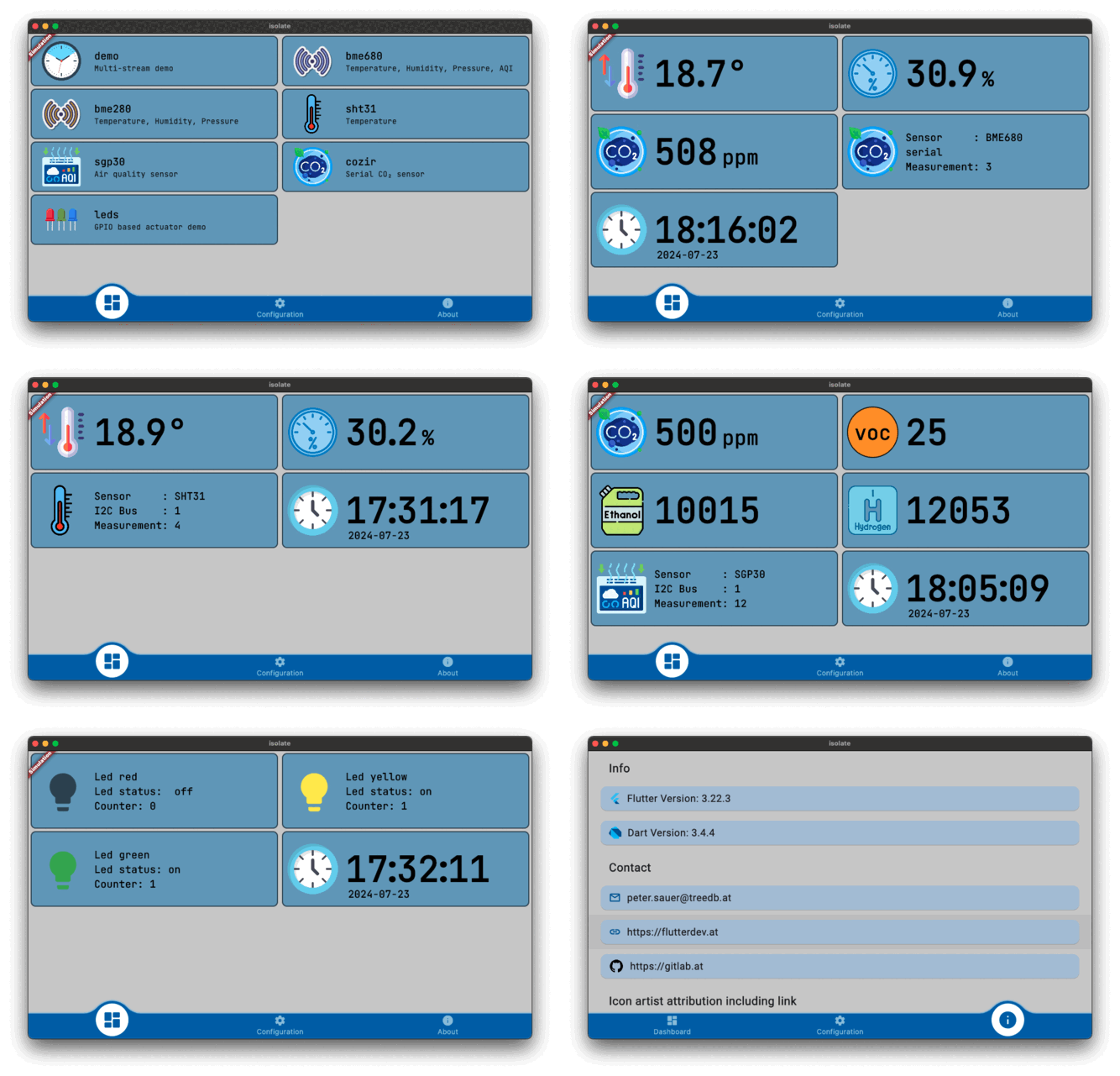
This [subproject](https://github.com/pezi/flutter_pi_sensor_tester) bases on
[flutter-pi](https://github.com/ardera/flutter-pi) and implements a simple
Dart isolate/stream architecture designed to transfer sensor data from an isolate to the Flutter UI:
**Isolate interface**: This consists of the steps `InitTask`, `MainTask`, and `ExitTask`, along with a
limited back channel for controlling the Dart isolate. This setup is typically used for sensor
measurements:
* `InitTask`: Initializes the sensor.
* `MainTask`: Collects sensor data and passes it to a stream.
* `ExitTask`: Disposes of the sensor.
**Listening Mode**: Supports user-defined handling for isolate events.
This variant remains on standby for data; once data is processed, the result is passed to the stream
and subsequently to the Flutter UI. This model is used for actuator control, such as operating a LED.
**Support for Multiple Streams**: Enables handling of multiple data streams simultaneously.
This project is currently still beta and development is ongoing.
## 💧 flutter_sensor_tester
This project builds upon the `flutter_pi_sensor_tester` by introducing a client/server architecture, enhancing its functionality for distributed applications.
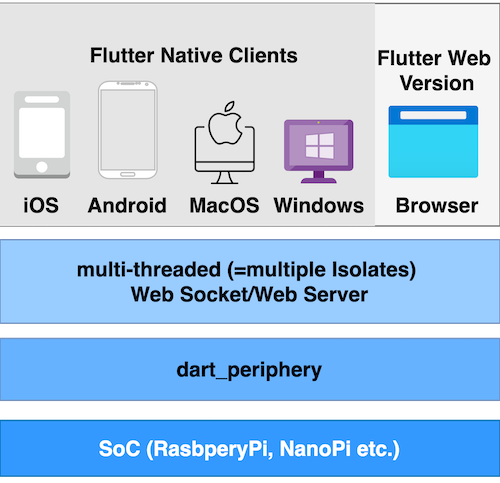
Currently in its alpha stage, the project is scheduled for release in March 2025.
## 📋 Test matrix
[Test suite](https://github.com/pezi/dart_periphery/tree/main/test)
| Architecture | GPIO | GPIOsysfs | I2C | SPI | Serial | MMIO | PWM | LED |
|---------------|:---------:|:--------------------:|:-------:|:-------:|:-------:|:-------:|:-------:|--------:|
| **ARM** ² | ✅ | ✅ | ✅ | ✅ | ✅ | ✅ | ✅ | ✅ |
| **AARCH64** ³ | ❌⁴ | ✅ | ✅ | ✅ | ✅ | ✅ | ✅ | ✅ |
| **X86** ⁵ | ☐ | ☐ | ☐ | ☐ | ☐ | ☐ | ☐ | ☐ |
| **X86_64** ⁵ | ☐ | ☐ | ☐ | ☐ | ☐ | ☐ | ☐ | ☐ |
| **RISC V** ⁶ | ☐ | ☐ | ✅ | ☐ | ☐ | ☐ | ☐ | ☐ |
☐ missing test | ✅ test passed | ❌ test failed
² [Raspberry Pi 3 Model B](https://www.raspberrypi.org/products/raspberry-pi-3-model-b-plus/)
³ Raspberry Pi OS (64-bit), [NanoPi Neo2](https://wiki.friendlyelec.com/wiki/index.php/NanoPi_NEO2) with a Allwinner H5, Quad-core 64-bit CPU
⁴ Fails for NanoPi, NanoPi Neo2 and Banana Pi on Armbian- same behavior like the original
c-periphery [test program](https://github.com/vsergeev/c-periphery/blob/master/tests/test_gpio.c). This is a point of deeper investigations
⁵ no X86/X86_64 SoC for testing available
⁶ Banana Pi BPI-F3, only limited tests
## 🙏 Help wanted
* Testing **dart_periphery** on different [SoC platforms](https://www.armbian.com/download/)
* Documentation review - I am not a native speaker.
* Code review - this is my first public Dart project. I am a Java developer and probably I tend
to solve problems rather in the Java than in the Dart way.