https://github.com/pgdr/seglines
https://github.com/pgdr/seglines
Last synced: over 1 year ago
JSON representation
- Host: GitHub
- URL: https://github.com/pgdr/seglines
- Owner: pgdr
- Created: 2023-02-24T14:26:43.000Z (over 3 years ago)
- Default Branch: master
- Last Pushed: 2023-03-15T09:53:13.000Z (over 3 years ago)
- Last Synced: 2024-03-24T11:20:38.554Z (over 2 years ago)
- Language: Python
- Size: 37.1 KB
- Stars: 0
- Watchers: 2
- Forks: 0
- Open Issues: 0
-
Metadata Files:
- Readme: README.md
Awesome Lists containing this project
README
# seglines
Compute segmented least squares for a dataset. Probably assumes that `X = 1...N` or something.
```
$ seglines 10 data.csv --plot
opt = 70.19
segment 1: 0 (1.330) 13 (13.880) f(x) = 1.009·x + 1.693
segment 2: 14 (1.340) 27 (14.190) f(x) = 0.997·x + -11.887
segment 3: 28 (3.350) 41 (15.760) f(x) = 0.987·x + -25.083
segment 4: 42 (3.420) 55 (17.630) f(x) = 0.991·x + -37.058
segment 5: 56 (5.160) 69 (18.600) f(x) = 0.949·x + -46.523
segment 6: 70 (3.870) 83 (17.660) f(x) = 0.973·x + -63.211
segment 7: 84 (5.930) 97 (17.490) f(x) = 0.977·x + -76.830
segment 8: 98 (5.210) 111 (17.590) f(x) = 0.897·x + -82.366
segment 9: 112 (3.810) 125 (16.410) f(x) = 0.963·x + -102.544
segment 10: 126 (16.780) 139 (3.190) f(x) = -1.036·x + 147.696
```
## Install
`pip install seglines`
Depends only on `numpy`. When using `--plot`, we also need `matplotlib`.
## Usage
There is a `--help` option: `seglines --help`
Use `seglines L data.csv` where `L` is the number of segments you want to segmentize into.
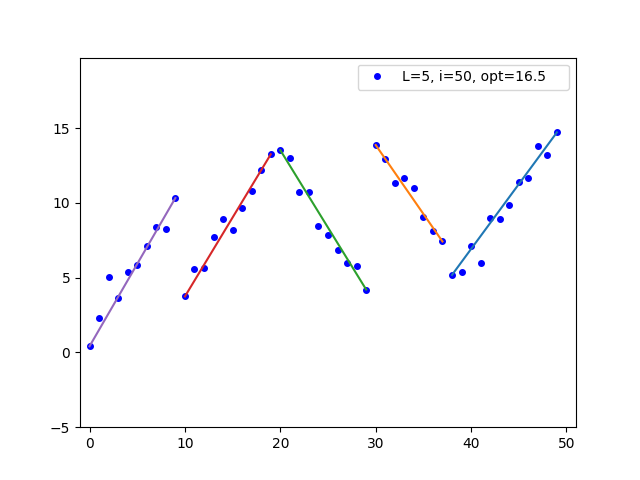
In case you want to generate an `L`-segmented linear dataset, use
`seglines --generate 5 10 > data.csv`
and then
`seglines 5 data.csv`
This will output the segments, e.g.
```
opt = 16.49
segment 1: 0 (0.410) 9 (10.330) f(x) = 0.961·x + 1.355
segment 2: 10 (3.750) 19 (13.260) f(x) = 0.987·x + -5.741
segment 3: 20 (13.530) 29 (4.210) f(x) = -1.031·x + 33.960
segment 4: 30 (13.880) 37 (7.420) f(x) = -0.913·x + 41.254
segment 5: 38 (5.190) 49 (14.720) f(x) = 0.904·x + -29.629
```
To create a plot of the dataset, add `--plot`:
`seglines 5 data.csv --plot`