https://github.com/pguso/calendar-web-component
Calendar - Native HTML Web Component
https://github.com/pguso/calendar-web-component
Last synced: about 1 year ago
JSON representation
Calendar - Native HTML Web Component
- Host: GitHub
- URL: https://github.com/pguso/calendar-web-component
- Owner: pguso
- License: mit
- Created: 2021-08-24T15:44:51.000Z (almost 5 years ago)
- Default Branch: main
- Last Pushed: 2021-11-04T17:53:37.000Z (over 4 years ago)
- Last Synced: 2024-10-31T17:44:45.448Z (over 1 year ago)
- Language: TypeScript
- Size: 2.78 MB
- Stars: 7
- Watchers: 1
- Forks: 0
- Open Issues: 0
-
Metadata Files:
- Readme: README.md
- License: LICENSE
Awesome Lists containing this project
README
## Simple native web component calendar
Native HTML web component calendar. Can easily be used in any framework or plain HTML.
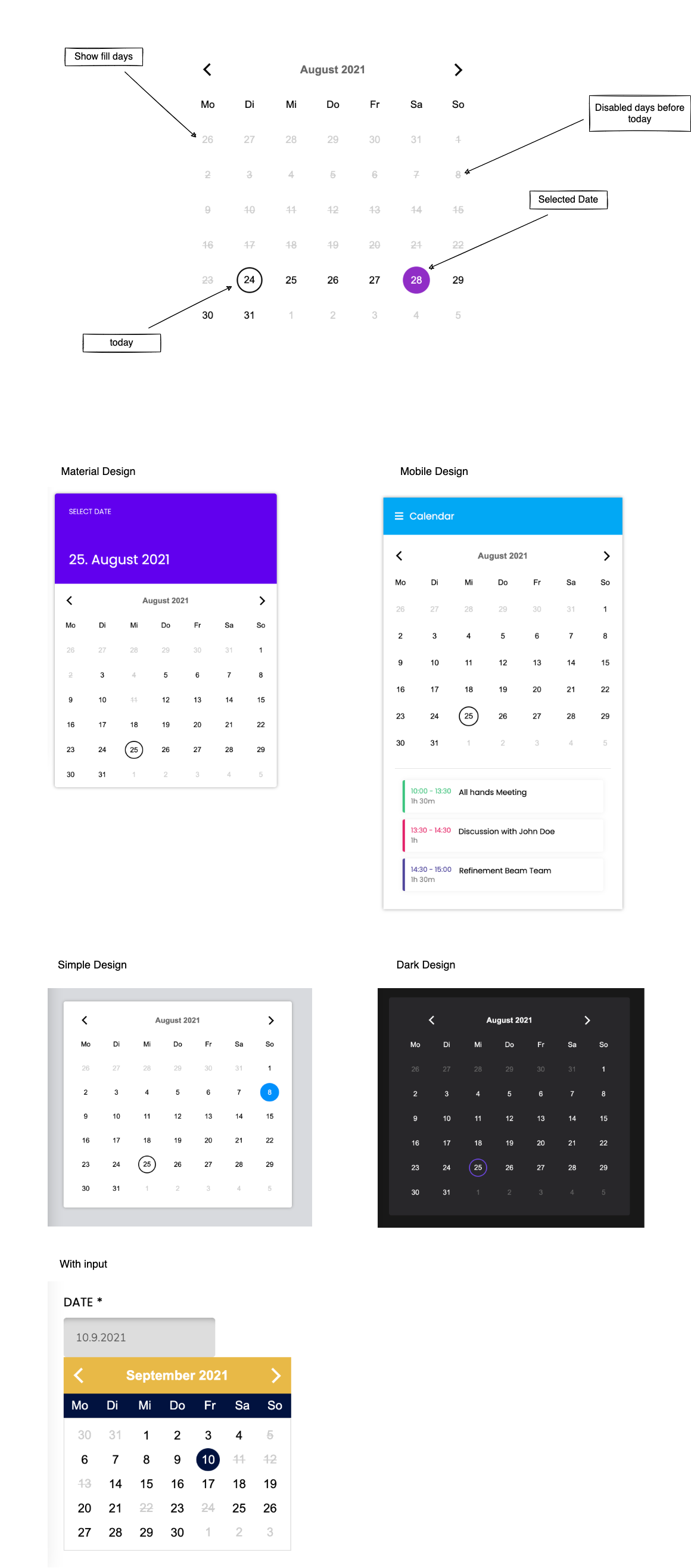
### Styled Examples (Codepen)
[Material Design](https://codepen.io/pguso/pen/mdwyWMJ)
[Simple Design](https://codepen.io/pguso/pen/vYZEJJY)
[Mobile Design](https://codepen.io/pguso/pen/VwWYzdw)
[Dark Design](https://codepen.io/pguso/pen/YzQPrdr)
[With Input](https://codepen.io/pguso/pen/rNwVOdW)
### Integration
#### Install the calendar component
```npm i calendar-native-web-component```
or
```yarn add calendar-native-web-component```
#### Import the package
```import 'calendar-native-web-component'```
or
```require('calendar-native-web-component')```
#### Use Tag
Just integrate this Tag into your HTML and you should see the component.
``````
#### Properties
Example of setters
Usage in HTML file
```html
```
Usage in JavaScript
```javascript
const datePicker = document.getElementById('date-picker')
datePicker.dayNames = ['Mo', 'Di', 'Mi', 'Do', 'Fr', 'Sa', 'So']
datePicker.monthNames = ['January', 'February', 'March', 'April', 'May', 'June', 'July', 'August', 'September', 'October', 'November', 'December']
datePicker.showFillDays = false
datePicker.disableDaysBeforeToday = true
datePicker.disabledDates = [
{year: 2021, day: 3, month: 9},
{year: 2021, day: 12, month: 9},
{year: 2021, day: 22, month: 9},
]
datePicker.primaryColor = '#000'
datePicker.secondaryColor = '#000'
datePicker.headerTextColor = '#000'
datePicker.disabledTextColor = '#000'
datePicker.dayTextColor = '#000'
datePicker.selectedTextColor = '#000'
datePicker.selectedBorderColor = '#000'
datePicker.monthNameBackground = '#E9B947'
datePicker.dayNamesBackground = '#01123F'
datePicker.additionalStyle = `
.calendar > * {
line-height: 2rem;
}
header {
padding: .5rem 1rem;
}
`
```
Example of getters
Usage in HTML file
```html
```
Usage in JavaScript
```javascript
const datePicker = document.getElementById('date-picker')
console.log(datePicker.selectedDate)
console.log(datePicker.currentMonth)
console.log(datePicker.today)
```
### Dev Setup
- clone repository
- open the console and switch into the root of this repository
- run `yarn` to install the dependencies
### Run dev server
``` yarn start ```
Open http://localhost:8081/ in your browser and start building.
### Build for production use
``` yarn run build ```