https://github.com/phact/quarkus-astra-demos
https://github.com/phact/quarkus-astra-demos
Last synced: about 1 year ago
JSON representation
- Host: GitHub
- URL: https://github.com/phact/quarkus-astra-demos
- Owner: phact
- Created: 2020-07-07T05:28:49.000Z (almost 6 years ago)
- Default Branch: main
- Last Pushed: 2021-03-22T17:07:10.000Z (about 5 years ago)
- Last Synced: 2024-11-22T16:11:46.668Z (over 1 year ago)
- Language: JavaScript
- Size: 3.01 MB
- Stars: 10
- Watchers: 3
- Forks: 11
- Open Issues: 1
-
Metadata Files:
- Readme: README.md
Awesome Lists containing this project
README
# quarkus-astra-demo
**`ASTRA`** is the simplest way to run Cassandra with zero operations at all - just push the button and get your cluster. No credit card required, $25.00 USD credit every month, roughly 5M writes, 30M reads, 40GB storage monthly - sufficient to run small production workloads.
To use this project:
✅ Clone the repo
✅ Register (if needed) and Sign In to Astra [https://astra.datastax.com](https://dtsx.io/3r8nOlJ): You can use your `Github`, `Google` accounts or register with an `email`.
_Make sure to chose a password with minimum 8 characters, containing upper and lowercase letters, at least one number and special character_
✅ Create a "pay as you go" plan
Follow this [guide](https://docs.datastax.com/en/astra/docs/creating-your-astra-database.html), to set up a pay as you go database with a free $25 monthly credit.
- **Select the pay as you go option**: Includes $25 monthly credit - no credit card needed to set up.
You will find below which values to enter for each field.
- **For the database name** - `free_db.` While Astra allows you to fill in these fields with values of your own choosing, please follow our recommendations to ensure the application runs properly.
- **For the keyspace name** - `free`. It's really important that you use the name "free" for the code to work.
_You can technically use whatever you want and update the code to reflect the keyspace. This is really to get you on a happy path for the first run._
- **For provider and region**: Choose and provider (either GCP or AWS). Region is where your database will reside physically (choose one close to you or your users).
- **Create the database**. Review all the fields to make sure they are as shown, and click the `Create Database` button.
You will see your new database `pending` in the Dashboard.
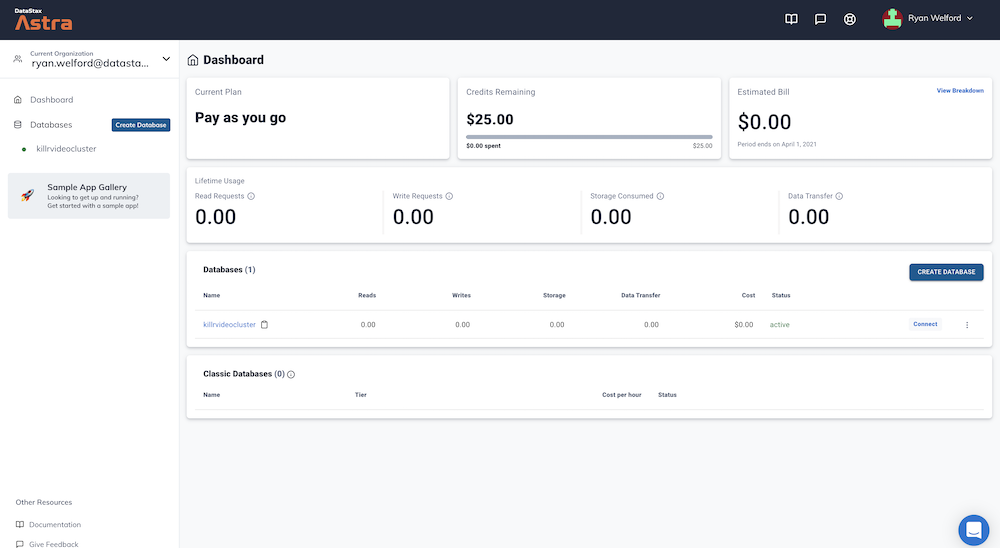
The status will change to `Active` when the database is ready, this will only take 2-3 minutes. You will also receive an email when it is ready.
✅ [Download your secure connect bundle](https://docs.datastax.com/en/astra/docs/obtaining-database-credentials.html) from the connect screen
✅ [Create a token for your app](https://docs.datastax.com/en/astra/docs/manage-application-tokens.html) to use in the settings screen
✅ Create and populate your application.properties file:
cp ./src/main/resources/application.properties.template ./src/main/resources/application.properties
✅ Replace the following lines to point at your scb and with your token:
quarkus.cassandra.cloud.secure-connect-bundle=<>
quarkus.cassandra.auth.password=AstraCS:<>
If you prefer to stub out the code yourself, pull the `puzzle` branch instead and give it a try. This `main` branch has the required endpoints stubbed out.
This project uses Quarkus, the Supersonic Subatomic Java Framework.
If you want to learn more about Quarkus, please visit the website: https://quarkus.io/
## Running the application in dev mode
You can run your application in dev mode that enables live coding using:
```
./mvnw clean quarkus:dev
```
📗 **Expected output**

Once the application is running navigate to [http://localhost:8080](http://localhost:8080).

## Packaging and running the application
The application can be packaged using `./mvnw package`.
It produces the `quarkus-run.jar` file in the `/target/quarkus-app` directory.
Be aware that it’s not an _über-jar_ as the dependencies are copied into the `target/quarkus-app/lib` directory.
The application is now runnable using `java -jar target/quarkus-app/quarkus-run.jar`.
## Creating a native executable
You can create a native executable using: `./mvnw package -Pnative`.
Or, if you don't have GraalVM installed, you can run the native executable build in a container using: `./mvnw package -Pnative -Dquarkus.native.container-build=true`.
> Make sure you have a container runtime (docker/podman/etc) installed
You can then execute your native executable with: `./target/quarkus-astra-demo-0.01-runner`
If you want to learn more about building native executables, please consult https://quarkus.io/guides/building-native-image.
## Running on Red Hat Developer Sandbox
Run this application on the free [Red Hat Developer Sandbox](https://developers.redhat.com/developer-sandbox). All you need to do is create an account and then [click here](https://workspaces.openshift.com/f?url=https://github.com/phact/quarkus-astra-demos/tree/todo) to load the workspace!