https://github.com/phucbm/pia
Leverage the use of localStorage and sessionStorage
https://github.com/phucbm/pia
Last synced: 3 months ago
JSON representation
Leverage the use of localStorage and sessionStorage
- Host: GitHub
- URL: https://github.com/phucbm/pia
- Owner: phucbm
- License: mit
- Created: 2022-10-07T11:20:04.000Z (almost 4 years ago)
- Default Branch: main
- Last Pushed: 2024-02-02T02:59:58.000Z (over 2 years ago)
- Last Synced: 2025-03-17T10:22:36.536Z (over 1 year ago)
- Language: JavaScript
- Homepage:
- Size: 343 KB
- Stars: 2
- Watchers: 2
- Forks: 0
- Open Issues: 0
-
Metadata Files:
- Readme: README.md
- License: LICENSE
Awesome Lists containing this project
README
# PiaJS
[](https://www.npmjs.com/package/piajs?activeTab=versions)
[](https://www.npmjs.com/package/piajs?activeTab=versions)
[](https://www.npmjs.com/package/piajs?activeTab=versions)
[](https://github.com/phucbm/pia/)
[](https://www.jsdelivr.com/package/gh/phucbm/pia)
[](https://www.npmjs.com/package/piajs?activeTab=versions)
[](https://github.com/phucbm/pia/blob/main/LICENSE)
[](https://webuild.community)
> A simple, lightweight JavaScript API for handling browser storage
- Automatically switch between `localStorage` and `sessionStorage` depends on your expires setting
- Accepts any value type
- No dependency
## Cookies vs. Local Storage vs. Session Storage
| | Cookies | Local Storage | Session Storage |
|------------------------|--------------------|-----------------------------------|-----------------|
| **Capacity** | 4kb | 10mb | 5mb |
| **Accessible from** | Any window | Any window | Same tab |
| **Expires** | Manually set | Never (_Manually set with PiaJS_) | On tab close |
| **Storage location** | Browser and server | Browser only | Browser only |
| **Sent with requests** | Yes | No | No |
## Installation
Using package manager:
```shell
npm i piajs
```
Import
```js
import "piajs";
```
Using CDN:
```html
```
## Usage
### Create record
Create a record, valid across the entire browser.
```js
Pia.set('key', 1); // number
Pia.set('key', [1, 2]); // array
Pia.set('key', "string"); // string
Pia.set('key', {value: "123"}); // object
Pia.set('key', true); // boolean
```
Unlike normal `localStorage` or `sessionStorage`, PiaJS uses `JSON.stringify()`
to convert the value to a string, so it would accept any type of value.
> **Warning**
> Prototypes of an _Object_ will be treated as a plain string value. So you can't store instances with Pia.
### Set expires
```js
Pia.set('key', 'your value', {expires: 'session'}); // valid in the current browser tab only
Pia.set('key', 'your value', {expires: 7}); // valid for 7 days
Pia.set('key', 'your value', {expires: '1 day'}); // valid for 1 day
Pia.set('key', 'your value', {expires: '2 days'}); // valid for 2 days
Pia.set('key', 'your value', {expires: '48 hours'}); // valid for 48 hours
```
> **Note**
> If you leave `expires` empty or something unrecognized, it will never expire.
### Read record
```js
Pia.get('key');
Pia.get('key', true); // => full value object
Pia.get('nothing'); // => null
```
### Delete record
```js
Pia.remove('key');
```
### Test record
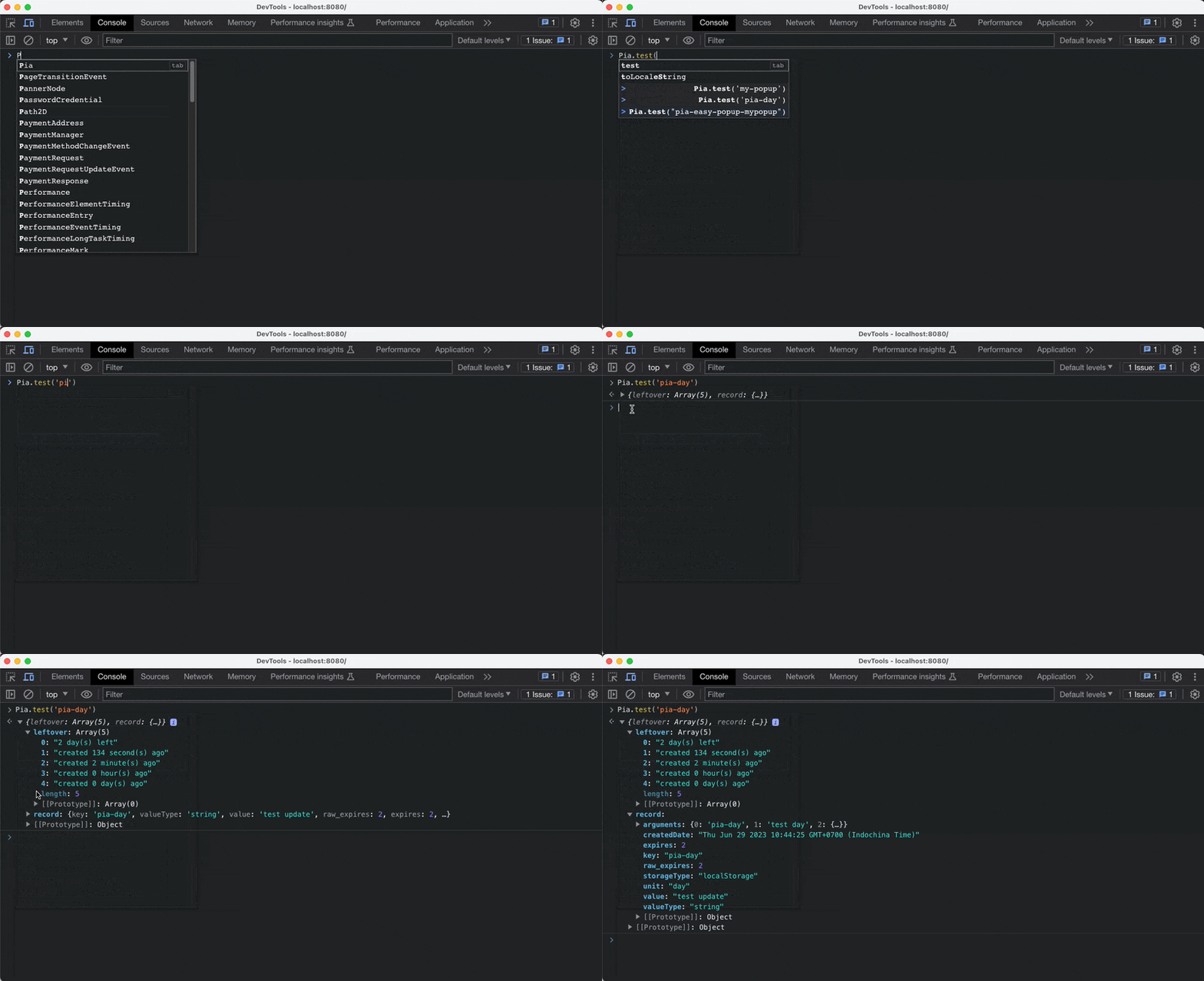
Run this in the console
```js
Pia.test()
```
Log the info about a record
```js
console.log(Pia.test('key'));
const info = {
"leftover": [
"2 day(s) left",
"created 134 second(s) ago",
"created 2 minute(s) ago",
"created 0 hour(s) ago",
"created 0 day(s) ago"
],
"record": {
"key": "pia-day",
"valueType": "string",
"value": "test update",
"raw_expires": 2,
"expires": 2,
"unit": "day",
"storageType": "localStorage",
"arguments": {
"0": "pia-day",
"1": "test day",
"2": {
"expires": 2
}
},
"createdDate": "Thu Jun 29 2023 10:44:25 GMT+0700 (Indochina Time)"
}
};
```
Test quickly in the console panel
## Deployment
```shell
# Install packages
npm i
# Run dev server
npm run dev
# Build prod files
npm run prod
```