https://github.com/phulelouch/catalyst_challenge
This is a challenge by Catalyst IT AU. But I want this to also be a useful tools that can be use in real life to parse CSV contents into Mysql
https://github.com/phulelouch/catalyst_challenge
docker mysql php script
Last synced: about 2 months ago
JSON representation
This is a challenge by Catalyst IT AU. But I want this to also be a useful tools that can be use in real life to parse CSV contents into Mysql
- Host: GitHub
- URL: https://github.com/phulelouch/catalyst_challenge
- Owner: phulelouch
- License: agpl-3.0
- Created: 2024-03-29T11:24:35.000Z (about 2 years ago)
- Default Branch: main
- Last Pushed: 2024-04-02T14:28:00.000Z (about 2 years ago)
- Last Synced: 2025-10-23T18:58:54.281Z (8 months ago)
- Topics: docker, mysql, php, script
- Language: PHP
- Homepage:
- Size: 92.8 KB
- Stars: 0
- Watchers: 1
- Forks: 0
- Open Issues: 0
-
Metadata Files:
- Readme: README.md
- License: LICENSE.txt
Awesome Lists containing this project
README
# User Upload Script
The user_upload.php is a CLI tools that accepts a CSV file as input (see command line directives below) and processes the CSV file. The parsed file data is to be inserted into a MySQL database.
Beside all the basic requirements, the script also include these features:
- [x] Can be run independently from host env with Docker
- [x] Use directly with [docker run](#usage)
- [x] Security implementation (SQL Injection, DOS)
- [x] Test script to generate a CSV file for test
- [x] Frontend web for easy testing
## Table of Contents
- [Catalyst Challenge](#catalyst_challenge)
- [Table of Contents](#table-of-contents)
- [Feature Completion Status](#features-completion-status)
- [Installation](#installation)
- [Database Credentials](#database-credentials)
- [Usage](#usage)
- [Asciicast Video](#video)
- [How to use the test script](#how-to-use-the-test-script)
- [How to use web](#how-to-use-web)
## Feature Completion Status
Below is the list of features and their completion status.
- [x] Create a Docker environment with Dockerfile the united with the Assumptions in the task (Ubuntu 22.04, Mysql)
- [x] Perform basic requirements
- [x] Apply Security measurement: DOS (import from CSV)
- [x] Apply Security measurement: SQL Injection (import from CSV)
- [ ] Apply Security measurement: OS Injection
- [x] Generate test script
- [x] A frontend web for easy test
- [ ] Fix the database config, it is better to create a DBConfig class or create a .env
- [ ] Implement based on OOP, like create a class User (though as I understand the task were to create a script)
- [ ] Expose the docker so that it can insert into other Mysql database outside
## Installation
There are 2 options:
1. Install the assumptions environment: Ubuntu 22.04, php8.1, mysql
2. Build the docker:
```bash
#Build the docker
docker build -t catalyst .
```
### Database Credentials
- Set default if not provided:
```env
DB_HOST=localhost
DB_NAME=users
DB_USER=phulelouch
DB_PASSWORD=phulelouch
```
## Usage
### VIDEO:
*Please refer to this asciicast for easy installation and use*
[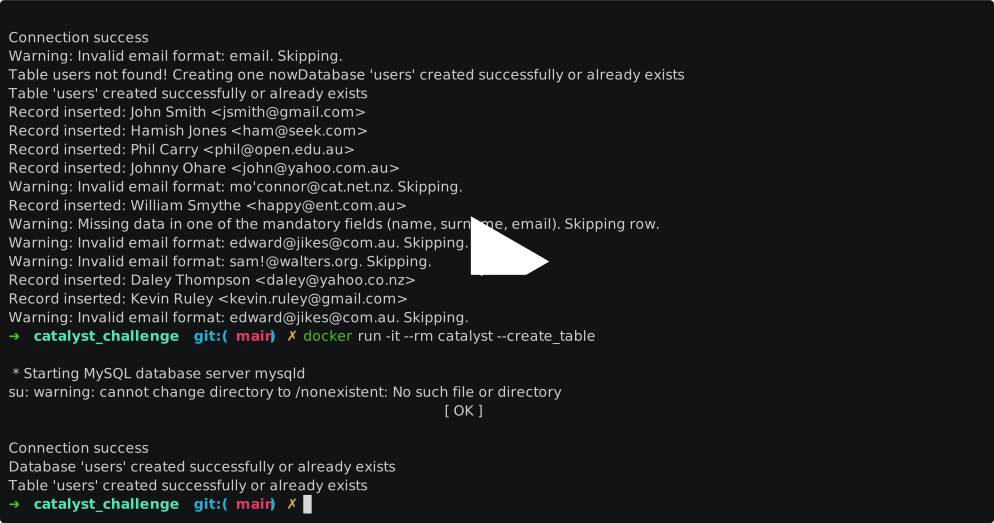](https://asciinema.org/a/ERHWJtk7uQeMncFOaNID5Q0ah)
If the above doesn't load, click [here](https://asciinema.org/a/ERHWJtk7uQeMncFOaNID5Q0ah) to view the recording.
1. Run with the assumptions environment
2. Access the docker terminal and run the script:
- Access /bin/bash:
```bash
#Access the terminal inside docker
docker run -it --rm catalyst /bin/bash
```
- Run the script:
```bash
php user_upload.php [options]
```
3. Run the script directly
*Note: This will not preserve the database since the database is in the docker as php script (all inside the Ubuntu docker).*
*This is the assumptions I made: in case the database is outside of docker we can expose the docker and the script will still run as an independence tools.*
- Parse the argument into it directly:
```bash
#Run directly like ... --help
docker run -it --rm catalyst --file test_data.csv
```
- Tips:
```bash
#Run alias to create a alias so that you don't have to type too many times
alias catalyst='docker run -it --rm catalyst'
```
## How to use the test script
*In addition I create a script to create CSV file for testing. This script will add invalid special characters at random point to test the filters ability*
```bash
#File output at the location of running
php test/test.php
```
The test csv name is: test_data.csv after that, use as normal and use the test_data.csv instead of users.csv
## How to use web
The frontend is a simple features use php/html for testing the script faster
```bash
#expose port 3000
docker run -p 3000:3000 -it --rm catalyst web
```
Open your browser at http://localhost:3000/
## AI usage
AI was use to help with:
- Unknow syntax and functions like: ucfirst, getopt
- Help with regex syntax
- Help with creating test script