https://github.com/piexian/astrbot_plugin_gemini_image_generation
图像生成插件,支持生图和改图,可以自动获取头像作为参考等。
https://github.com/piexian/astrbot_plugin_gemini_image_generation
astrbot-plugin doubao gemimi grok image-generation openai xai-api
Last synced: about 2 months ago
JSON representation
图像生成插件,支持生图和改图,可以自动获取头像作为参考等。
- Host: GitHub
- URL: https://github.com/piexian/astrbot_plugin_gemini_image_generation
- Owner: piexian
- License: agpl-3.0
- Created: 2025-11-22T16:18:51.000Z (7 months ago)
- Default Branch: master
- Last Pushed: 2026-04-26T03:30:29.000Z (about 2 months ago)
- Last Synced: 2026-04-26T04:25:27.907Z (about 2 months ago)
- Topics: astrbot-plugin, doubao, gemimi, grok, image-generation, openai, xai-api
- Language: Python
- Homepage:
- Size: 14.4 MB
- Stars: 39
- Watchers: 1
- Forks: 12
- Open Issues: 2
-
Metadata Files:
- Readme: README.md
- Changelog: CHANGELOG.md
- License: LICENSE
Awesome Lists containing this project
README
# AstrBot Gemini 图像生成插件


**强大的 AstrBot 图像生成插件,支持生图、改图、头像参考、表情包切分和 LLM 工具调用。**
> **升级提示**:v1.9.0 以后的配置文件格式不兼容 v1.8.x 及更早版本。升级后如遇配置模板显示错误,请查看 [配置迁移说明](https://github.com/piexian/astrbot_plugin_gemini_image_generation/blob/master/docs/troubleshooting.md#配置迁移说明)。
## 功能概览
- **多模式图像生成**:纯文本生图、参考图改图、风格转换、手办化、表情包生成。
- **快速预设**:头像、海报、壁纸、卡片、手机壁纸、手办化、表情包一键生成。
- **智能参考图**:自动读取消息图片、引用图片、合并转发、群文件,以及用户头像和 @ 对象头像。
- **多供应商支持**:Google Gemini、OpenAI 兼容、OpenAI Images、xAI Images、MiniMax、Zai、grok2api、豆包。
- **LLM 工具集成**:支持自然语言触发生图,前台短等待,超时后自动转后台发送。
- **表情包切分**:内置 SmartMemeSplitter v4,并提供手动网格、视觉识别、主体吸附等兜底路径。
- **限流与缓存**:支持群白名单/黑名单、周期限流、KV 持久化、临时文件自动清理。
## 快速安装
### 前置要求
- AstrBot 4.10+
- Python 3.10+
- NapCat(目前主要适配 NapCat 平台)
### 安装方式
**插件市场**:搜索 `Gemini 图像生成` 并安装。
**链接安装**:在插件界面右下角点击加号,选择从链接安装,输入:
```text
https://github.com/piexian/astrbot_plugin_gemini_image_generation
```
依赖会按 [requirements.txt](https://github.com/piexian/astrbot_plugin_gemini_image_generation/blob/master/requirements.txt) 自动安装。
## 最小配置
至少需要配置一个可用的图像模型供应商:
| 配置项 | 说明 |
|--------|------|
| `api_settings.provider_id` | 生图模型提供商,从 AstrBot 提供商列表选择;豆包可不填 |
| `api_settings.api_type` | API 类型:`google` / `openai` / `openai_images` / `xai` / `minimax` / `zai` / `grok2api` / `doubao` |
常用配置入口:
- [完整配置参考](https://github.com/piexian/astrbot_plugin_gemini_image_generation/blob/master/docs/config.md)
- [使用指南](https://github.com/piexian/astrbot_plugin_gemini_image_generation/blob/master/docs/usage.md)
- [故障排除](https://github.com/piexian/astrbot_plugin_gemini_image_generation/blob/master/docs/troubleshooting.md)
- [新增 API 供应商](https://github.com/piexian/astrbot_plugin_gemini_image_generation/blob/master/docs/新增API供应商.md)
## 常用命令
| 命令 | 说明 | 示例 |
|------|------|------|
| `/生图` | 纯文本生成 | `/生图 一只可爱的橙色小猫` |
| `/改图` | 基于参考图修改 | 发送图片 + `/改图 把头发改成红色` |
| `/换风格` | 风格转换 | 发送图片 + `/换风格 水彩` |
| `/快速 头像` | 头像模式 | `/快速 头像 商务风格` |
| `/快速 海报` | 海报模式 | `/快速 海报 赛博朋克` |
| `/快速 壁纸` | 壁纸模式 | `/快速 壁纸 未来城市` |
| `/快速 卡片` | 卡片模式 | `/快速 卡片 商务名片` |
| `/快速 手机` | 手机壁纸 | `/快速 手机 极简风格` |
| `/快速 手办化` | 手办效果 | `/快速 手办化 [1/2] 动漫角色` |
| `/快速 表情包` | 表情包 | `/快速 表情包 Q版可爱` |
| `/切图` | 切割图片 | `/切图` 或 `/切图 4 4` |
| `/生图帮助` | 查看帮助 | `/生图帮助` |
更多参数、快速模式说明和 LLM 工具行为见 [使用指南](https://github.com/piexian/astrbot_plugin_gemini_image_generation/blob/master/docs/usage.md)。
## OpenAI Images 提示
`openai_images` 供应商支持 OpenAI Images 原生端点。启用 `size_mode=custom` 后:
| 调用路径 | `size` 取值 |
|----------|-------------|
| 普通生图/改图 | 直接使用配置中的 `custom_size` |
| 快速模式 | 根据模式预设的 `resolution + aspect_ratio` 自动换算 |
| LLM 工具调用 | LLM 显式传入 `size` 时以该值为准,否则使用配置中的 `custom_size` |
尺寸格式为 `WxH`,支持 `x` 或 `×`,例如 `1024x1024`、`2048×1152`。详细限制和示例见 [OpenAI Images 配置](https://github.com/piexian/astrbot_plugin_gemini_image_generation/blob/master/docs/config.md#openai_images_settingsopenai-images-api-专用配置)。
## MiniMax 提示
`minimax` 供应商支持 MiniMax 官方 `/v1/image_generation` 端点,模型默认 `image-01`:
| 能力 | 说明 |
|------|------|
| 文生图 | 直接发送 prompt、长宽比、生成数量等参数 |
| 图生图 | 通过 `subject_reference` 传入参考图,默认 `type=character` |
| 多图生成 | `n` 支持 `1-9` |
| 响应格式 | 默认 `base64` 并保存为本地图片,避免官方 URL 24 小时过期 |
| 分辨率适配 | 全局 `resolution`(1K/2K/4K)自动映射;不支持的比例(如 4:5)会计算显式像素尺寸 |
详细配置见 [MiniMax 配置](https://github.com/piexian/astrbot_plugin_gemini_image_generation/blob/master/docs/config.md#minimax_settingsminimax-图片生成-api-专用配置)。
## 项目结构
```text
astrbot_plugin_gemini_image_generation/
├── main.py # 插件主入口
├── _conf_schema.json # 配置 Schema
├── docs/ # 配置、使用、故障排除和适配器文档
├── templates/ # 帮助页面模板
└── tl/ # 核心模块和供应商适配器
```
`tl/` 目录接口索引见:[tl 模块接口说明](https://github.com/piexian/astrbot_plugin_gemini_image_generation/blob/master/tl/README.md)。
## 贡献
欢迎提交 [Issue](https://github.com/piexian/astrbot_plugin_gemini_image_generation/issues) 和 [Pull Request](https://github.com/piexian/astrbot_plugin_gemini_image_generation/pulls)。
新增 API 供应商请参考:[适配器开发指南](https://github.com/piexian/astrbot_plugin_gemini_image_generation/blob/master/docs/新增API供应商.md)。
### 致谢
- [@MliKiowa](https://github.com/MliKiowa) - 图像切割算法
- [@exynos967](https://github.com/exynos967) - 限流设置、手办化功能、OpenAI 兼容、Zai 供应商、快速模式配置
- [@zouyonghe](https://github.com/zouyonghe) - 代理支持、保留参考图尺寸、空格参数支持
- [@vmoranv](https://github.com/vmoranv) - 表情包提示词优化
- [@itismygo](https://github.com/itismygo) - grok2api 适配
- [@xunxiing](https://github.com/xunxiing) - OpenAI Images 端点支持、配置提示修复
- [@Clhikari](https://github.com/Clhikari) - 快速生图修复
- [@YukiRa1n](https://github.com/YukiRa1n) - GIF 支持、多项修复
## 许可证
AGPL-3.0 License - 详见 [LICENSE](https://github.com/piexian/astrbot_plugin_gemini_image_generation/blob/master/LICENSE)。
## 相关链接
- [项目地址](https://github.com/piexian/astrbot_plugin_gemini_image_generation)
- [更新日志](https://github.com/piexian/astrbot_plugin_gemini_image_generation/blob/master/CHANGELOG.md)
- [问题反馈](https://github.com/piexian/astrbot_plugin_gemini_image_generation/issues)
- [AstrBot](https://docs.astrbot.app/)
- [Google Gemini API](https://ai.google.dev/)
- [NapCat](https://napneko.github.io/)
- [AstrBook 论坛插件](https://github.com/advent259141/astrbot_plugin_astrbook)
- [grok2api](https://github.com/chenyme/grok2api)
- [zaiis2api](https://github.com/Futureppo/zaiis2api)
- [zai.is](https://zai.is)
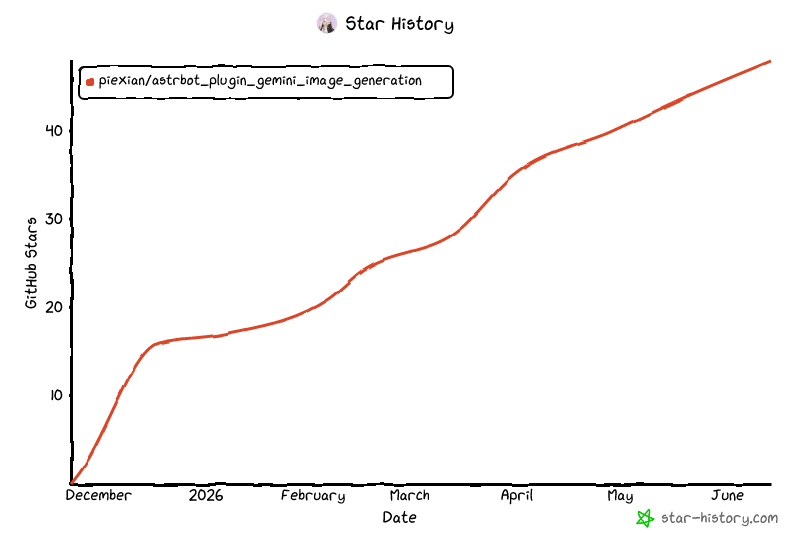
## Star History
[](https://www.star-history.com/?repos=piexian%2Fastrbot_plugin_gemini_image_generation&type=date&legend=top-left)