https://github.com/pikoci/pikoci
The CI/CD that grows with you. One binary, any database, any queue, runs anywhere.
https://github.com/pikoci/pikoci
cd ci ci-cd cicd go golang queue
Last synced: about 1 month ago
JSON representation
The CI/CD that grows with you. One binary, any database, any queue, runs anywhere.
- Host: GitHub
- URL: https://github.com/pikoci/pikoci
- Owner: PikoCI
- License: apache-2.0
- Created: 2025-09-28T19:38:53.000Z (10 months ago)
- Default Branch: master
- Last Pushed: 2026-06-07T06:24:31.000Z (about 2 months ago)
- Last Synced: 2026-06-07T07:10:39.429Z (about 2 months ago)
- Topics: cd, ci, ci-cd, cicd, go, golang, queue
- Language: Go
- Homepage: https://pikoci.com
- Size: 14.2 MB
- Stars: 95
- Watchers: 0
- Forks: 1
- Open Issues: 67
-
Metadata Files:
- Readme: README.md
- Changelog: CHANGELOG.md
- License: LICENSE
Awesome Lists containing this project
- awesome-go-with-stars - PikoCI - hosted CI/CD inspired by Concourse. Single binary, any database, any queue. HCL pipelines, pluggable resource types and runners. | 2026-07-08 | (Continuous Integration / Standard CLI)
- awesome-go - PikoCI - Self-hosted CI/CD inspired by Concourse. Single binary, any database, any queue. HCL pipelines, pluggable resource types and runners. (Continuous Integration / Standard CLI)
- fucking-awesome-go - PikoCI - Self-hosted CI/CD inspired by Concourse. Single binary, any database, any queue. HCL pipelines, pluggable resource types and runners. (Continuous Integration / Standard CLI)
README

# PikoCI
**The CI/CD that grows with you. One binary, any database, runs anywhere.**
[](https://golang.org)
[](LICENSE)
[](https://goreportcard.com/report/github.com/pikoci/pikoci)
[](https://pkg.go.dev/github.com/pikoci/pikoci)
[](https://github.com/PikoCI/pikoci/releases/latest)
[](https://github.com/orgs/PikoCI/packages/container/package/pikoci)
[](https://codecov.io/gh/PikoCI/pikoci)
[](https://discord.gg/gctEh24CTm)
[Documentation](https://docs.pikoci.com) · [Quick Start](#quick-start) · [Contributing](#contributing) · [Discord](https://discord.gg/gctEh24CTm)
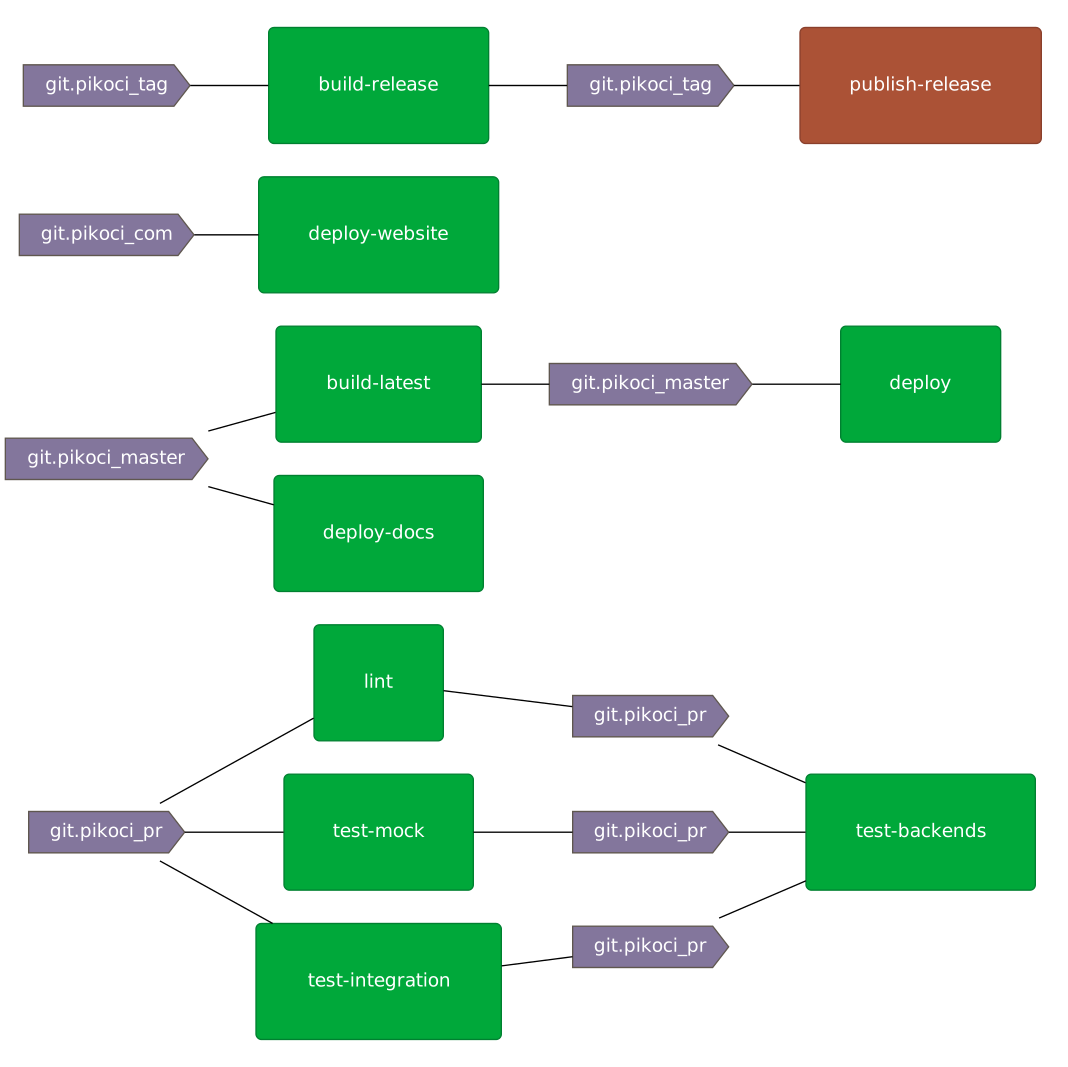
## What is PikoCI?
PikoCI is a self-hosted CI/CD system built around a resource/resource-type pipeline model, inspired by [Concourse CI](https://concourse-ci.org), but designed to run anywhere without operational pain.
Most CI/CD tools either lock you into a cloud platform or require spinning up multiple services just to get started. PikoCI runs as a single binary with a pluggable database backend. Use what you already have, or run entirely in memory with zero external dependencies. Bundle your binary, your pipelines, and your database file, and move them anywhere.
Pipelines are defined in [HCL](https://github.com/hashicorp/hcl). The runner abstraction means you're not locked into a specific execution environment.
## Features
- **Single binary**: download and run. No Docker Compose, no Kubernetes, no setup scripts.
- **Truly portable**: bundle the binary with your pipeline config and SQLite file. Move it anywhere, run it instantly.
- **In-memory mode**: run the entire system in memory for development and testing. Zero files, zero cleanup.
- **Any SQL database**: SQLite (built-in), MySQL, PostgreSQL, and any other SQL-compatible backend.
- **Resource model**: pipelines built from resources and resource types. Clean, composable, reusable.
- **HCL pipelines**: more expressive and readable than YAML. Familiar to anyone who has used Terraform.
- **Flexible runners**: run jobs on the host machine, in Docker containers, or define your own runner.
- **Pipelines at startup**: pass a pipeline config at launch and it's ready the moment the server starts. No CLI or UI step required.
- **Public pipelines**: mark a pipeline as public so anyone can view its status without an account. Perfect for open source projects.
- **Built-in UI**: visualize pipeline state, stream build logs, manage pipelines from a web interface.
- **Teams and users**: multi-user support with team-based access control. [Granular role management planned (#207)](https://github.com/PikoCI/pikoci/issues/207).
- **DOT graph output**: export pipeline state as a DOT graph, or as embeddable SVG/PNG images for READMEs and dashboards.
## Quick Start
### Download
```bash
# Linux (amd64)
curl -L https://github.com/PikoCI/pikoci/releases/latest/download/linux-amd64 -o pikoci
chmod +x pikoci
# macOS (amd64)
curl -L https://github.com/PikoCI/pikoci/releases/latest/download/darwin-amd64 -o pikoci
chmod +x pikoci
```
Or build from source:
```bash
git clone https://github.com/PikoCI/pikoci.git
cd pikoci
go build -o pikoci .
```
Or pull the Docker image:
```bash
docker pull ghcr.io/pikoci/pikoci:latest
```
### Run with a pipeline
The fastest way to get started. Pass a pipeline config directly at launch. When the server starts, your pipeline is already loaded and ready:
```bash
./pikoci server \
--db-system mem \
--jwt-secret my-secret \
--run-worker \
--pipeline-name my-pipeline \
--pipeline-config pipeline.hcl
```
Or with Docker:
```bash
docker run -p 8080:8080 ghcr.io/pikoci/pikoci:latest server \
--db-system mem \
--jwt-secret my-secret \
--run-worker \
--pipeline-name my-pipeline \
--pipeline-config pipeline.hcl
```
Open [http://localhost:8080](http://localhost:8080) and log in with the default user `admin` and password `admin123`. On first login with the default password, you will be redirected to the Profile page to set a new password.
> **Users:** pass `--users 'username:hashed-password'` to create users or override the default password at startup. Users who have changed their password via the UI/CLI are not affected. Use `pikoci user-password` to generate password hashes.
### Example pipeline
A cron resource checks for new versions every 10 seconds. When a new version is detected, it triggers the `gen` job, which runs `echo IN` on the host machine.
```hcl
resource "cron" "my_cron" {
check_interval = "@every 10s"
}
job "gen" {
get "cron" "my_cron" {
trigger = true
}
task "echo" {
run "exec" {
path = "echo"
args = ["IN"]
}
}
}
```
## Local Execution
Run a single pipeline job locally without starting a server. PikoCI spins up an in-memory database and worker in a single process, executes the job, streams the output, and exits with an appropriate exit code.
```bash
# Run a job from a pipeline file
pikoci run -p pipeline.hcl -j my-job
# Override variables
pikoci run -p pipeline.hcl -j my-job --var db_password=local
# Use a local directory instead of pulling a resource (type.name format)
pikoci run -p pipeline.hcl -j test --resource git.my-repo=./my-repo
# Load variables from a JSON file
pikoci run -p pipeline.hcl -j my-job -v vars.json
```
Resource overrides (`--resource name=path`) copy the local directory into the working directory, skipping the resource type's pull command entirely. This is useful for testing pipeline changes against local code.
See [#161](https://github.com/PikoCI/pikoci/issues/161) for more details.
## Examples
The [`examples/`](examples/) folder contains ready-to-run pipelines and a Docker Compose file for one-command evaluation. See the [examples README](examples/README.md) for details.
## Pipeline Visualization
PikoCI can export pipeline state as a [DOT graph](https://graphviz.org/doc/info/lang.html):
```bash
# Export as SVG
pikoci client -u localhost:8080 pipelines graph -n my-pipeline | dot -Tsvg > pipeline.svg
# Live view in terminal
watch -n2 'pikoci client -u localhost:8080 pipelines graph -n my-pipeline | dot -Txtk'
```
## Running Workers Separately
For production setups, run the server and workers as separate processes on different machines:
```bash
# Server (logs a worker token on startup)
./pikoci server --db-system mysql --jwt-secret my-secret --run-worker=false
# Generate a worker token (or copy from server logs)
./pikoci worker-token --jwt-secret my-secret
# Worker, can run anywhere with HTTP access to the server
./pikoci worker --pikoci-url http://your-server:8080 --worker-token
```
Full server and worker configuration options are covered in the [documentation](https://docs.pikoci.com/Server).
## Dogfooding: PikoCI runs its own CI
PikoCI uses itself for CI. See it live at [pikoci.com/teams/main/pipelines/pikoci](https://pikoci.com/teams/main/pipelines/pikoci). The [full pipeline](deploy/pipeline.hcl) runs lint, unit tests, integration tests, and backend tests with services — all defined in HCL:
```hcl
resource_type "git" {
source = "pikoci://git"
}
resource "git" "pikoci_pr" {
params {
url = var.git_url
name = var.git_name
pr = true
token = var.github_token
}
}
job "lint" {
get "git" "pikoci_pr" { trigger = true }
task "make" {
run "docker" {
image = "golang:1.25.1"
cmd = "cd ${var.git_name} && make lint"
}
}
}
job "test-mock" {
get "git" "pikoci_pr" { trigger = true }
task "make" {
run "docker" {
image = "golang:1.25.1"
cmd = "cd ${var.git_name} && make test-mock"
}
}
}
job "test-integration" {
get "git" "pikoci_pr" { trigger = true }
task "make" {
run "docker" {
image = "golang:1.25.1"
cmd = "cd ${var.git_name} && make test-integration"
}
}
}
job "test-backends" {
get "git" "pikoci_pr" {
trigger = true
passed = ["lint", "test-mock", "test-integration"]
}
service "mariadb" {}
service "postgresql" {}
service "vault" {}
task "make" {
run "docker" {
image = "golang:1.25.1"
cmd = "cd ${var.git_name} && make test-backends"
args = ["--network=host"]
}
}
}
```
The `test-backends` job uses [service types](https://docs.pikoci.com/Services) to spin up MariaDB, PostgreSQL, and Vault as Docker containers, runs the backend integration tests against them, then tears everything down. See the [full pipeline](deploy/pipeline.hcl) for secrets, variables, and service definitions.
## Coming from Concourse?
PikoCI's resource model is directly inspired by Concourse. The main differences:
- **Runners** replace task `image_resource`. Define a runner once, reference it from any job
- **Deployment** is a single binary instead of a multi-service setup requiring PostgreSQL
- **Secrets** use `secret_type` blocks with secret-backed variables. Built-in support for Vault and file-based secrets (JSON, env, raw)
[Concourse pipeline importer planned (#210)](https://github.com/PikoCI/pikoci/issues/210).
## Documentation
Full documentation is at [docs.pikoci.com](https://docs.pikoci.com):
- [Pipeline configuration reference](https://docs.pikoci.com/Pipeline)
- [Resource types](https://docs.pikoci.com/Resource-Types)
- [Runners](https://docs.pikoci.com/Runners)
- [Server configuration](https://docs.pikoci.com/Server)
- [Variables and secrets](https://docs.pikoci.com/Variables)
- [Database backends](https://docs.pikoci.com/Database)
- [CLI reference](https://docs.pikoci.com/CLI)
- [Public pipelines](https://docs.pikoci.com/Public-Pipelines)
- [Running workers separately](https://docs.pikoci.com/Workers)
- [Deployment](https://docs.pikoci.com/Deployment)
- [Portability and bundling](https://docs.pikoci.com/Portability)
- [Coming from Concourse](https://docs.pikoci.com/Concourse)
## Contributing
PikoCI is open source and contributions are welcome. Please open an issue before starting work on a large feature so we can discuss the approach.
```bash
git clone https://github.com/PikoCI/pikoci.git
cd pikoci
make test
```
## License
Apache 2.0, see [LICENSE](LICENSE).
Built with Go · Inspired by Concourse · Designed to run anywhere