https://github.com/pimoroni/mote
Mote - drivers for the plug and play USB APA102 controller
https://github.com/pimoroni/mote
led-controller pypi-package python raspberry-pi raspberry-pi-library
Last synced: about 1 year ago
JSON representation
Mote - drivers for the plug and play USB APA102 controller
- Host: GitHub
- URL: https://github.com/pimoroni/mote
- Owner: pimoroni
- License: mit
- Archived: true
- Created: 2016-07-28T17:01:53.000Z (almost 10 years ago)
- Default Branch: master
- Last Pushed: 2020-02-25T11:20:32.000Z (over 6 years ago)
- Last Synced: 2025-05-01T00:45:54.736Z (about 1 year ago)
- Topics: led-controller, pypi-package, python, raspberry-pi, raspberry-pi-library
- Language: Python
- Homepage: https://shop.pimoroni.com/products/mote
- Size: 15.1 MB
- Stars: 24
- Watchers: 13
- Forks: 12
- Open Issues: 0
-
Metadata Files:
- Readme: README.md
- License: LICENSE
Awesome Lists containing this project
README

Buy the Mote controller & accessories here: https://shop.pimoroni.com/products/mote
# Installation
## Windows/Linux/Mac
Install the mote library with pip, like so:
```bash
pip install mote
```
Or,
```bash
pip3 install mote
```
## Raspberry Pi (Raspbian)
### Full install (recommended):
We've created an easy installation script that will install all pre-requisites and get your Mote
up and running with minimal efforts. To run it, fire up Terminal which you'll find in Menu -> Accessories -> Terminal
on your Raspberry Pi desktop, as illustrated below:
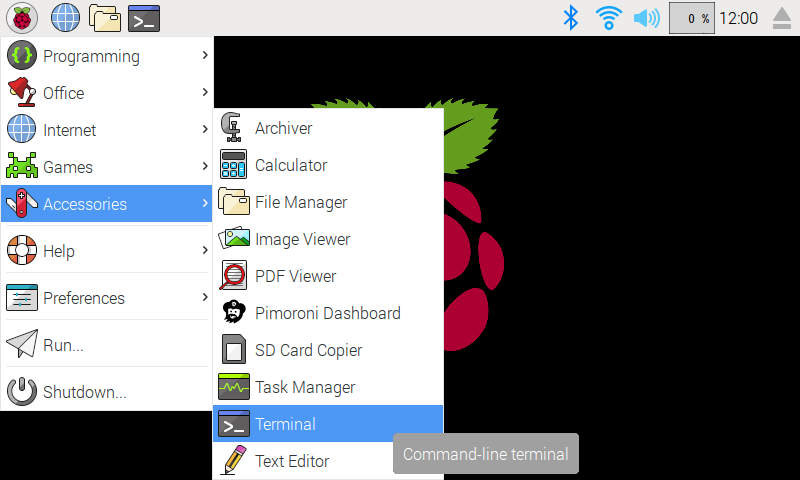
In the new terminal window type the command exactly as it appears below (check for typos) and follow the on-screen instructions:
```bash
curl https://get.pimoroni.com/mote | bash
```
Alternatively, on Raspbian, you can download the `pimoroni-dashboard` and install your product by browsing to the relevant entry:
```bash
sudo apt-get install pimoroni
```
(you will find the Dashboard under 'Accessories' too, in the Pi menu - or just run `pimoroni-dashboard` at the command line)
If you choose to download examples you'll find them in `/home/pi/Pimoroni/mote/`.
### Manual install:
#### Library install for Python 3:
```bash
sudo apt-get install python3-mote
```
#### Library install for Python 2:
```bash
sudo apt-get install python-mote
```
### Development:
If you want to contribute, or like living on the edge of your seat by having the latest code, you should clone this repository, `cd` to the library directory, and run:
```bash
sudo python3 setup.py install
```
(or `sudo python setup.py install` whichever your primary Python environment may be)
In all cases you will have to enable the i2c bus.
## Documentation & Support
* Guides and tutorials - https://learn.pimoroni.com/mote
* Function reference - http://docs.pimoroni.com/mote/
* Get help - http://forums.pimoroni.com/c/support
## Unofficial / Third-party libraries
* Rust library by Tiziano Santoro - https://github.com/tiziano88/mote-rs