https://github.com/pinguy/kokoro-tts-addon
https://github.com/pinguy/kokoro-tts-addon
Last synced: 5 months ago
JSON representation
- Host: GitHub
- URL: https://github.com/pinguy/kokoro-tts-addon
- Owner: pinguy
- License: apache-2.0
- Created: 2025-06-12T04:15:40.000Z (about 1 year ago)
- Default Branch: main
- Last Pushed: 2025-06-22T07:43:33.000Z (about 1 year ago)
- Last Synced: 2025-06-22T08:28:49.630Z (about 1 year ago)
- Language: JavaScript
- Size: 210 KB
- Stars: 28
- Watchers: 1
- Forks: 4
- Open Issues: 2
-
Metadata Files:
- Readme: README.md
- License: LICENSE
Awesome Lists containing this project
README
# Kokoro TTS Add-on
> 🧠 Local Neural Text-to-Speech for Firefox — fast, private, offline.
> **Tested on a Xeon E3-1265L v3 (2013)** — Ran multiple TTS jobs in parallel with barely perceptible lag.
> If it works on this, it'll fly on your machine.
---
## 🔍 What is This?
Kokoro TTS is a browser extension that lets you convert selected or pasted text into natural-sounding speech — without needing an internet connection.
It uses a lightweight Flask server and the Kokoro model running locally on your system.
- ✅ No accounts or logins
- ✅ No cloud APIs or telemetry
- ✅ No GPU required but helps a lot, if no usable GPU falls to using the CPU.
---
## 🚀 Features
- 🎙️ Neural TTS with multiple voice options
- 🔒 Offline-first & privacy-respecting
- 🧊 Lightweight: Small 82M parameters
- 🥔 Works on low-end CPUs
- 🌍 Linux, macOS, and Windows support
---
## ⚙️ Installation
### 1. Download from Releases
Head to the [Releases Page](https://github.com/pinguy/kokoro-tts-addon/releases) and grab:
- `latest kokoro-tts-addon.xpi`
- `server.py`
### 2. Install the Add-on in Firefox
- Go to `about:addons`
- Click the gear icon → `Install Add-on From File...`
- Select the `.xpi` you downloaded
### 3. Start the Local Server
#### macOS / Linux:
```bash
nohup python3 /path/to/server.py &
```
#### Windows:
Create a `.bat` file like this:
```bat
cd C:\path\to\server
start python server.py
```
Drop a shortcut to it in the Startup folder (`Win + R → shell:startup`).
To install espeak-ng on Windows:
1. Go to [espeak-ng releases](https://github.com/espeak-ng/espeak-ng/releases)
2. Click on **Latest release**
3. Download the appropriate `*.msi` file (e.g. **espeak-ng-20191129-b702b03-x64.msi**)
4. Run the downloaded installer
For advanced configuration and usage on Windows, see the [official espeak-ng Windows guide](https://github.com/espeak-ng/espeak-ng/blob/master/docs/guide.md)
---
## 🧪 How to Test
1. Visit `http://localhost:8000/health`
2. You should see a simple “healthy” JSON response
3. Use the extension: paste text, pick a voice, click “Generate Speech” 🎉
---
## 📌 Notes
- First-time run will download the model
- Make sure Python 3.8+ is installed and in PATH
- All processing is local — nothing leaves your machine
---
## 🧩 Dependencies
You’ll need Python 3.8+ and `pip` installed. Most systems already have them.
To install all required Python packages (including some optional extras for extended model usage), run:
```bash
python3 -m pip install --upgrade pip
pip install --upgrade pip setuptools
cat requirements.txt | xargs -n 1 pip3 install
pip3 install -U flask-cors
```
---
## 📄 License
Licensed under the [Apache License 2.0](LICENSE)
---
## ❤️ Credits
Powered by the Kokoro TTS model
---
| Feature | Preview |
| ---------------------------------------------------------------- | --------------------------------------------------------------------------------------- |
| **Popup UI**: Select text, and this pops up. | [](https://i.imgur.com/zXvETFV.png) |
| **Playback in Action**: After clicking "Generate Speech" | [](https://i.imgur.com/STeXJ78.png) |
| **System Notifications**: Get notified when playback starts | *(not pictured)* |
| **Settings Panel**: configuration options | [](https://i.imgur.com/wNOgrnZ.png) |
| **Voice List**: Browse the models available | [](https://i.imgur.com/3fTutUR.png) |
| **Accents Supported**: 🇺🇸 American English, 🇬🇧 British English, 🇪🇸 Spanish, 🇫🇷 French, 🇮🇹 Italian, 🇧🇷 Portuguese (BR), 🇮🇳 Hindi, 🇯🇵 Japanese, 🇨🇳 Mandarin Chines | [](https://i.imgur.com/lc7qgYN.png) |
---
# Video - Kokoro Text-to-Speech - Local on a Potato Vs Hugging Face
[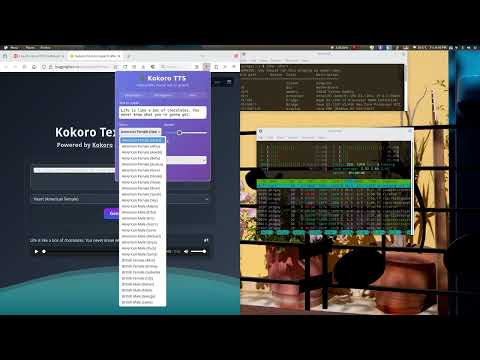](https://www.youtube.com/watch?v=6AVZFwWllgU)
*Comparison of offline using MKLDNN vs online generation using WASM/WebGPU.*
---