https://github.com/pipelex/pipelex
Declarative language for composable Al workflows. Devtool for agents and mere humans.
https://github.com/pipelex/pipelex
agents ai automation dsl language llm orchestration pipeline workflows
Last synced: 2 months ago
JSON representation
Declarative language for composable Al workflows. Devtool for agents and mere humans.
- Host: GitHub
- URL: https://github.com/pipelex/pipelex
- Owner: Pipelex
- License: mit
- Created: 2025-05-26T07:21:34.000Z (about 1 year ago)
- Default Branch: main
- Last Pushed: 2026-05-19T19:54:58.000Z (3 months ago)
- Last Synced: 2026-05-19T21:59:07.891Z (3 months ago)
- Topics: agents, ai, automation, dsl, language, llm, orchestration, pipeline, workflows
- Language: Python
- Homepage: https://pipelex.com
- Size: 67.7 MB
- Stars: 673
- Watchers: 10
- Forks: 50
- Open Issues: 15
-
Metadata Files:
- Readme: README.md
- Changelog: CHANGELOG.md
- Contributing: CONTRIBUTING.md
- License: LICENSE
- Code of conduct: CODE_OF_CONDUCT.md
- Agents: AGENTS.md
- Cla: CLA.md
Awesome Lists containing this project
- awesome-ChatGPT-repositories - pipelex - Pipelex: open-source language for AI Agents to create and run repeatable AI workflows (NLP)
README

Build & Run AI Methods
A method is a reusable, typed AI procedure — declared in a .mthds file and executed by Pipelex.
Each step is explicit, each output is structured, and every run is repeatable.


## What a Method Looks Like
```toml
[pipe.summarize_article]
type = "PipeLLM"
inputs = { article = "Text", audience = "Text" }
output = "Text"
prompt = "Summarize $article in three bullet points for $audience."
```
From here, Pipelex handles model routing across 60+ models, structured output parsing, and pipeline orchestration.
## Why Methods?
| | |
|---|---|
| **Declarative** — Human-readable `.mthds` files that work across models | **Typed** — Semantic types: AI understands what you mean, every input/output connects with purpose |
| **Repeatable** — Deterministic orchestration with controlled room for AI creativity | **Composable** — Chain pipes into sequences, nest methods inside methods, share with the community |
# Quick Start
## With Claude Code (Recommended)
Paste this into Claude Code:
```
Install mthds: run bash -c 'npm install -g mthds && mthds-agent bootstrap && claude plugin marketplace add mthds-ai/mthds-plugins && claude plugin install mthds@mthds-plugins'. Then tell me to /reload-plugins.
```
Build your first method:
```
/mthds-build A method to summarize articles with key takeaways for different audiences
```
Run it:
```
/mthds-run
```
## With Codex
Paste this into Codex:
```
Install mthds: run bash -c 'npm install -g mthds && mthds-agent bootstrap && mthds-agent codex install-hook && mthds-agent codex apply-config && codex plugin marketplace add mthds-ai/mthds-plugins'. Then tell me to restart Codex and run /plugins to install mthds.
```
Install the [VS Code extension](https://go.pipelex.com/vscode) for `.mthds` syntax highlighting and flowchart visualization.
## From the Terminal
```bash
npm install -g mthds
mthds-agent bootstrap
pipelex init
```
Install the [VS Code extension](https://go.pipelex.com/vscode) for `.mthds` syntax highlighting and flowchart visualization.
Verify everything is set up correctly:
```bash
pipelex doctor
```
## Standalone CLI
If you just need the Pipelex CLI without agent integration:
```bash
uv tool install pipelex
pipelex init
```
## Configure AI Access
- **Pipelex Gateway (Recommended)** — Free credits, single API key for LLMs, OCR / document extraction, and image generation across all major providers. [Get your key](https://app.pipelex.com/), add `PIPELEX_GATEWAY_API_KEY=your-key-here` to `~/.pipelex/.env`, run `pipelex init`.
- **Bring Your Own Keys** — Use existing API keys from OpenAI, Anthropic, Google, Mistral, etc. See [Configure AI Providers](https://docs.pipelex.com/latest/setup/configure-ai-providers/).
- **Local AI** — Ollama, vLLM, LM Studio, or llama.cpp — no API keys required. See [Configure AI Providers](https://docs.pipelex.com/latest/setup/configure-ai-providers/).
# Real-World Example: CV Batch Screening
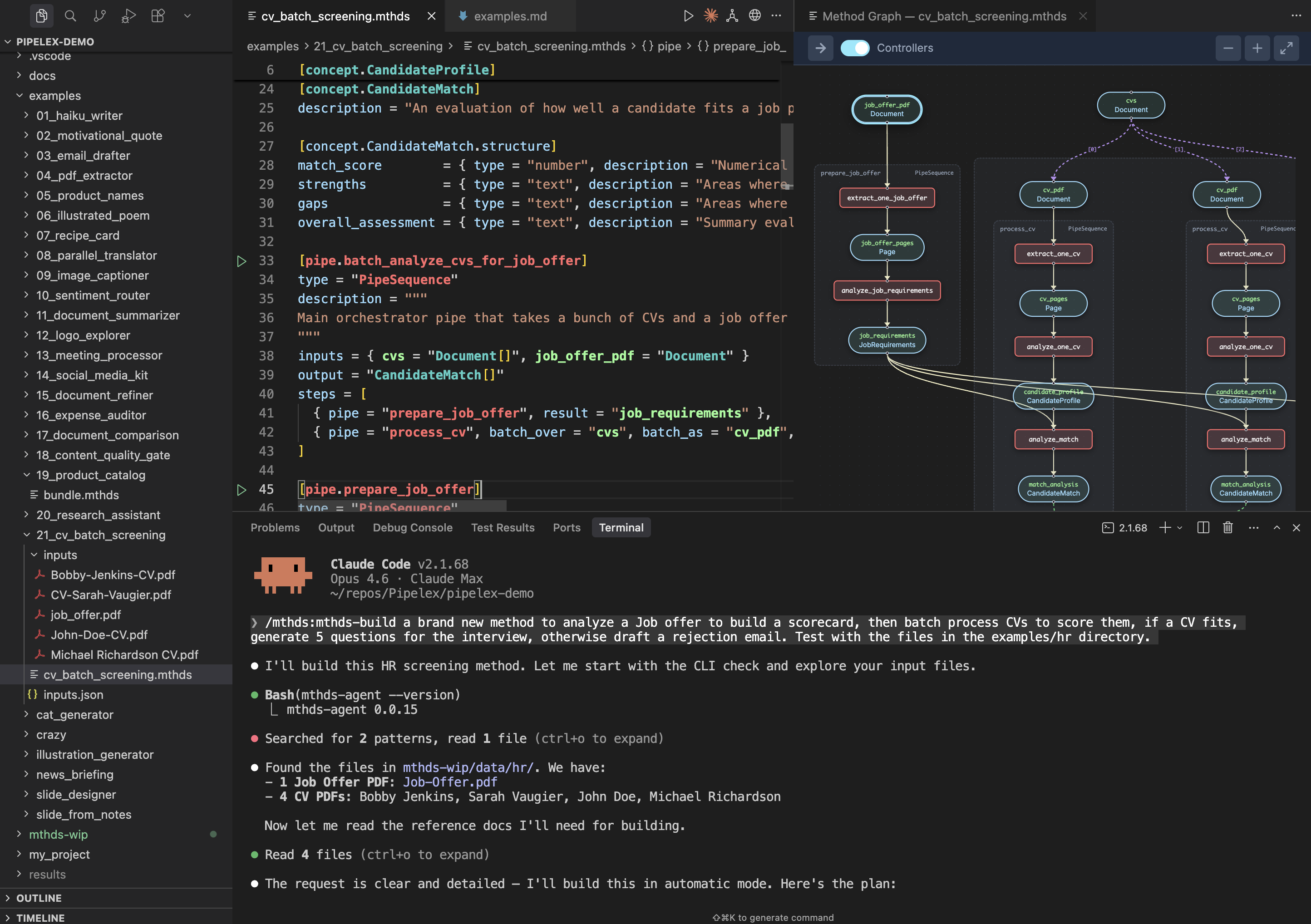
A production method that takes a stack of CVs and a job offer PDF, extracts and analyzes each, then scores how well each candidate matches the role.
**cv_batch_screening.mthds**
```toml
[pipe.batch_analyze_cvs_for_job_offer]
type = "PipeSequence"
description = """
Main orchestrator pipe that takes a bunch of CVs and a job offer in PDF format, and analyzes how they match.
"""
inputs = { cvs = "Document[]", job_offer_pdf = "Document" }
output = "CandidateMatch[]"
steps = [
{ pipe = "prepare_job_offer", result = "job_requirements" },
{ pipe = "process_cv", batch_over = "cvs", batch_as = "cv_pdf", result = "match_analyses" },
]
```
View concepts, supporting pipes, flowchart, and run commands
**Concepts:**
```toml
[concept.CandidateProfile]
description = "A structured summary of a job candidate's professional background extracted from their CV."
[concept.CandidateProfile.structure]
skills = { type = "text", description = "Technical and soft skills possessed by the candidate", required = true }
experience = { type = "text", description = "Work history and professional experience", required = true }
education = { type = "text", description = "Educational background and qualifications", required = true }
achievements = { type = "text", description = "Notable accomplishments and certifications" }
[concept.JobRequirements]
description = "A structured summary of what a job position requires from candidates."
[concept.JobRequirements.structure]
required_skills = { type = "text", description = "Skills that are mandatory for the position", required = true }
responsibilities = { type = "text", description = "Main duties and tasks of the role", required = true }
qualifications = { type = "text", description = "Required education, certifications, or experience levels", required = true }
nice_to_haves = { type = "text", description = "Preferred but not mandatory qualifications" }
[concept.CandidateMatch]
description = "An evaluation of how well a candidate fits a job position."
[concept.CandidateMatch.structure]
match_score = { type = "number", description = "Numerical score representing overall fit percentage between 0 and 100", required = true }
strengths = { type = "text", description = "Areas where the candidate meets or exceeds requirements", required = true }
gaps = { type = "text", description = "Areas where the candidate falls short of requirements", required = true }
overall_assessment = { type = "text", description = "Summary evaluation of the candidate's suitability", required = true }
```
Click to view the supporting pipes implementation
```toml
[pipe.prepare_job_offer]
type = "PipeSequence"
description = """
Extracts and analyzes the job offer PDF to produce structured job requirements.
"""
inputs = { job_offer_pdf = "Document" }
output = "JobRequirements"
steps = [
{ pipe = "extract_one_job_offer", result = "job_offer_pages" },
{ pipe = "analyze_job_requirements", result = "job_requirements" },
]
[pipe.extract_one_job_offer]
type = "PipeExtract"
description = "Extracts text content from the job offer PDF document"
inputs = { job_offer_pdf = "Document" }
output = "Page[]"
model = "@default-text-from-pdf"
[pipe.analyze_job_requirements]
type = "PipeLLM"
description = """
Parses and summarizes the job requirements from the extracted job offer content, identifying required skills, responsibilities, qualifications, and nice-to-haves
"""
inputs = { job_offer_pages = "Page" }
output = "JobRequirements"
model = "$writing-factual"
system_prompt = """
You are an expert HR analyst specializing in parsing job descriptions. Your task is to extract and summarize job requirements into a structured format.
"""
prompt = """
Analyze the following job offer content and extract the key requirements for the position.
@job_offer_pages
"""
[pipe.process_cv]
type = "PipeSequence"
description = "Processes one application"
inputs = { cv_pdf = "Document", job_requirements = "JobRequirements" }
output = "CandidateMatch"
steps = [
{ pipe = "extract_one_cv", result = "cv_pages" },
{ pipe = "analyze_one_cv", result = "candidate_profile" },
{ pipe = "analyze_match", result = "match_analysis" },
]
[pipe.extract_one_cv]
type = "PipeExtract"
description = "Extracts text content from the CV PDF document"
inputs = { cv_pdf = "Document" }
output = "Page[]"
model = "@default-text-from-pdf"
[pipe.analyze_one_cv]
type = "PipeLLM"
description = """
Parses and summarizes the candidate's professional profile from the extracted CV content, identifying skills, experience, education, and achievements
"""
inputs = { cv_pages = "Page" }
output = "CandidateProfile"
model = "$writing-factual"
system_prompt = """
You are an expert HR analyst specializing in parsing and summarizing candidate CVs. Your task is to extract and structure the candidate's professional profile into a structured format.
"""
prompt = """
Analyze the following CV content and extract the candidate's professional profile.
@cv_pages
"""
[pipe.analyze_match]
type = "PipeLLM"
description = """
Evaluates how well the candidate matches the job requirements, calculating a match score and identifying strengths and gaps
"""
inputs = { candidate_profile = "CandidateProfile", job_requirements = "JobRequirements" }
output = "CandidateMatch"
model = "$writing-factual"
system_prompt = """
You are an expert HR analyst specializing in candidate-job fit evaluation. Your task is to produce a structured match analysis comparing a candidate's profile against job requirements.
"""
prompt = """
Analyze how well the candidate matches the job requirements. Evaluate their fit by comparing their skills, experience, and qualifications against what the position demands.
@candidate_profile
@job_requirements
Provide a comprehensive match analysis including a numerical score, identified strengths, gaps, and an overall assessment.
"""
```
View the pipeline flowchart
```mermaid
flowchart LR
%% Pipe and stuff nodes within controller subgraphs
subgraph sg_n_8b2136e3fe["batch_analyze_cvs_for_job_offer"]
subgraph sg_n_91d5d6dc7c["prepare_job_offer"]
n_fde22777cb["analyze_job_requirements"]
s_f9f703fbb4(["job_requirements
JobRequirements"]):::stuff
n_b8469c838f["extract_one_job_offer"]
s_d998350046(["job_offer_pages
Page"]):::stuff
end
subgraph sg_n_f8d5afb7cd["process_cv_batch"]
subgraph sg_n_6e53e16369["process_cv"]
n_c18aded200["analyze_match"]
s_5c911f7e54(["match_analysis
CandidateMatch"]):::stuff
n_a7ed00ac24["analyze_one_cv"]
s_c5ae714e89(["candidate_profile
CandidateProfile"]):::stuff
n_d24f39aa60["extract_one_cv"]
s_427beb5195(["cv_pdf
Document"]):::stuff
s_f1f80289df(["cv_pages
Page"]):::stuff
end
subgraph sg_n_2cfb7a32c8["process_cv"]
n_f6a25d1769["analyze_match"]
s_ea99eee6ed(["match_analysis
CandidateMatch"]):::stuff
n_f48b73fbee["analyze_one_cv"]
s_e1ffee913e(["candidate_profile
CandidateProfile"]):::stuff
n_d16f2fe381["extract_one_cv"]
s_041bb18fb4(["cv_pdf
Document"]):::stuff
s_5fbba7194a(["cv_pages
Page"]):::stuff
end
subgraph sg_n_08a7186be9["process_cv"]
n_937e750ea4["analyze_match"]
s_bb41a103f0(["match_analysis
CandidateMatch"]):::stuff
n_786a2969d5["analyze_one_cv"]
s_c47fe821d7(["candidate_profile
CandidateProfile"]):::stuff
n_38f0cfd11c["extract_one_cv"]
s_2634ece93d(["cv_pdf
Document"]):::stuff
s_44e253b325(["cv_pages
Page"]):::stuff
end
end
end
%% Pipeline input stuff nodes (no producer)
s_9b7e74ac51(["job_offer_pdf
Document"]):::stuff
%% Data flow edges: producer -> stuff -> consumer
n_a7ed00ac24 --> s_c5ae714e89
n_b8469c838f --> s_d998350046
n_f48b73fbee --> s_e1ffee913e
n_d16f2fe381 --> s_5fbba7194a
n_fde22777cb --> s_f9f703fbb4
n_d24f39aa60 --> s_f1f80289df
n_38f0cfd11c --> s_44e253b325
n_786a2969d5 --> s_c47fe821d7
n_c18aded200 --> s_5c911f7e54
n_f6a25d1769 --> s_ea99eee6ed
n_937e750ea4 --> s_bb41a103f0
s_c5ae714e89 --> n_c18aded200
s_9b7e74ac51 --> n_b8469c838f
s_d998350046 --> n_fde22777cb
s_e1ffee913e --> n_f6a25d1769
s_427beb5195 --> n_d24f39aa60
s_041bb18fb4 --> n_d16f2fe381
s_2634ece93d --> n_38f0cfd11c
s_5fbba7194a --> n_f48b73fbee
s_f9f703fbb4 --> n_c18aded200
s_f9f703fbb4 --> n_f6a25d1769
s_f9f703fbb4 --> n_937e750ea4
s_f1f80289df --> n_a7ed00ac24
s_44e253b325 --> n_786a2969d5
s_c47fe821d7 --> n_937e750ea4
%% Batch edges: list-item relationships
s_52d84618d0(["match_analyses
CandidateMatch"]):::stuff
s_5c911f7e54 -."[0]".-> s_52d84618d0
s_ea99eee6ed -."[1]".-> s_52d84618d0
s_bb41a103f0 -."[2]".-> s_52d84618d0
%% Style definitions
classDef failed fill:#ffcccc,stroke:#cc0000
classDef stuff fill:#fff3e6,stroke:#cc6600,stroke-width:2px
classDef controller fill:#e6f3ff,stroke:#0066cc
%% Subgraph depth-based coloring
style sg_n_08a7186be9 fill:#fffde6
style sg_n_2cfb7a32c8 fill:#fffde6
style sg_n_6e53e16369 fill:#fffde6
style sg_n_8b2136e3fe fill:#e6f3ff
style sg_n_91d5d6dc7c fill:#e6ffe6
style sg_n_f8d5afb7cd fill:#e6ffe6
```
### Run Your Method
**Via CLI:**
```bash
pipelex run bundle cv_batch_screening.mthds --inputs inputs.json
```
Create an `inputs.json` file with your PDF URLs:
```json
{
"cvs": {
"concept": "native.Document",
"content": [
{ "url": "https://pipelex-web.s3.amazonaws.com/demo/John-Doe-CV.pdf" },
{ "path": "inputs/Jane-Smith-CV.pdf" }
]
},
"job_offer_pdf": {
"concept": "native.Document",
"content": {
"url": "https://pipelex-web.s3.amazonaws.com/demo/Job-Offer.pdf"
}
}
}
```
**Via Python:**
```python
import asyncio
from pipelex.core.stuffs.document_content import DocumentContent
from pipelex.pipelex import Pipelex
from pipelex.pipeline.runner import PipelexRunner
# Generated by: `pipelex build structures bundle cv_batch_screening.mthds`
from structures.cv_batch_screening__candidate_match import CandidateMatch
async def run_pipeline() -> list[CandidateMatch]:
runner = PipelexRunner()
response = await runner.execute_pipeline(
pipe_code="batch_analyze_cvs_for_job_offer",
inputs={
"cvs": {
"concept": "Document",
"content": [
DocumentContent(url="https://pipelex-web.s3.amazonaws.com/demo/John-Doe-CV.pdf"),
DocumentContent(path="inputs/Jane-Smith-CV.pdf"),
],
},
"job_offer_pdf": {
"concept": "native.Document",
"content": DocumentContent(url="https://pipelex-web.s3.amazonaws.com/demo/Job-Offer.pdf"),
},
},
)
pipe_output = response.pipe_output
print(pipe_output)
return pipe_output.main_stuff_as_items(item_type=CandidateMatch)
Pipelex.make()
asyncio.run(run_pipeline())
```
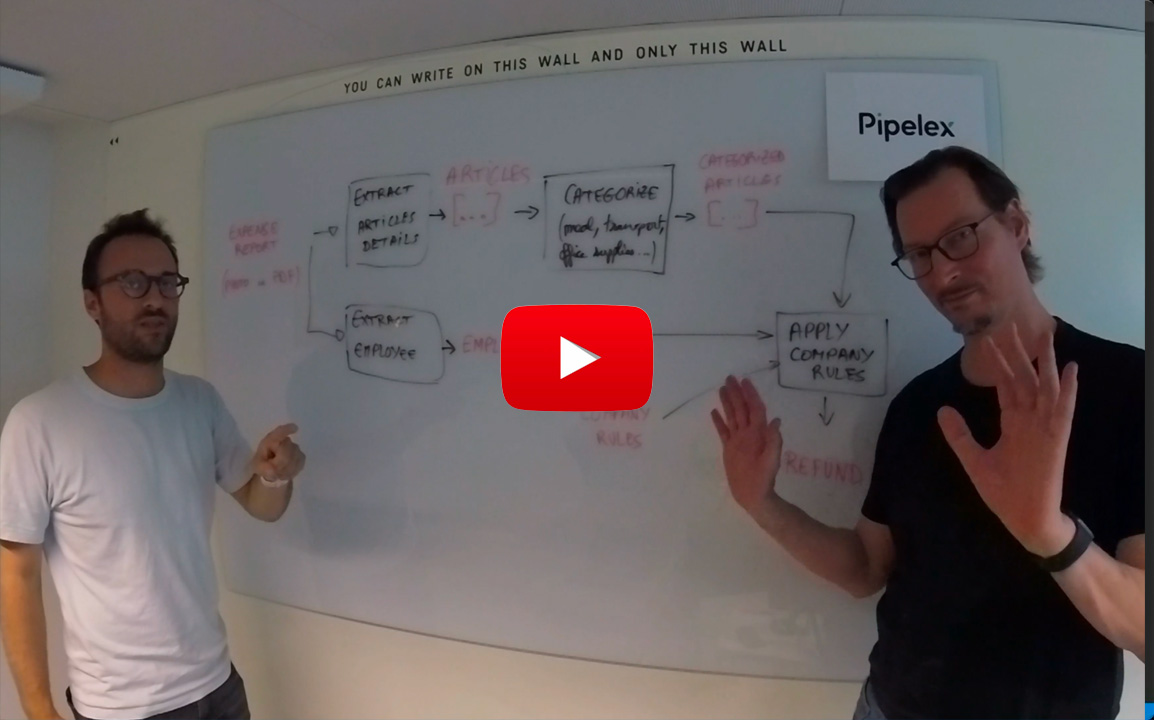
## See Pipelex in Action
**Claude Code builds your AI Method**
## IDE Extension
We **highly** recommend installing our extension for `.mthds` syntax highlighting in your IDE:
- **VS Code**: Install from the [VS Code Marketplace](https://marketplace.visualstudio.com/items?itemName=pipelex.pipelex)
- **Cursor, Windsurf, and other VS Code forks**: Install from the [Open VSX Registry](https://open-vsx.org/extension/Pipelex/pipelex), or search for "Pipelex" directly in your extensions tab
Running `pipelex init` will also offer to install the extension automatically if it detects your IDE.
## Run Anywhere
The same `.mthds` file runs from multiple execution targets:
| Target | How |
|--------|-----|
| **CLI** | `pipelex run bundle method.mthds --inputs inputs.json` |
| **Python** | `PipelexRunner().execute_pipeline(...)` |
| **TypeScript / Node** | [`mthds`](https://www.npmjs.com/package/mthds) SDK calling a Pipelex API server |
| **REST API** | Self-hosted API server |
| **MCP** | Model Context Protocol — agents call methods as tools |
| **n8n** | Pipelex node for workflow automation |
## Use Pipelex from TypeScript
For Node, Next.js, or any TypeScript app, call a Pipelex API server via the [`mthds`](https://www.npmjs.com/package/mthds) npm SDK (source: [`mthds-js`](https://github.com/mthds-ai/mthds-js)). Self-host the open-source [`pipelex-api`](https://github.com/Pipelex/pipelex-api) and point the SDK at your instance. A Pipelex-hosted runner at `api.pipelex.com` is also available in private beta — [join the waitlist](https://go.pipelex.com/waitlist).
```bash
npm install mthds
```
Fastest way to get started: fork the [`pipelex-starter-js`](https://github.com/Pipelex/pipelex-starter-js) template — a Next.js 16 + TypeScript app with three working demos (text entity extraction, PDF summary, image generation). Click *Use this template* on GitHub.
# The MTHDS Ecosystem
| | Description | Link |
|---|---|---|
| **MTHDS Standard** | The open standard specification — language, package system, and typed concepts | [mthds.ai](https://mthds.ai/latest/) |
| **MTHDS Hub** | Discover and share methods — browse packages, search by signature | [mthds.sh](https://mthds.sh) |
| **MTHDS Plugins** | Claude Code plugin — commands to build, run, edit, check, fix, and publish methods | [github.com/mthds-ai/mthds-plugins](https://github.com/mthds-ai/mthds-plugins) |
| **Package System** | Versioned dependencies, lock files with SHA-256 integrity, cross-package references via `->` | [Packages docs](https://mthds.ai/latest/packages/structure/) |
| **Know-How Graph** | Typed discovery — "I have X, I need Y" — find methods or chains by typed signature | [Know-How Graph](https://mthds.ai/latest/know-how-graph/) |
View MTHDS skills
| Command | Description |
|---------|-------------|
| `/mthds-build` | Build new AI method bundles from scratch |
| `/mthds-run` | Execute methods and interpret their JSON output |
| `/mthds-edit` | Modify existing methods — change pipes, update prompts, add steps |
| `/mthds-check` | Validate bundles for issues (read-only) |
| `/mthds-fix` | Auto-fix validation errors |
| `/mthds-explain` | Walk through execution flow in plain language |
| `/mthds-inputs` | Prepare inputs: templates, synthetic data, user files |
| `/mthds-install` | Install method packages from GitHub or local dirs |
| `/mthds-pkg` | Package management — init, deps, lock, install, update |
| `/mthds-publish` | Publish methods to the hub |
| `/mthds-share` | Share methods on social media |
## Examples & Cookbook
Explore real-world examples in our **Cookbook** repository:
[](https://github.com/Pipelex/pipelex-cookbook/tree/main)
Clone it, fork it, and experiment with production-ready methods for various use cases.
## Optional Features
The package supports the following additional features:
- `anthropic`: Anthropic/Claude support for text generation
- `google`: Google models (Vertex) support for text generation
- `mistralai`: Mistral AI support for text generation and OCR
- `bedrock`: Amazon Bedrock support for text generation
- `fal`: Image generation with Black Forest Labs "FAL" service
- `linkup`: Web search with Linkup
- `docling`: OCR with Docling
Install all extras:
```bash
uv pip install "pipelex[anthropic,google,google-genai,mistralai,bedrock,fal,linkup,docling]"
```
---
**Privacy & Telemetry** — Pipelex Gateway collects only technical data (model names, token counts, latency) — never prompts or business data. If you want to avoid Gateway telemetry, disable `pipelex_gateway` and use your own provider keys or local AI instead. [Learn more](https://docs.pipelex.com/latest/setup/telemetry/)
**Contributing** — We welcome contributions! See our [Contributing Guidelines](CONTRIBUTING.md).
**Community** — [](https://go.pipelex.com/discord) [GitHub Issues](https://github.com/Pipelex/pipelex/issues) · [Discussions](https://github.com/Pipelex/pipelex/discussions) · [Documentation](https://docs.pipelex.com/)
## License
This project is licensed under the [MIT license](LICENSE). Runtime dependencies are distributed under their own licenses via PyPI.
---
"Pipelex" is a trademark of Evotis S.A.S.
© 2025-2026 Evotis S.A.S.