https://github.com/piperliu/easy-cipher-content
https://github.com/piperliu/easy-cipher-content
Last synced: over 1 year ago
JSON representation
- Host: GitHub
- URL: https://github.com/piperliu/easy-cipher-content
- Owner: PiperLiu
- License: mit
- Created: 2025-02-17T14:45:03.000Z (over 1 year ago)
- Default Branch: main
- Last Pushed: 2025-03-06T15:25:25.000Z (over 1 year ago)
- Last Synced: 2025-03-06T16:29:02.231Z (over 1 year ago)
- Language: TypeScript
- Size: 2.3 MB
- Stars: 0
- Watchers: 1
- Forks: 0
- Open Issues: 0
-
Metadata Files:
- Readme: README.md
- Changelog: CHANGELOG.md
- License: LICENSE
Awesome Lists containing this project
README
# Easy Cipher Content
A powerful VS Code extension for securing both text and binary files with industry-standard encryption algorithms. Easily protect your sensitive data while maintaining a seamless workflow in your development environment.
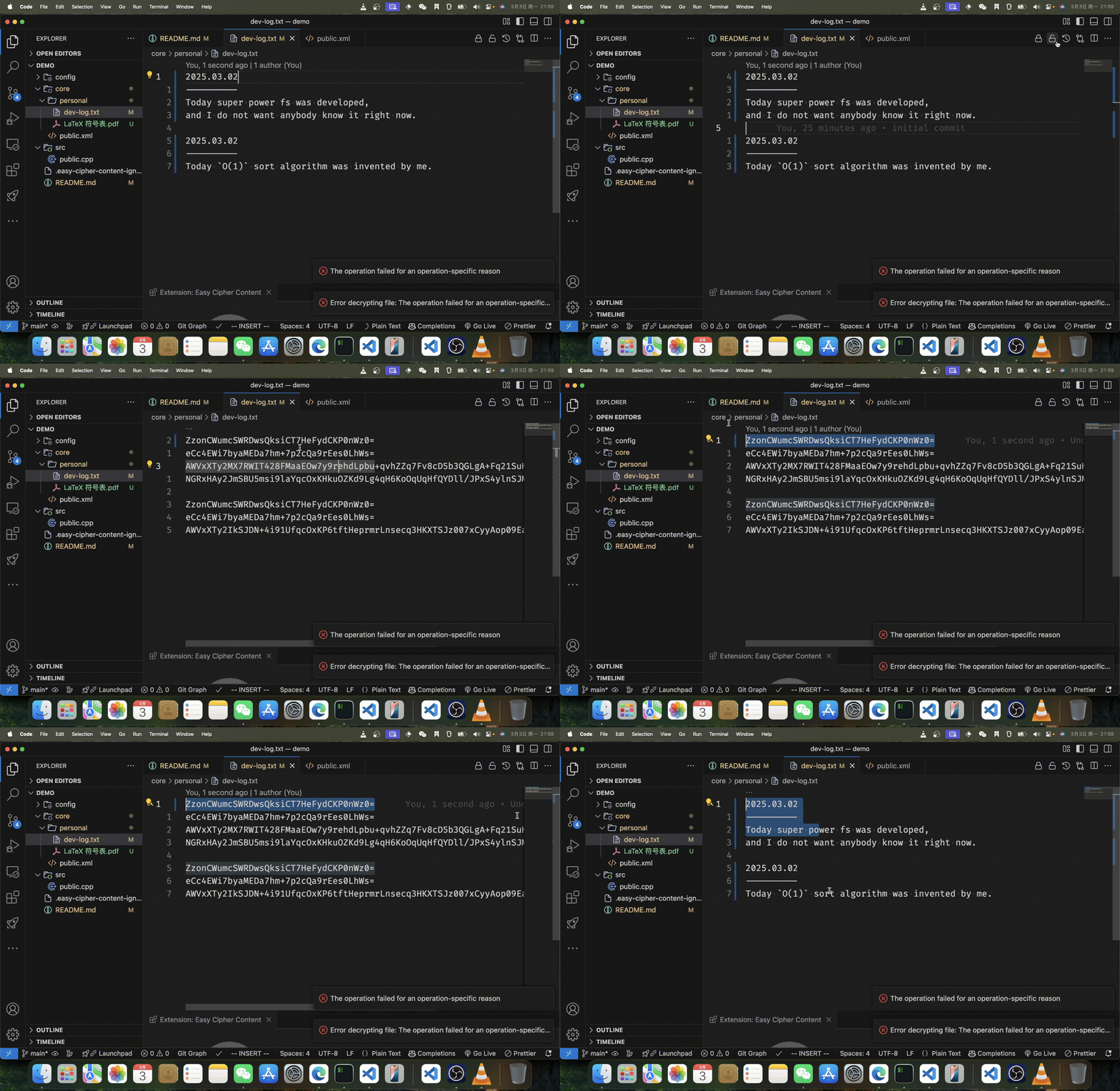
## Features
- 🔒 **Encrypt** and 🔓 **Decrypt** content with a single click
- 🔄 Support for both text files (line-by-line encryption) and binary files (complete file encryption)
- 🗄️ Batch operations for entire workspaces or specific directories
- 📂 Smart path suggestions and file browser integration
- 🚫 Configurable ignore patterns for excluding files from batch operations
- 🔐 Enterprise-grade encryption algorithms: AES-GCM and ChaCha20-Poly1305
- 🛠️ Flexible key management via environment variables or JSON configuration
## Getting Started
### Installation
1. Open VS Code
2. Go to Extensions (Ctrl+Shift+X / Cmd+Shift+X)
3. Search for "Easy Cipher Content"
4. Click Install
### Setup
Configure your encryption keys using one of these methods:
**Environment Variables** (Recommended for security)
```
# For AES-GCM
export VSCODE_EXT_ECC_AESGCM_PASSWORD="your-secure-password"
export VSCODE_EXT_ECC_AESGCM_SALT="your-salt-value"
export VSCODE_EXT_ECC_AESGCM_IV="your-initialization-vector"
# For ChaCha20-Poly1305
export VSCODE_EXT_ECC_CHACHA20POLY1305_PASSWORD="your-secure-password"
export VSCODE_EXT_ECC_CHACHA20POLY1305_SALT="your-salt-value"
export VSCODE_EXT_ECC_CHACHA20POLY1305_NONCE="your-nonce-value"
```
**JSON Configuration**
Create a JSON file with your encryption keys and set the path in the extension settings.
## Usage
### Single File Operations
1. Open a file in the editor
2. Click the 🔒 **Encrypt** or 🔓 **Decrypt** button in the editor title bar
3. For text files, content is encrypted line-by-line, preserving the file structure
4. For binary files, a new encrypted file is created with the `.enc` extension
### Workspace Operations
Encrypt or decrypt multiple files in your workspace:
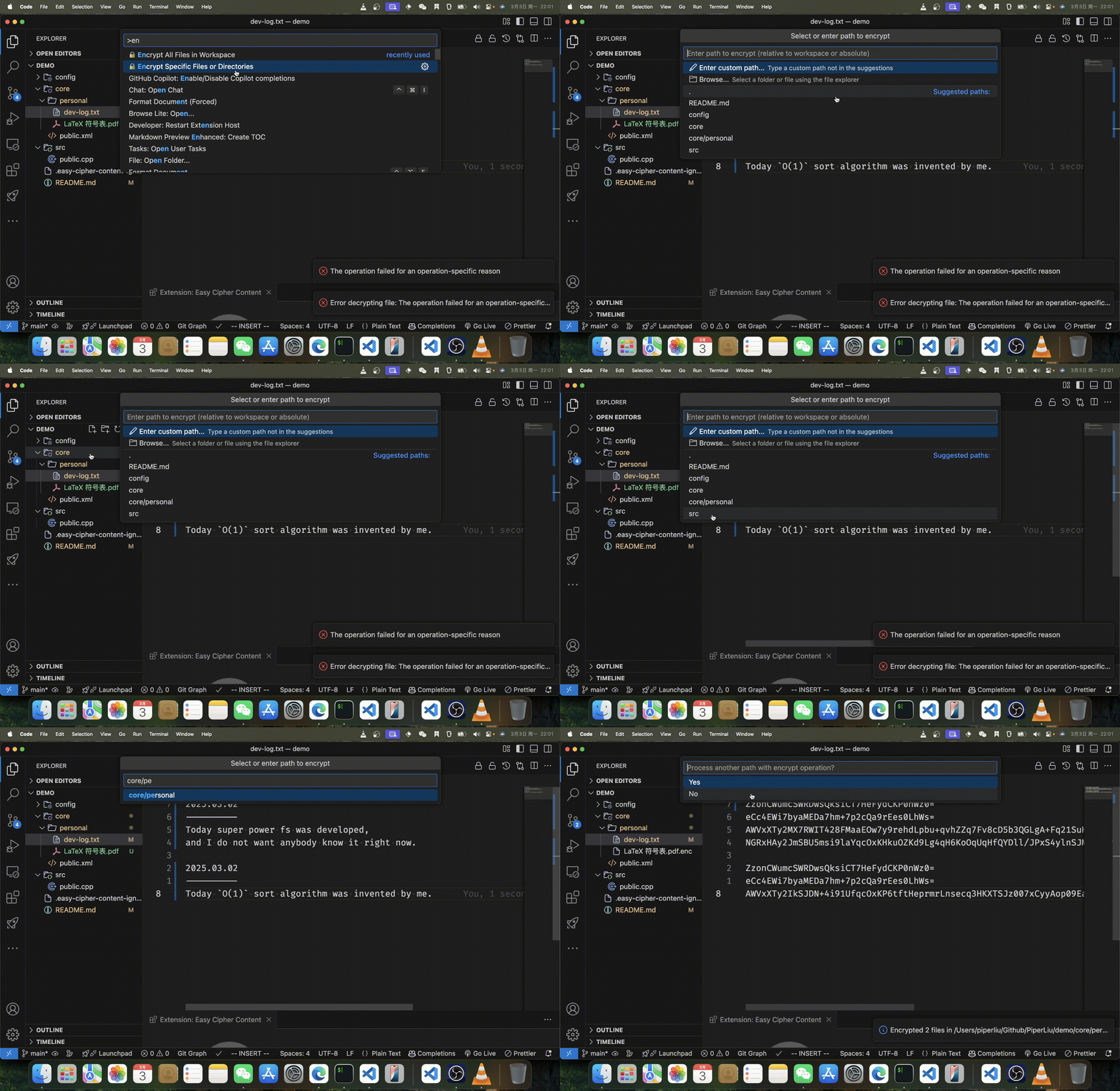
1. Open the Command Palette (`Ctrl+Shift+P` / `Cmd+Shift+P`)
2. Type and select one of the following:
- `Easy Cipher Content: 🔒 Encrypt All Files in Workspace`
- `Easy Cipher Content: 🔓 Decrypt All Files in Workspace`
- `Easy Cipher Content: 🔒 Encrypt Specific Files or Directories`
- `Easy Cipher Content: 🔓 Decrypt Specific Files or Directories`
### Path Selection
When choosing specific files or directories to process, you have three convenient options:
1. **Quick Selection**: Choose from smart suggestions of common directories and files
2. **Custom Path**: Enter a custom path relative to your workspace or an absolute path
3. **File Browser**: Use the integrated file picker to visually select files or folders
### Ignoring Files and Directories
Create a `.easy-cipher-content-ignore` file in your workspace root with patterns similar to `.gitignore`:
```
# Example ignore patterns
node_modules/
*.log
.git/
dist/
```
## Extension Settings
This extension provides the following settings:
* `easy-cipher-content.algorithm`: Choose encryption algorithm ("aes-gcm" or "chacha20-poly1305")
* `easy-cipher-content.use_env`: Whether to use environment variables for encryption keys
* `easy-cipher-content.json_path`: Path to JSON file containing encryption keys (if not using env vars)
* `easy-cipher-content.textFileExtensions`: Array of file extensions to be treated as text files
* `easy-cipher-content.ignoreFile`: Name of the file containing ignore patterns
* `easy-cipher-content.deleteOriginalAfterEncryption`: Whether to delete original files after encryption
## Security Best Practices
- **Never commit** encryption keys or encrypted sensitive data to public repositories
- Use **environment variables** rather than JSON files for key management when possible
- Set up a secure method for sharing encryption keys with team members
- Consider using different keys for different projects or types of sensitive data
## Technical Details
### Text File Encryption
Text files are processed line by line, with each non-empty line encrypted individually. This approach:
- Preserves file structure and line breaks
- Makes diff tools still useful for encrypted files
- Allows partial decryption if only certain lines need to be accessible
### Binary File Encryption
Binary files are encrypted as complete units, resulting in a new file with the `.enc` extension.
## Known Issues
- Very large binary files may cause performance issues during encryption/decryption
- Some special encodings might not be preserved perfectly in text mode encryption
- The extension cannot automatically detect binary vs text files outside the configured extensions
## Troubleshooting
**Issue**: Decryption fails with "Invalid password" error
**Solution**: Verify that you're using the same encryption key that was used for encryption
**Issue**: Binary files are being treated as text files
**Solution**: Add the file extension to the `textFileExtensions` setting if it should be treated as text, or remove it if it should be treated as binary
## Contributing
Contributions are welcome! Please feel free to submit a Pull Request.
1. Fork the repository
2. Create your feature branch (`git checkout -b feature/amazing-feature`)
3. Commit your changes (`git commit -m 'Add some amazing feature'`)
4. Push to the branch (`git push origin feature/amazing-feature`)
5. Open a Pull Request
## License
Distributed under the MIT License. See `LICENSE` for more information.
## Acknowledgments
- Built with [easy-cipher-mate](https://github.com/PiperLiu/easy-cipher-mate) encryption library
- Inspired by the need for simple but secure content protection in VS Code
---
**Privacy Notice**: This extension performs all encryption and decryption locally on your machine. Your encryption keys and content are never transmitted to any server.