https://github.com/pisugar/pisugar-power-manager
Management program for PiSugar 2
https://github.com/pisugar/pisugar-power-manager
Last synced: about 1 year ago
JSON representation
Management program for PiSugar 2
- Host: GitHub
- URL: https://github.com/pisugar/pisugar-power-manager
- Owner: PiSugar
- License: gpl-3.0
- Created: 2019-07-12T09:22:38.000Z (almost 7 years ago)
- Default Branch: master
- Last Pushed: 2022-02-10T18:56:47.000Z (over 4 years ago)
- Last Synced: 2025-04-05T18:58:44.464Z (about 1 year ago)
- Language: Python
- Homepage:
- Size: 1.76 MB
- Stars: 12
- Watchers: 3
- Forks: 5
- Open Issues: 4
-
Metadata Files:
- Readme: README.md
- License: LICENSE
Awesome Lists containing this project
README
# pisugar-power-manager

### Management program for PiSugar 2
#### Note: python version will be deprecated, we had migranted to rust.
#### https://github.com/PiSugar/pisugar-power-manager-rs
Install
```
# before installation
# turn on the i2c interface on raspbian.
# make sure there's no other phat using address 0x32 or 0x75
# make sure your python version is 3.6
# check if device 0x32 and 0x75 work.
# If you can't find them or find some meaningless random code, please reattach the battery module and try again.
i2cdetect -y 1
i2cdump -y 1 0x32
i2cdump -y 1 0x75
# install
apt-get update
apt-get install python3-pyqt5 pyqt5-dev-tools
pip3 install smbus2 websockets
```
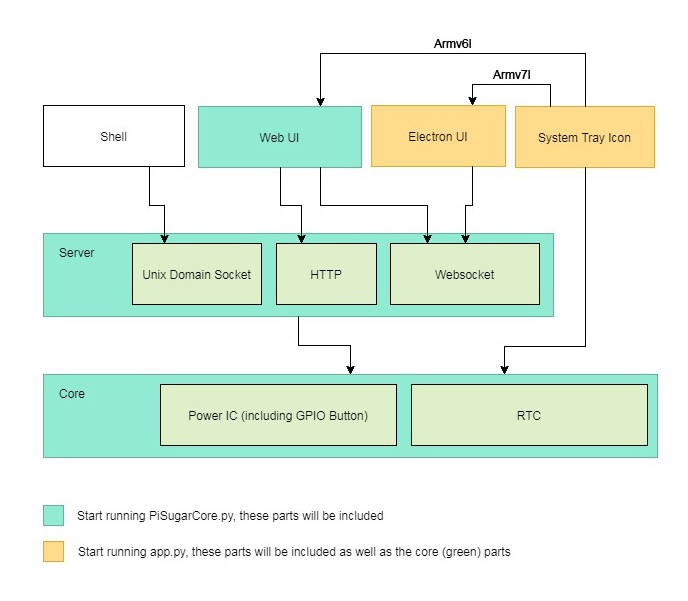
Start the core with Web UI:
```
$ python3 core/PiSugarCore.py
# core program will host an http server at port 8000
# please visit http://:8000
# core program will also create a unix domain socket file: /tmp/pisugar.sock
# use following commands to get / set data from the battery
# get model (pisugar model)
# get battery (battery level percent)
# get battery_v (lithium battery votage)
# get battery_i (lithium battery current)
# get battery_charging (charging status)
# get rtc_time (rtc time string)
# get rtc_time_list (rtc time in python list)
# get rtc_alarm_flag (rtc alarm flag)
# get safe_shutdown_level
# get alarm type (1: daily alarm, 0: off)
# get alarm time (alarm timestamp)
# get alarm type (alarm week repeat)
# get button enable (type: single/double/long)
# get button shell (type: single/double/long)
# rtc_clean_flag (clean alarm flag)
# rtc_pi2rtc (sync time from Pi to rtc)
# rtc_alarm_set (set auto wake up alarm)
# rtc_alarm_disable (disable wake up alarm)
# rtc_test_wake (test wake in 1min30sec)
# set_button_enable (argv1: single/double/long argv2: 1/0)
# set_button_shell (argv1: single/double/long argv2: shell script to execute)
# set_safe_shutdown_level (e.g. -1 / 3 / 5)
# e.g. get battery level precentage
$ echo get battery | nc -U /tmp/pisugar.sock
63.15938281249997
# e.g. set auto wake up alarm on 15:39:00 repeat on Sun, Mon, Tue, Wed, Sat
$ echo rtc_alarm_set 0,39,15,0,0,0,0 0b1001111 | nc -U /tmp/pisugar.sock
Done.
```
Start with Destop UI (not finished yet):
```
$ export DISPLAY=:0
$ python3 app.py
```
#### Architecture diagram