https://github.com/piwigo/piwigo-editorplus
EditorPlus is a plugin for Piwigo. This plugin add a WYSIWYG editor to a set of defined textareas.
https://github.com/piwigo/piwigo-editorplus
Last synced: about 1 year ago
JSON representation
EditorPlus is a plugin for Piwigo. This plugin add a WYSIWYG editor to a set of defined textareas.
- Host: GitHub
- URL: https://github.com/piwigo/piwigo-editorplus
- Owner: Piwigo
- Created: 2023-12-27T11:42:10.000Z (over 2 years ago)
- Default Branch: main
- Last Pushed: 2025-01-11T15:36:52.000Z (over 1 year ago)
- Last Synced: 2025-01-11T16:35:21.795Z (over 1 year ago)
- Language: PHP
- Homepage:
- Size: 6.12 MB
- Stars: 0
- Watchers: 3
- Forks: 2
- Open Issues: 2
-
Metadata Files:
- Readme: README.md
Awesome Lists containing this project
README
# EditorPlus
EditorPlus is a plugin for Piwigo. This plugin add a WYSIWYG editor to a set of defined textareas.
  
## Summary
- [Installation](#installation)
- [For Users](#for-users)
- [For Developers](#for-developers)
- [Features](#features)
- [How It Works](#how-it-works)
- [License](#license)
## Installation
### For Users
1. **Download the Latest Release**:
- Go to the [Releases page](https://piwigo.org/ext/index.php?eid=972) of the EditorPlus official page.
- Download the latest release's ZIP file.
2. **Installation**:
- Unzip the downloaded file.
- Upload the extracted folder to your Piwigo gallery's `plugins` directory. The path should look like `your-gallery/plugins/EditorPlus`.
3. **Activate the Plugin**:
- Log in to your Piwigo dashboard.
- Go to the `Plugins` section.
- Find `EditorPlus` in the list and activate it.
### For Developers
1. **Clone the Repository**:
- Clone the EditorPlus repository to your local machine using:
```git clone https://github.com/Piwigo/piwigo-editorplus.git```
2. **Install Dependencies**:
- Navigate to the cloned directory and run:
```npm install```
3. **Development and Contributions**:
- Make your changes or improvements to the code.
- Test your changes thoroughly.
- Feel free to submit a pull request if you wish to contribute your changes back to the project.
## Features
- **WYSIWYG Editor**: Integrate a What You See Is What You Get editor into your Piwigo gallery, enhancing the user experience for content creation and editing.
- **Powered by**: Quill v2 & CKEditor 5.
- **Customizable Toolbars**: Tailor the editor toolbars to fit the specific needs of your piwigo, choosing from a variety of formatting options.
- **Easy Integration**: Seamlessly integrates with Piwigo, allowing for a quick and hassle-free setup.
- **Extensible**: Built to be extensible, enabling further customization and extension of functionality as needed.
## How It Works
Get a quick overview of how to configure and use EditorPlus in your Piwigo gallery. The following animated GIF demonstrates the process of adding and removing items in the Quill editor:
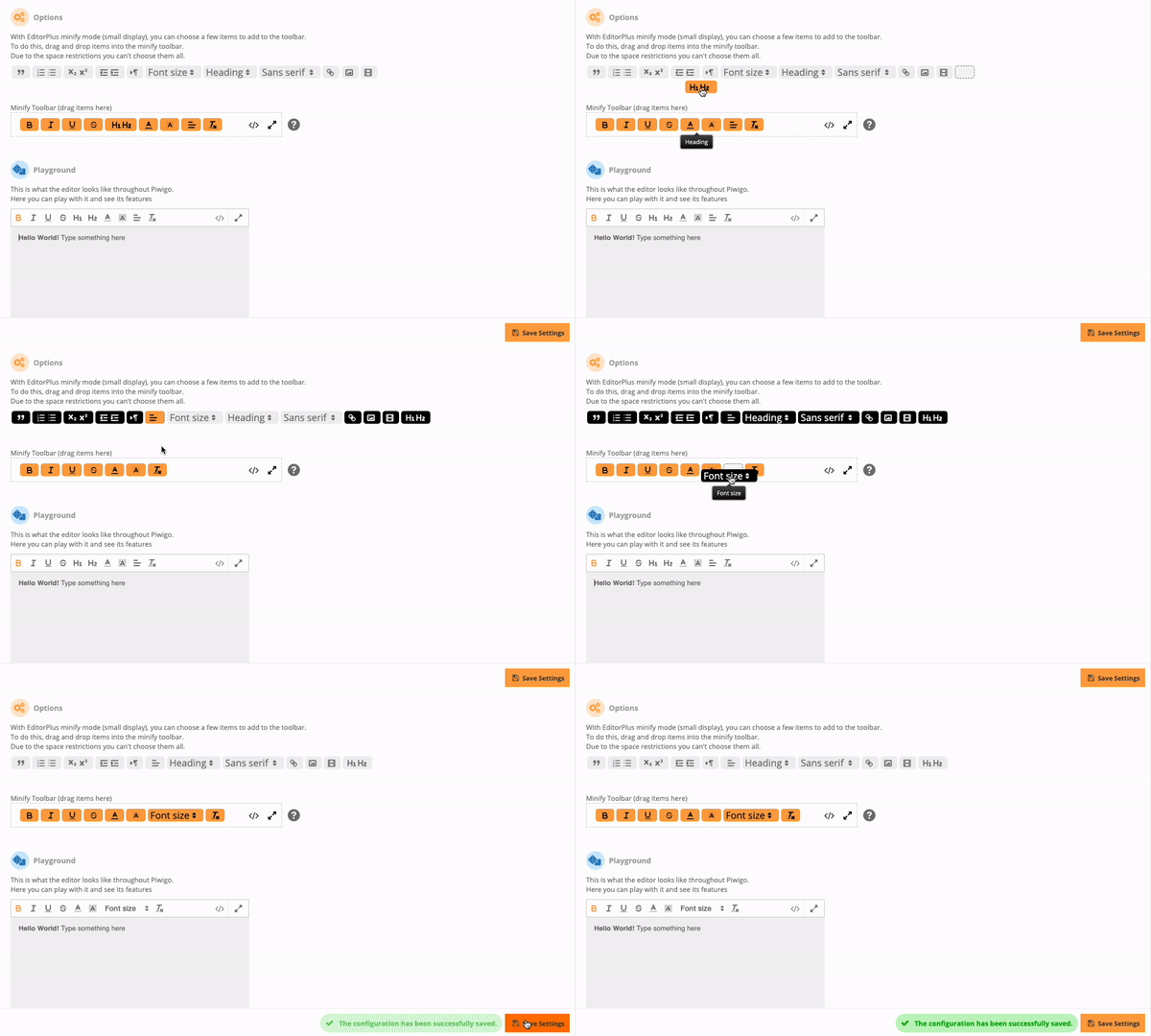
This visual guide should help you easily understand how to customize the WYSIWYG editor for your needs.
## License
* MIT Licence