https://github.com/playay/ws2s
ws2s(websocket to socket)--bring socket to browser-side js.
https://github.com/playay/ws2s
redis-gui-client socket websocket ws2s
Last synced: 5 months ago
JSON representation
ws2s(websocket to socket)--bring socket to browser-side js.
- Host: GitHub
- URL: https://github.com/playay/ws2s
- Owner: playay
- License: mit
- Created: 2018-02-12T09:10:49.000Z (over 8 years ago)
- Default Branch: master
- Last Pushed: 2020-10-27T21:36:32.000Z (over 5 years ago)
- Last Synced: 2025-09-19T01:27:55.144Z (9 months ago)
- Topics: redis-gui-client, socket, websocket, ws2s
- Language: Python
- Homepage:
- Size: 92.8 KB
- Stars: 62
- Watchers: 2
- Forks: 18
- Open Issues: 5
-
Metadata Files:
- Readme: README.md
- License: LICENSE.txt
Awesome Lists containing this project
README
also see: https://gitee.com/apihub/ws2s
## ws2s--bring socket to browser-side js
ws2s(websocket to socket) is a websocket server that handle socket(tcp)s.
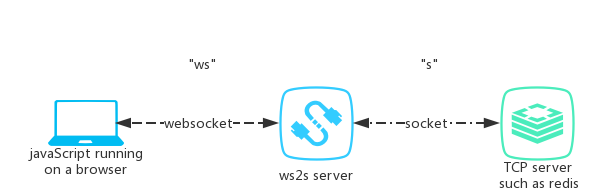
the simplest workflow might be like this:
1. a websocket client(we called **`"ws"`**) ask ws2s_server to create a socket(we called **`"s"`**) for it.
2. **`"ws"`** ask ws2s_server to use **`"s"`** to send data.
3. when **`"s"`** received data, ws2s_server will notify **`"ws"`** with the received data.
with this workflow, javaScript running on a browser got the ability to use socket.
## client case
+ a ws2s server at `wss://ws2s.feling.net/` is ready for test case.
+ an online redis gui client powered by ws2s is provided at [https://feling.net/redis/](https://feling.net/redis/).
### use origin javaScript
```javaScript
var ws = new WebSocket("wss://ws2s.feling.net/")
ws.onmessage = (event) => {
console.log("onmessage: ", event.data)
}
ws.onopen = () => {
console.log("onopen")
ws.send(JSON.stringify(
{
command: "connect",
host: "feling.net",
port: 80
}
))
ws.send(JSON.stringify(
{
command: "send",
data: "GET / HTTP/1.1\r\nHost: feling.net\r\nConnection: close\r\n\r\n"
}
))
}
ws.onclose = () => {
console.log("onclose")
}
```
### use [ws2s.js](ws2s-js/)
```javaScript
var socket = new WS2S("wss://ws2s.feling.net/").newSocket()
$('#connect-button').bind("click", () => {
socket.connect("feling.net", 80)
})
$('#send-button').bind("click", () => {
socket.send("GET / HTTP/1.1\r\nHost: feling.net\r\nConnection: close\r\n\r\n")
})
socket.onRecv = (data) => {
console.log('onRecv', data)
}
```
## install
ws2s works with py2、py3 on Linux、OSX. Windows users please try Windows Subsystem for Linux(WSL).
It is recommended to install from github:
```shell
pip install git+https://github.com/playay/ws2s --upgrade
```
you can also install ws2s from pypi:
```shell
pip install ws2s-python --upgrade
```
after installed ws2s:
`ws2sd` command can be used in shell,
`~/.ws2s/` directory will be created when you exec `ws2sd`
## config
config file is store at `~/.ws2s/config.json`. modify it then exec `ws2sd restart`
## start on boot
at see [this wiki](https://github.com/playay/ws2s/wiki/start-on-boot)
## protocol
### request
here are some examples of requests:
```json
{
"command": "connect",
"host":"127.0.0.1",
"port":80
}
{
"command": "send",
"data":"GET / HTTP/1.1\r\nHost: 127.0.0.1\r\nConnection: close\r\n\r\n"
}
```
you can find out that:
1. message(we called request) send to ws2s_sever is a json format string.
2. a `command` field is required. other fields are dependent on different `command`s
3. [this wiki](https://github.com/playay/ws2s/wiki/command) describes details of each command.
### response
message(we called response) received from ws2s_sever, is a json format string too:
```json
{
"success": true,
"code": -1,
"message": "recv data",
"data": "JDINCk9LDQo="
}
```
```
As the example above:
- "message" field is for human.
- "success" field can be ignored.
when "code" field = -1, "data" field is presented.
that means ws2s_server received data from peer. "data" is a base64 string representing a byte array.
when "code" field = 0.
usually means ws2s_server successfully completed the most recent command
when "code" field > 0.
means something is not normal:
when "code" = 1:
unknown exception, you can submit an issue to ws2s
when "code" = 2:
ConnectionRefusedError raisesd when ws2s_server try to
connect host:port you specified
when "code" = 3:
IllegalSocketState, just reSend an "connect" request like:
{"command":"connect","host":"127.0.0.1","port":80}
when "code" = 4:
usually means you want ws2s_server to connect 127.0.0.1, but ws2s_server refused
to do that. this feature is configurable in `~/.ws2s/config.json`
when "code" = 5:
socket connection closed by socket server you connected to
when "code" = 6:
failed to open ssh tunnel
```
### dev
```
pipenv shell
python setup.py bdist_wheel
python setup.py sdist
twine upload dist/*
```