https://github.com/playcanvas/editor
Browser-based visual editor for building WebGL, WebGPU, WebXR apps
https://github.com/playcanvas/editor
3d-editor editor frontend game-development game-engine gamedev hacktoberfest nodejs pcui playcanvas typescript ui webgl webgl2 webgpu webxr
Last synced: 3 months ago
JSON representation
Browser-based visual editor for building WebGL, WebGPU, WebXR apps
- Host: GitHub
- URL: https://github.com/playcanvas/editor
- Owner: playcanvas
- License: mit
- Created: 2020-01-30T14:12:46.000Z (over 6 years ago)
- Default Branch: main
- Last Pushed: 2026-03-26T18:01:53.000Z (4 months ago)
- Last Synced: 2026-03-27T06:10:09.766Z (4 months ago)
- Topics: 3d-editor, editor, frontend, game-development, game-engine, gamedev, hacktoberfest, nodejs, pcui, playcanvas, typescript, ui, webgl, webgl2, webgpu, webxr
- Language: TypeScript
- Homepage: https://playcanvas.com
- Size: 35.1 MB
- Stars: 998
- Watchers: 25
- Forks: 147
- Open Issues: 489
-
Metadata Files:
- Readme: README.md
- Contributing: .github/CONTRIBUTING.md
- License: LICENSE
- Agents: AGENTS.md
Awesome Lists containing this project
- awesome - playcanvas/editor - Browser-based visual editor for building WebGL, WebGPU, WebXR apps (TypeScript)
README
# PlayCanvas Editor
[](https://github.com/playcanvas/editor/actions/workflows/test-suite-run.yml)
[](https://github.com/playcanvas/editor/releases)
[](https://github.com/playcanvas/editor/blob/main/LICENSE)
[](https://discord.gg/RSaMRzg)
[](https://www.reddit.com/r/PlayCanvas)
[](https://x.com/intent/follow?screen_name=playcanvas)
| [User Manual](https://developer.playcanvas.com/user-manual/editor) | [API Reference](https://api.playcanvas.com/editor) | [Blog](https://blog.playcanvas.com) | [Forum](https://forum.playcanvas.com) |
The PlayCanvas Editor is a visual editing environment for building WebGL/WebGPU/WebXR apps. It can be accessed at https://playcanvas.com.
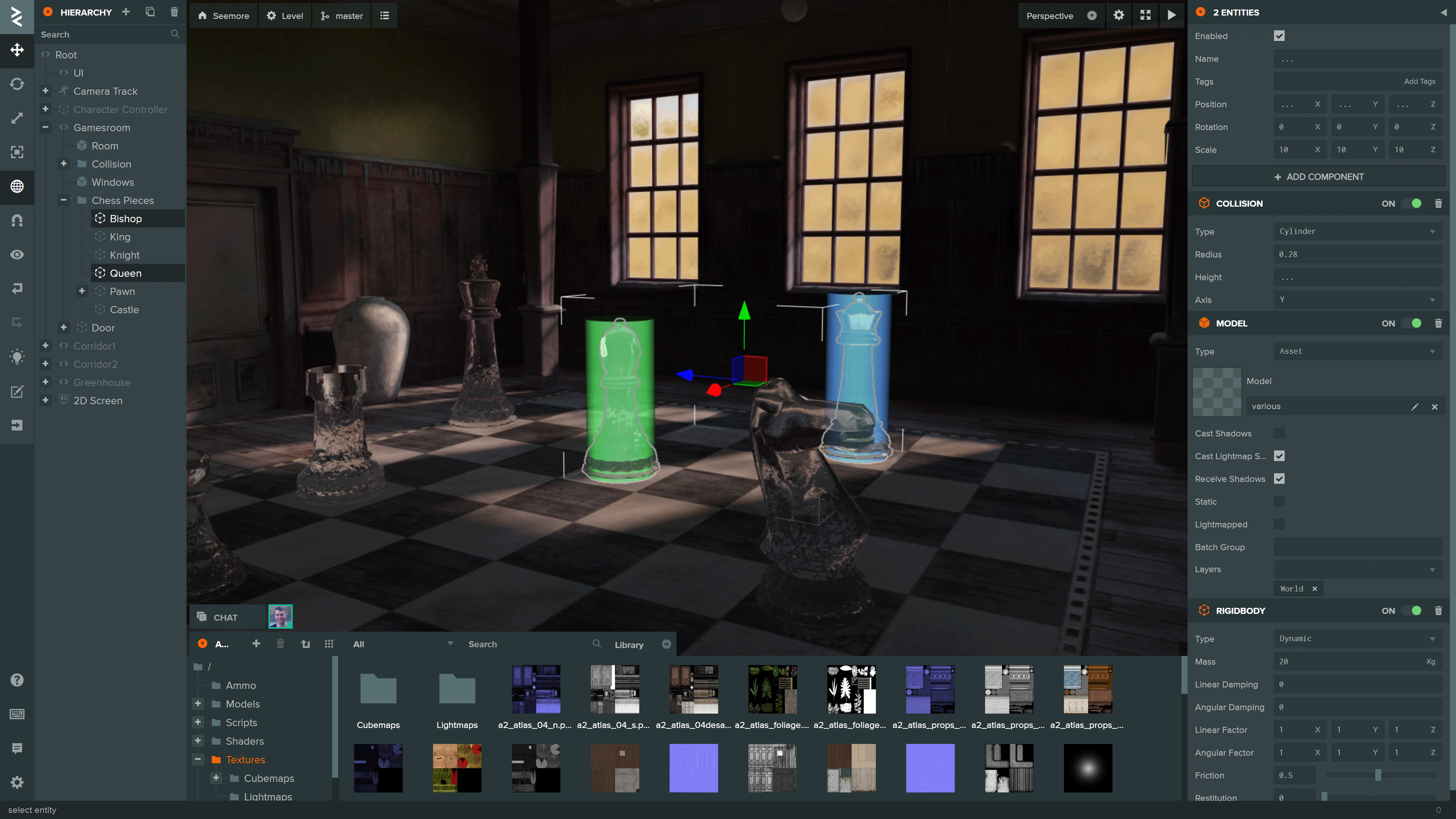
You can see more projects built using the Editor on the [PlayCanvas website](https://playcanvas.com/explore).
## Local Development
To initialize a local development environment for the Editor Frontend, ensure you have [Node.js](https://nodejs.org/) 18 or later installed. Follow these steps:
1. Clone the repository:
```sh
git clone https://github.com/playcanvas/editor.git
cd editor
```
2. Install dependencies:
```sh
npm install
```
3. Build the Editor frontend and start a local web server:
```sh
npm run develop
```
4. Open the Editor at [playcanvas.com](https://playcanvas.com) and append the query parameter `use_local_frontend` to load the development build:
```
https://playcanvas.com/editor/scene/?use_local_frontend
```
This will load the Editor frontend from `http://localhost:3487` instead of the production build.
> [!NOTE]
> This query parameter is also supported in the code editor and launch page
## Library integration testing
The Editor is built on the following open source libraries:
| Library | Details |
| ------------------------------------------------------------- | ------------------------------------------- |
| [PlayCanvas Engine](https://github.com/playcanvas/engine) | Powers the Editor's 3D View and Launch Page |
| [Observer](https://github.com/playcanvas/observer) | Data binding and history |
| [PCUI](https://github.com/playcanvas/pcui) | Front-end component library |
| [PCUI-Graph](https://github.com/playcanvas/pcui-graph) | PCUI plugin for rendering node-based graphs |
To test the integration of these libraries, use [npm link](https://docs.npmjs.com/cli/v9/commands/npm-link). Follow these steps:
1. Create a global link from source
```sh
cd
npm link
```
2. Create a link to the global link
```sh
cd editor
npm link
```
## Test Suite
The test suite for the PlayCanvas Editor uses [Playwright](https://playwright.dev/) for end-to-end testing.

### Tests
Tests are split into two categories:
- `test-suite/test/api` - tests for the Editor API behavior
- `test-suite/test/ui` - tests for the Editor UI behavior
### Running Tests
To run the test suite ensure you have [Docker](https://www.docker.com/) installed. Follow these steps:
1. Create a `.env` file based on the [template](.env.template)
```env
PC_HOST=playcanvas.com
PC_LOGIN_HOST=login.playcanvas.com
PC_LAUNCH_HOST=launch.playcanvas.com
PC_LOCAL_FRONTEND=
PC_COOKIE_NAME=pc_auth
PC_COOKIE_VALUE=
```
> [!IMPORTANT]
> The account used must be an existing account. Create one [here](https://login.playcanvas.com)
2. Run the container with Docker compose
```sh
docker compose up
```
3. Stop the container with Docker compose
```sh
docker compose down --remove-orphans
```
> [!NOTE]
> To build the image from source instead of pulling from the registry append the `--build` flag
### Test Suite Local Development
To create new tests, ensure you have [Node.js](https://nodejs.org/) 18 or later installed. Follow these steps:
1. Install dependencies:
```sh
cd test-suite
npx playwright install --with-deps
npm install
```
2. Create tests and put them into the respective folders. For dynamic recording of tests run this command:
```sh
npm run codegen
```
> [!NOTE]
> Run `npm run` for the full list of npm scripts