https://github.com/pnmartinez/repo-popularity-stats
Simple tool to check whether a repo is getting increasingly more attention or not.
https://github.com/pnmartinez/repo-popularity-stats
github issues repository stats tracker
Last synced: 3 months ago
JSON representation
Simple tool to check whether a repo is getting increasingly more attention or not.
- Host: GitHub
- URL: https://github.com/pnmartinez/repo-popularity-stats
- Owner: pnmartinez
- Created: 2020-07-24T08:49:12.000Z (almost 6 years ago)
- Default Branch: master
- Last Pushed: 2020-07-29T19:15:03.000Z (almost 6 years ago)
- Last Synced: 2025-03-29T17:34:08.149Z (over 1 year ago)
- Topics: github, issues, repository, stats, tracker
- Language: Jupyter Notebook
- Homepage:
- Size: 200 KB
- Stars: 1
- Watchers: 1
- Forks: 0
- Open Issues: 0
-
Metadata Files:
- Readme: README.md
Awesome Lists containing this project
README
# repo-popularity-stats
Simple tool for visually inspecting whether a repo you are interested in is going viral. Useful to check where you stand in the "competitive advantage landscape" by using that code.
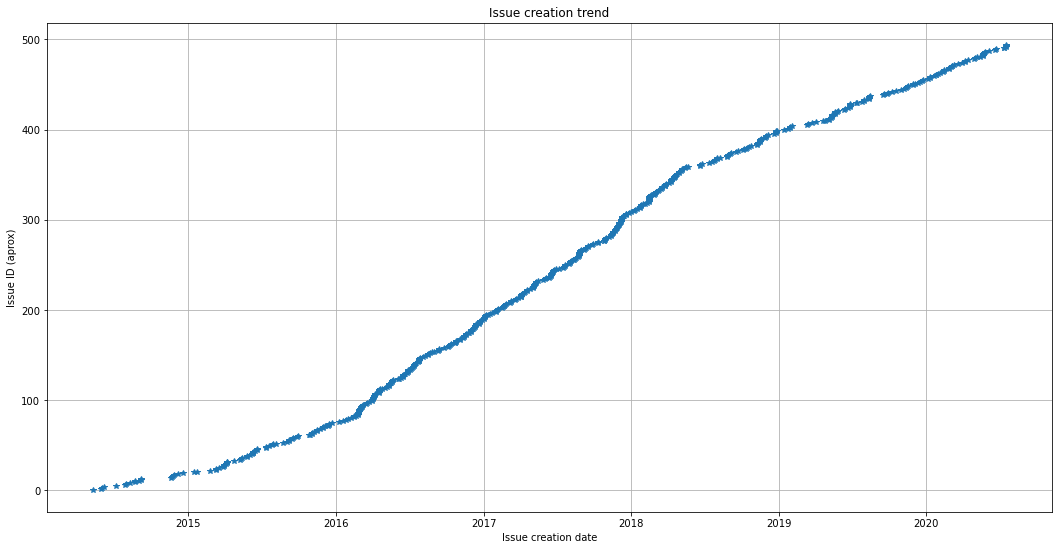
## Quickstart on commmand line (CLI)
Simply get from the repo URL the `repo_creator/repo_name` and run:
```
python cli.py repo_creator/repo_name
```
## Two folded code: CLI + Jupyter
The code is in a Jupyter notebook, nicely shown.
It is *the same code* as the in the command line interface `cli.py` (only without the argument parsing header). It is quite self-explanatory: open it and take a look.
If you use the notebook just change the first cell to **define the target repo you want to analyze**, and then run all cells.
It will query GitHub's API, which has different limits for registered/unregistered requests; unregistered has worked fine so far.
## Need other repo stats?
Open one of the URLs that the program is querying, i. e:
```
https://api.github.com/repos/ + repo_creator/repo_name + /issues?state=all&per_page=100&page=1
```
You can check all the JSON fields and change the code to retrieve whatever you need.