https://github.com/pocket/extension-pocket-new-tab
Pocket New Tab is a browser extension that serves as a replacement to the default new tab.
https://github.com/pocket/extension-pocket-new-tab
Last synced: about 1 year ago
JSON representation
Pocket New Tab is a browser extension that serves as a replacement to the default new tab.
- Host: GitHub
- URL: https://github.com/pocket/extension-pocket-new-tab
- Owner: Pocket
- License: mit
- Created: 2017-12-05T18:57:42.000Z (over 8 years ago)
- Default Branch: master
- Last Pushed: 2020-02-03T19:54:12.000Z (over 6 years ago)
- Last Synced: 2025-03-28T22:07:22.716Z (about 1 year ago)
- Language: JavaScript
- Homepage: https://getpocket.com
- Size: 541 KB
- Stars: 32
- Watchers: 23
- Forks: 8
- Open Issues: 6
-
Metadata Files:
- Readme: README.md
- Contributing: CONTRIBUTING.md
- License: LICENSE
Awesome Lists containing this project
README
# Pocket New Tab Extension
## Introduction
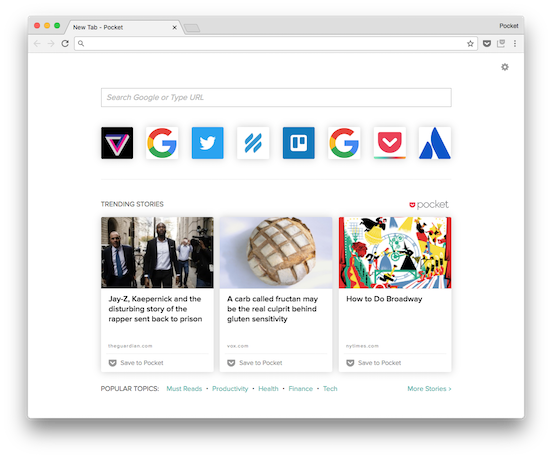
Pocket New Tab is a browser extension that serves as a replacement to the default new tab. It includes much of the same functionality that’s available with the default new tab, while adding Trending Stories and Popular Topics from Pocket.
Features include:
* Trending Stories - the best stories on the web curated by the Pocket community
* Popular Topics - links to popular topics in Pocket Explore
* Dark Theme - Invert the colors of your new tab with light text on a dark background.
* Bookmarks Bar - See your Bookmarks Bar at the top of every new tab for quick access.
* Search Bar - Perform a web search or navigate to a URL directly.
* Most Visited Sites - Quick links to your most frequently visited sites in
The Pocket New Tab Extension is currently compatible with Chrome, but future iterations will be compatible with other Webkit browsers.
## About this Repository
This is the skeleton structure for the Pocket New Tab extension codebase.
It leverages an external build script (to be moved to an official repo) to keep things simple when working with the operational code.
At this time it is set up to use the following:
- React
- Redux
- Jest for testing
- Eslint for JS linting
- Babel for ES6/7
- Stylelint for Style linting
- SASS
- CSS modules
- Webpack for compiling
## Updating
As functionality is added the readme should be updated with the module added. Testing coverage thresholds will also be added.
## Conventions
#### React
[React](https://facebook.github.io/react/) is a view library developed by Facebook to create declarative, component based UI. It will automatically update the UI based on the state of the application using a virtual dom.
#### Redux
[Redux](http://redux.js.org/) is a library used to create a predictable state container.
#### React-Chrome-Redux
[React Chrome Redux](https://github.com/tshaddix/react-chrome-redux) allows us to build react/redux seamlessly with the background messaging convention in extensions. The background page holds the Redux store, while Popovers and Content-Scripts act as UI Components, passing actions and state updates between themselves and the background store.
## Getting Started
### High level steps
1. [Prepare your project](#setupanchor)
1. [Install dependencies](#installanchor)
1. [Create a development/production build](#buildanchor)
1. [Load the extension into your browser](#loadinganchor)
---
### Setup
Before you get started you will need to do the following:
1. Register an API key from [https://getpocket.com/developer/](https://getpocket.com/developer/)
2. Create a keys.json file in the root directory of the project with the
folowing format:
```json
{
"browserName": "key"
}
```
3. You are able to add multiple browsers and keys. During the build process
it will create a seperate folder for each browser defined.
### Installation
The app is bundled with webpack via node. You may use Yarn or NPM to run the
build/start/test scripts.
`yarn install` OR `npm install`
##### *Development*
Run `yarn start` OR `npm run start`
This will create a generic build using the first key in your `keys.json` and
place it in `_build/_dev` at the root directory. This will watch for changes and
automatically reload the extension. It is important to note that you will need
to refresh the individual pages the extension is active in after a change is made.
##### *Production*
Run `yarn build` OR `npm run build`
This will create an optimized build and place it inside `_build` at the root
directory. There will be a folder for each browser defined in
your keys.json.
To load the extension:
1. Open chrome and navigate to [chrome://extensions](chrome://extensions)
2. Check the `Developer mode` in the upper right
3. Select `Load unpacked extension...`
4. Select the browser folder inside the `_build` folder when prompted.
(*Note: During the development process a single folder (`_dev`) be generated.*)
---
### Third Party Tools Licenses
- [blueimp-md5](https://github.com/blueimp/JavaScript-MD5) - MIT License - Copyright (c) 2011 Sebastian Tschan
- [classnames](https://github.com/JedWatson/classnames) - MIT License - Copyright (c) 2016 Jed Watson.
- [prop-types](https://github.com/facebook/prop-types) - MIT License - Copyright (c) 2013-present, Facebook, Inc.
- [react](https://github.com/facebook/react) - MIT License - Copyright (c) 2013-present, Facebook, Inc.
- [react-chrome-redux](https://github.com/tshaddix/react-chrome-redux) - MIT License - Copyright (c) 2016 Tyler Shaddix
- [react-dom](https://github.com/facebook/react) - MIT License - Copyright (c) 2013-present, Facebook, Inc.
- [react-onclickoutside](https://github.com/Pomax/react-onclickoutside) - MIT License
- [react-redux](https://github.com/reactjs/react-redux) - MIT License - Copyright (c) 2015-present Dan Abramov
- [redux](https://github.com/reactjs/react) - MIT License - Copyright (c) 2015-present Dan Abramov
- [redux-saga](https://github.com/redux-saga/redux-saga) - MIT License - Copyright (c) 2015 Yassine Elouafi
- [semver](https://github.com/npm/node-semver) - ISC License - Copyright (c) Isaac Z. Schlueter and Contributors