https://github.com/polemius/lucent
Lucent is a powerful and expressive terminal styling library for Dart
https://github.com/polemius/lucent
ansi-colors colors dart emoji terminal terminal-colors
Last synced: 3 months ago
JSON representation
Lucent is a powerful and expressive terminal styling library for Dart
- Host: GitHub
- URL: https://github.com/polemius/lucent
- Owner: polemius
- License: mit
- Created: 2025-05-07T22:30:11.000Z (about 1 year ago)
- Default Branch: main
- Last Pushed: 2025-06-25T08:42:38.000Z (about 1 year ago)
- Last Synced: 2025-06-25T09:39:57.944Z (about 1 year ago)
- Topics: ansi-colors, colors, dart, emoji, terminal, terminal-colors
- Language: Dart
- Homepage:
- Size: 1.28 MB
- Stars: 0
- Watchers: 1
- Forks: 0
- Open Issues: 0
-
Metadata Files:
- Readme: README.md
- Changelog: CHANGELOG.md
- License: LICENSE
Awesome Lists containing this project
README

**Lucent** is a powerful and expressive terminal styling library for Dart, inspired by Python's Rich. It allows you to style terminal output with ease, supporting nested styles, truecolor, and intelligent fallbacks for terminals with limited capabilities.
---
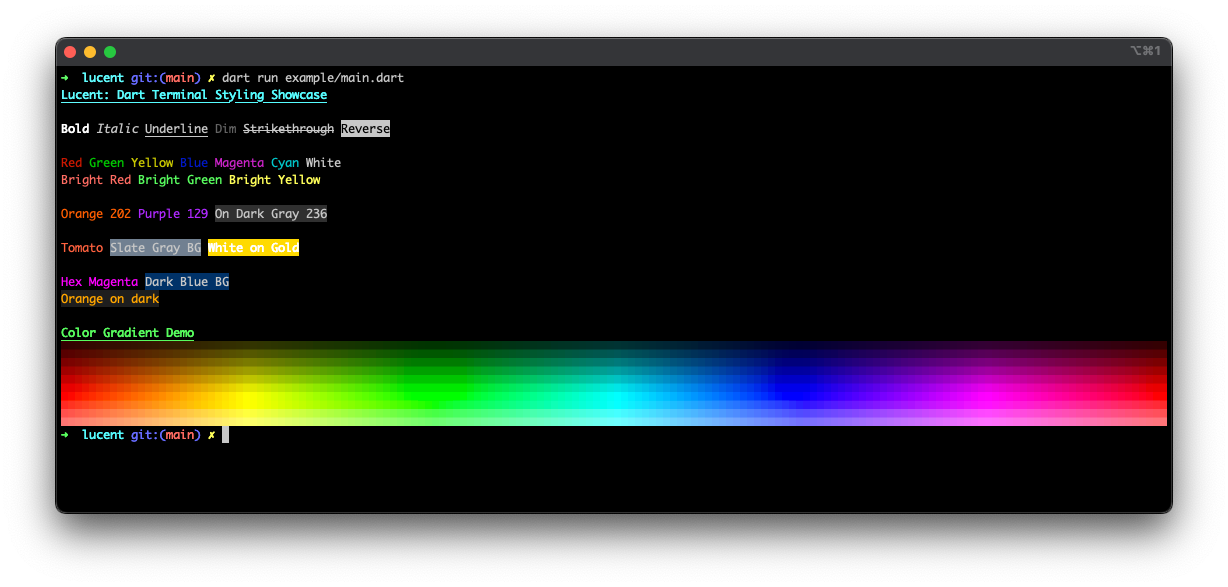
## ✨ Features
- **Rich Markup Syntax** – Use tags like `[bold red]Error:[/]` for styled output.
- **Truecolor Support** – Use 24-bit RGB with `[color(#ff33aa)]` or `[on rgb(255, 255, 0)]`.
- **256-Color & 4-Bit Fallbacks** – Automatically converts to nearest match based on terminal.
- **Named Colors** – CSS-like color names: `[color(tomato)]`, `[on slategray]`, etc.
- **Style Nesting** – Combine `[bold underline red]` and more.
- **Dumb Terminal Detection** – Automatically disables styling for `TERM=dumb`.
- **Manual Styling Control** – Enable/disable styling and silence warnings.
---
## 🚀 Getting Started
### Installation
Add to `pubspec.yaml`:
```yaml
dependencies:
lucent: ^0.1.0
```
Then install:
```bash
dart pub get
```
### Basic Usage
```dart
import 'package:lucent/lucent.dart';
void main() {
Console.print('[bold green]Success:[/] Operation completed.');
}
```
---
## 🎨 Advanced Styling
### Nested Styles
```dart
Console.print('[bold red]Error: [underline]File not found[/][/]');
```
### Truecolor (24-bit)
```dart
Console.print('[color(#ff33aa)]Pink Text[/]');
Console.print('[on rgb(255, 255, 0)]Yellow Background[/]');
```
### Named Colors
```dart
Console.print('[color(tomato)]Tomato Text[/]');
Console.print('[on slategray]Slate Gray Background[/]');
```
---
## 🧠 Terminal Compatibility
Lucent automatically detects and adapts to the terminal:
| Terminal | Output |
|------------------|----------------------------|
| TERM=dumb | No styling (safe) |
| 4-bit (ANSI) | 16 colors |
| 8-bit (xterm-256)| 256-color palette |
| Truecolor | Full 24-bit RGB |
Manually override behavior:
```dart
enableStyling(); // Force styling on
disableStyling(); // Disable all styling
silentMode(); // Suppress warnings
```
---
## 📦 API Reference
- `Console.print(String markup)`
- `enableStyling([bool enabled = true])`
- `disableStyling()`
- `silentMode()`
---
## 🧪 Examples
```dart
Console.print('[bold blue]Info:[/] App started');
Console.print('[italic yellow]Warning:[/] Low disk space');
Console.print('[underline red]Error:[/] Connection failed');
Console.print('[bold color(tomato) on gold] Tasty styled message [/]');
```
---
Lucent is inspired by the [Rich](https://github.com/Textualize/rich) Python library.
## TODO
Planned features to reach closer parity with Rich:
- **Progress bars** – Add a `ProgressBar` utility for dynamic progress indicators.
- **Table rendering** – Create a `Table` builder with headers, borders, and alignment options.
- **Panels** – Provide a `Panel` widget for boxed sections of text.
- **Syntax highlighting** – Integrate a highlighter for displaying code snippets.
- **Logging helpers** – Offer colorized `Console.log` with optional timestamps.
- **Traceback formatting** – Pretty-print exceptions and stack traces.