https://github.com/pollination/pollination-dsl
A Python library for creating Pollination plugins and recipes.
https://github.com/pollination/pollination-dsl
Last synced: 11 months ago
JSON representation
A Python library for creating Pollination plugins and recipes.
- Host: GitHub
- URL: https://github.com/pollination/pollination-dsl
- Owner: pollination
- License: apache-2.0
- Created: 2020-12-25T15:16:50.000Z (over 5 years ago)
- Default Branch: master
- Last Pushed: 2024-10-22T20:07:26.000Z (over 1 year ago)
- Last Synced: 2024-11-15T20:41:23.319Z (over 1 year ago)
- Language: Python
- Homepage: https://pollination.github.io/pollination-dsl/docs/
- Size: 745 KB
- Stars: 6
- Watchers: 3
- Forks: 3
- Open Issues: 2
-
Metadata Files:
- Readme: README.md
- License: LICENSE
Awesome Lists containing this project
README
# pollination-dsl
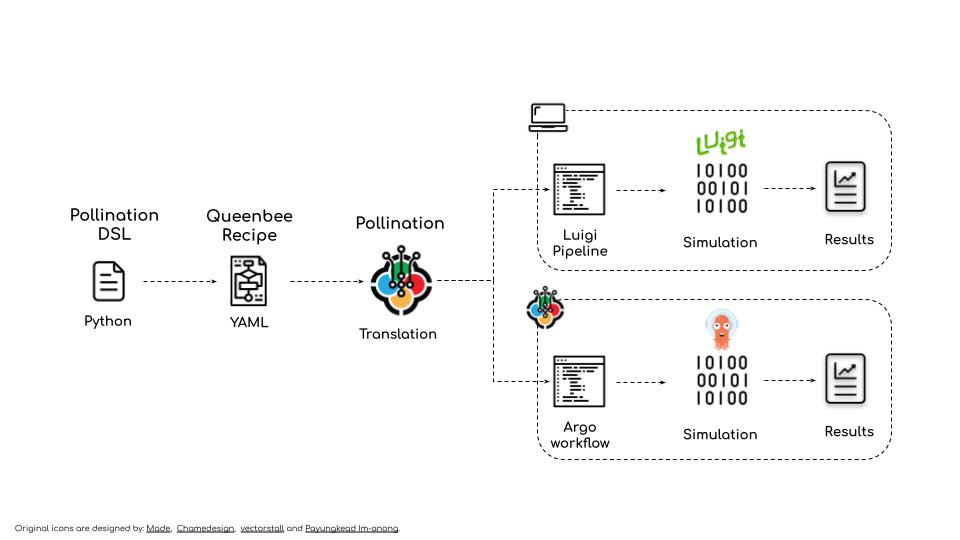
A Python Domain Specific Language (DSL) to create Pollination Plugins and Recipes.
Pollination uses [Queenbee](https://github.com/pollination/queenbee) as its workflow
language. Pollination-dsl makes it easy to create Queenbee object without the need to
learn Queenbee.
# API docs
[Pollination-DSL API docs](https://pollination.github.io/pollination-dsl/docs/pollination_dsl.html#subpackages)
# Requirements
Python >=3.7
# Installation
Using pip:
`pip install pollination-dsl`
For local development:
1. Clone this repository.
2. Change directory to root folder of the repository.
3. `pip install -e .`
## Function
```python
from dataclasses import dataclass
from pollination_dsl.function import Function, command, Inputs, Outputs
@dataclass
class CreateOctreeWithSky(Function):
"""Generate an octree from a Radiance folder and sky!"""
# inputs
include_aperture = Inputs.str(
default='include',
description='A value to indicate if the static aperture should be included in '
'octree. Valid values are include and exclude. Default is include.',
spec={'type': 'string', 'enum': ['include', 'exclude']}
)
black_out = Inputs.str(
default='default',
description='A value to indicate if the black material should be used. Valid '
'values are default and black. Default value is default.',
spec={'type': 'string', 'enum': ['black', 'default']}
)
model = Inputs.folder(description='Path to Radiance model folder.', path='model')
sky = Inputs.file(description='Path to sky file.', path='sky.sky')
@command
def create_octree(self):
return 'honeybee-radiance octree from-folder model --output scene.oct ' \
'--{{self.include_aperture}}-aperture --{{self.black_out}} ' \
'--add-before sky.sky'
# outputs
scene_file = Outputs.file(description='Output octree file.', path='scene.oct')
```
If you want to access the `Queenbee` objects you can use `queenbee` property. For example
try `print(CreateOctreeWithSky().queenbee.yaml())` and you should see the full Queenbee
definition:
```yaml
type: Function
annotations: {}
inputs:
- type: FunctionStringInput
annotations: {}
name: black-out
description: A value to indicate if the black material should be used. Valid values
are default and black. Default value is default.
default: default
alias: []
required: false
spec:
type: string
enum:
- black
- default
- type: FunctionStringInput
annotations: {}
name: include-aperture
description: A value to indicate if the static aperture should be included in octree.
Valid values are include and exclude. Default is include.
default: include
alias: []
required: false
spec:
type: string
enum:
- include
- exclude
- type: FunctionFolderInput
annotations: {}
name: model
description: Path to Radiance model folder.
default: null
alias: []
required: true
spec: null
path: model
- type: FunctionFileInput
annotations: {}
name: sky
description: Path to sky file.
default: null
alias: []
required: true
spec: null
path: sky.sky
extensions: null
outputs:
- type: FunctionFileOutput
annotations: {}
name: scene-file
description: Output octree file.
path: scene.oct
name: create-octree-with-sky
description: Generate an octree from a Radiance folder and sky!
command: honeybee-radiance octree from-folder model --output scene.oct --{{inputs.include-aperture}}-aperture
--{{inputs.black-out}} --add-before sky.sky
```
Since the functions are standard Python classes you can also subclass them from one
another as long as you use the same name for the `@command` method. Otherwise it will
create an invalid function with two commands.
## Plugin
To create a Pollination plugin use the functions to create a standard Python module.
The only change is that you need to provide the information for Pollination plugin in
the `__init__.py` file as dictionary assigned to `__pollination__` variable.
Follow the standard way to install a Python package. Once the package is installed you
can use `pollination-dsl` to load the package or write it to a folder.
```python
from pollination_dsl.package import load, write
# name of the pollination package
python_package = 'pollination_honeybee_radiance'
# load this package as Pollination Plugin
plugin = load(python_package)
# or write the package as a Pollination plugin to a folder directly
write(python_package, './pollination-honeybee-radiance')
```
Here are two real world examples of Pollination plugins:
- [`pollination-honeybee-radiance` plugin](https://github.com/pollination/honeybee-radiance)
- [`pollination-honeybee-energy` plugin](https://github.com/pollination/honeybee-energy)
## Recipe
`Recipe` is a collection of `DAG`s. Each `DAG` is a collection of interrelated `task`s.
You can use pollination-dsl to create complex recipes with minimum code by reusing the
`functions` as templates for each task.
Packaging a plugin is exactly the same as packaging a plugin.
```python
from pollination_dsl.package import load, translate
# name of the pollination package
python_package = 'daylight-factor'
# load this package as Pollination Recipe
recipe = load(python_package, baked=True)
# or translate and write the package as a Pollination plugin to a folder directly
translate(python_package, './daylight-factor')
```
Here are number of real world examples of Pollination recipes:
- [`Annual energy use` recipe](https://github.com/pollination/annual-energy-use)
- [`Daylight factor` recipe](https://github.com/pollination/daylight-factor)
- [`Annual daylight` recipe](https://github.com/pollination/annual-daylight)
# How to create a pollination-dsl package
Pollination-dsl uses Python's standard packaging to package pollination plugins and recipes.
It parses most of the data from inputs in `setup.py` file and some Pollination specific
information from `__init__.py` file. Below is an example of how these file should look
like.
By taking advantage of [Python's native namespace packaging](https://packaging.python.org/guides/packaging-namespace-packages/#native-namespace-packages)
we keep all the packages under the `pollination` namespace.
## setup.py
Here is an example `setup.py` file. You can see the latest version of the file [here](https://github.com/pollination/honeybee-radiance/blob/master/setup.py).
```python
#!/usr/bin/env python
import setuptools
with open("README.md", "r") as fh:
long_description = fh.read()
with open('requirements.txt') as f:
requirements = f.read().splitlines()
setuptools.setup(
name='pollination-honeybee-radiance', # required - will be used for package name
author='ladybug-tools', # required - author must match the owner account name on Pollination
author_email='info@ladybug.tools',
packages=setuptools.find_namespace_packages(include=['pollination.*']), # required - that's how pollination find the package
version='0.1.0', # required - will be used as package tag. you can also use semantic versioning
install_requires=requirements,
url='https://github.com/pollination/pollination-honeybee-radiance', # optional - will be translated to home
project_urls={
'icon': 'https://raw.githubusercontent.com/ladybug-tools/artwork/master/icons_bugs/grasshopper_tabs/HB-Radiance.png', # optional but strongly encouraged - link to package icon
},
description='Honeybee Radiance plugin for Pollination.', # optional - will be used as package description
long_description=long_description, # optional - will be translated to ReadMe content on Pollination
long_description_content_type="text/markdown",
maintainer='maintainer_1, maintainer_2', # optional - will be translated to maintainers. For multiple maintainers
maintainer_email='maintainer_1@example.come, maintainer_2@example.com', # use comma inside the string.
keywords='honeybee, radiance, ladybug-tools, daylight', # optional - will be used as keywords
license='PolyForm Shield License 1.0.0, https://polyformproject.org/wp-content/uploads/2020/06/PolyForm-Shield-1.0.0.txt', # optional - the license link should be separated by a comma
zip_safe=False # required - set to False to ensure the packaging will always work
)
```
## __init__.py
Here is an example `__init__.py` for a plugin. The latest version of the file is
accessible [here](https://github.com/pollination/honeybee-radiance/blob/master/pollination/honeybee_radiance/__init__.py).
```python
"""Honeybee Radiance plugin for Pollination."""
from pollination_dsl.common import get_docker_image_from_dependency
# set the version for docker image dynamically based on honeybee-radiance version
# in dependencies
image_id = get_docker_image_from_dependency(
__package__, 'honeybee-radiance', 'ladybugtools'
)
__pollination__ = {
'app_version': '5.4', # optional - tag for version of Radiance
'config': {
'docker': {
'image': image_id,
'workdir': '/home/ladybugbot/run'
}
}
}
```
Here is an example `__init__.py` for a recipe. The latest version of the file is
accessible [here](https://github.com/pollination/annual-daylight/blob/master/pollination/annual_daylight/__init__.py).
```python
from .entry import AnnualDaylightEntryPoint
__pollination__ = {
'entry_point': AnnualDaylightEntryPoint
}
```