https://github.com/polywock/globalspeed
Web extension to set a default speed for video and audio
https://github.com/polywock/globalspeed
audio-speed chrome-extension firefox-addon media-hotkeys pitch-shift speed-controller video-speed web-extension
Last synced: 5 months ago
JSON representation
Web extension to set a default speed for video and audio
- Host: GitHub
- URL: https://github.com/polywock/globalspeed
- Owner: polywock
- Created: 2019-06-07T10:28:36.000Z (about 7 years ago)
- Default Branch: master
- Last Pushed: 2024-10-29T04:31:32.000Z (over 1 year ago)
- Last Synced: 2024-10-29T15:38:12.634Z (over 1 year ago)
- Topics: audio-speed, chrome-extension, firefox-addon, media-hotkeys, pitch-shift, speed-controller, video-speed, web-extension
- Language: TypeScript
- Homepage: https://chrome.google.com/webstore/detail/global-speed-youtube-netf/jpbjcnkcffbooppibceonlgknpkniiff?hl=en
- Size: 2 MB
- Stars: 1,657
- Watchers: 21
- Forks: 191
- Open Issues: 92
-
Metadata Files:
- Readme: README.md
Awesome Lists containing this project
README
# Global Speed
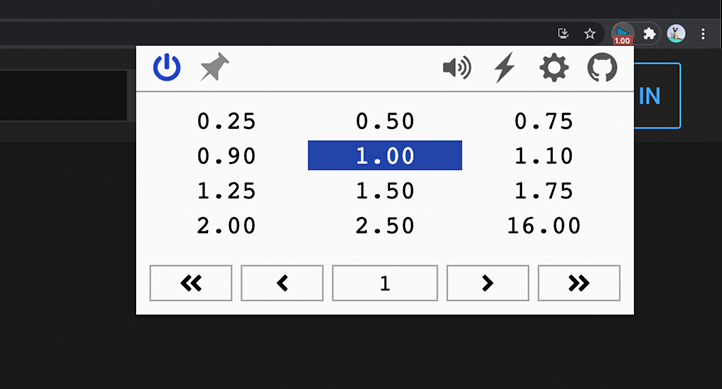
Universal speed control for video and audio.
## Install the [Chrome](https://chrome.google.com/webstore/detail/global-speed-youtube-netf/jpbjcnkcffbooppibceonlgknpkniiff), [Firefox](https://addons.mozilla.org/firefox/addon/global-speed/), or [Edge](https://microsoftedge.microsoft.com/addons/detail/mjhlabbcmjflkpjknnicihkfnmbdfced) extension.
### Speed Control
- Set the speed once and forget: it automatically applies to all video and audio
- Define URL rules to auto-apply your favorite speeds on specific sites
- Compatible with YouTube, Netflix, Spotify, podcast sites, and more
### Media Hotkeys
- Conveniently change speed through customizable shortcuts
- Rewind/forward, frame-by-frame analysis, volume up/down and more
- Support for multiple trigger modes, including context menu and global shortcuts; control background music or PiP videos while using another app
### Filters & Effects
- Netflix movie too dark? Brighten it and dial in the contrast
- Video too quiet? Boost volume up to 600%
- Listen to songs or shows in a new way with pitch shift
- Optionally assign hotkeys to toggle filters and effects on the fly
_Audio Effects [Chromium Only]_
## Build
1. `npm install` to install required dependencies.
1. `npm run build:dev` build unpacked version.
1. Load the unpacked folder
1. Chrome: open extensions page, enable dev mode, load unpacked.
1. Edge: open extensions page, load unpacked.