https://github.com/poneding/mdi
mdi(markdown indexer) is a command line tool used to recursively generate markdown indexes in directories. Examples: https://github.com/poneding/knowledge-base/blob/master/README.md
https://github.com/poneding/mdi
markdown-index markdown-index-generator
Last synced: 12 months ago
JSON representation
mdi(markdown indexer) is a command line tool used to recursively generate markdown indexes in directories. Examples: https://github.com/poneding/knowledge-base/blob/master/README.md
- Host: GitHub
- URL: https://github.com/poneding/mdi
- Owner: poneding
- License: apache-2.0
- Created: 2023-11-24T08:29:33.000Z (over 2 years ago)
- Default Branch: master
- Last Pushed: 2025-03-26T06:36:20.000Z (about 1 year ago)
- Last Synced: 2025-03-26T07:31:33.607Z (about 1 year ago)
- Topics: markdown-index, markdown-index-generator
- Language: Go
- Homepage: http://mdi.poneding.com/
- Size: 47.9 KB
- Stars: 1
- Watchers: 1
- Forks: 0
- Open Issues: 0
-
Metadata Files:
- Readme: README.md
- License: LICENSE
Awesome Lists containing this project
README
# mdi
English | [中文](README_zh-CN.md)
mdi(Markdown indexer) is a command line tool used to recursively generate markdown indexes in directories.
## Installation
```bash
go install github.com/poneding/mdi@latest
```
## Usage
Generate markdown index:
```bash
mdi gen
```
- `-d` or `--workdir`: Specify the directory to generate markdown index.
- `-t` or `--index-title`: Specify the title of markdown index, default is title of markdown index file or current directory name.
- `--home-title`: Specify the title of home link in markdown index, if not specified, use `index-title`.
- `-f` or `--root-index-file`: Specify the markdown root index file, default is `zz_gneratered_mdi.md`.
- `--sub-index-file`: Specify the markdown sub index file, default is `zz_gneratered_mdi.md`.
- `--inherit-gitignore`: Use `.gitignore` file as ignore file, default is `true`.
- `--override`: Override markdown existing index file, default is `false`.
- `--no-header-link`: Do not generate header link in index file, default is `false`.
- `-r` or `--recursive`: Recursively generate markdown index in subdirectories, default is `false`.
- `--nav`: Generate navigation in markdown file, default is `false`.
- `-v` or `--verbose`: Show verbose log, default is `false`.
> Use `.mdiignore` file as ignore file by default.
Other commands:
```bash
# Print version
mdi version
# Print help
mdi help
# Auto Complete
mdi completion
# Example:
# source <(mdi completion zsh)
```
## Screenshots
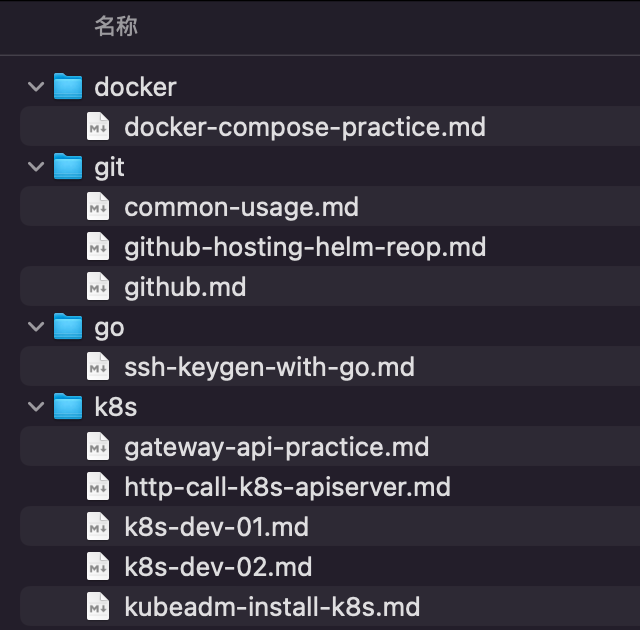
Markdown folder:
**Generate markdown index**:
```bash
mdi gen -f README.md -t "My Notes"
```
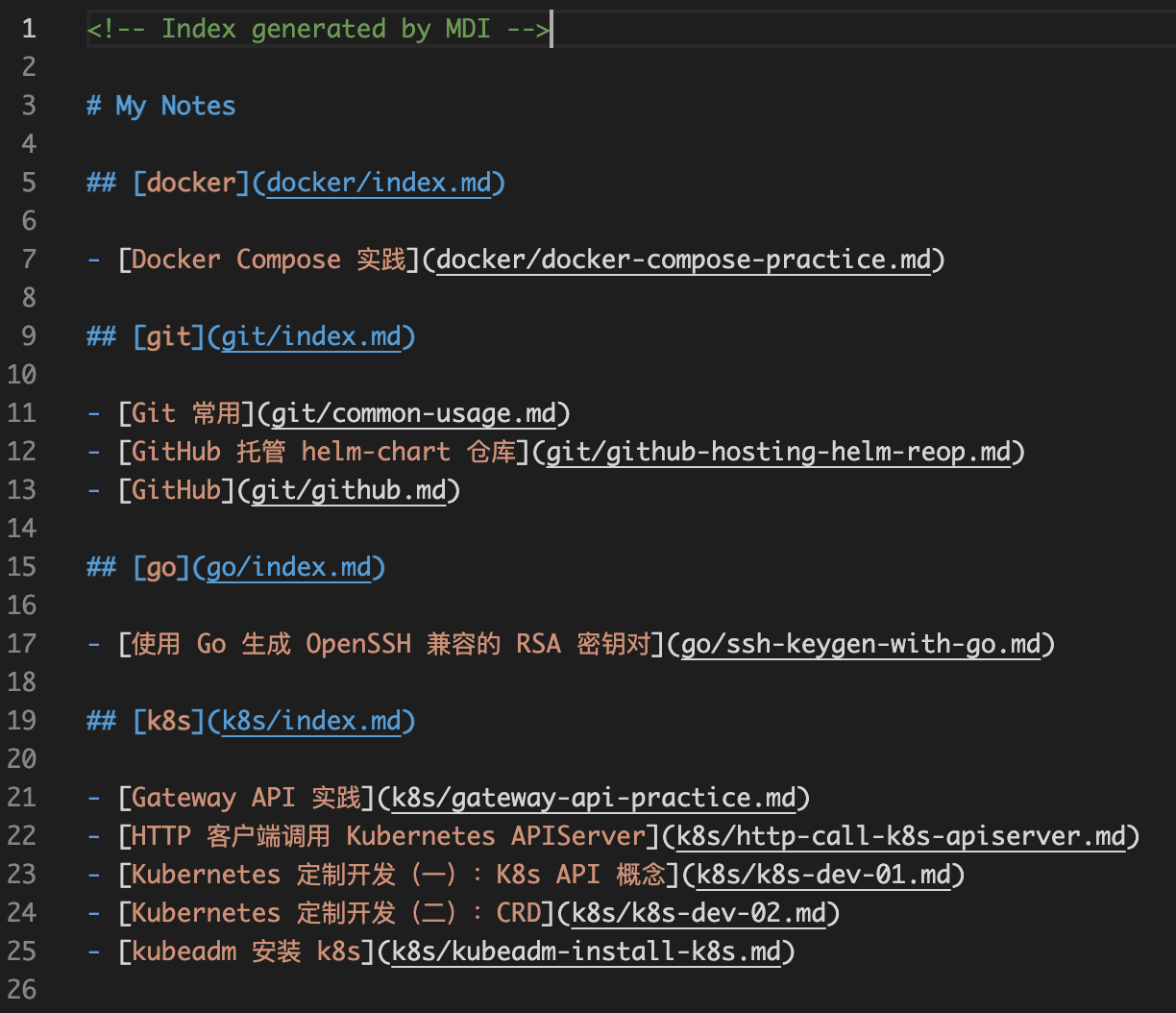
As the same time, the index file will be generated in the subdirectory recursively.
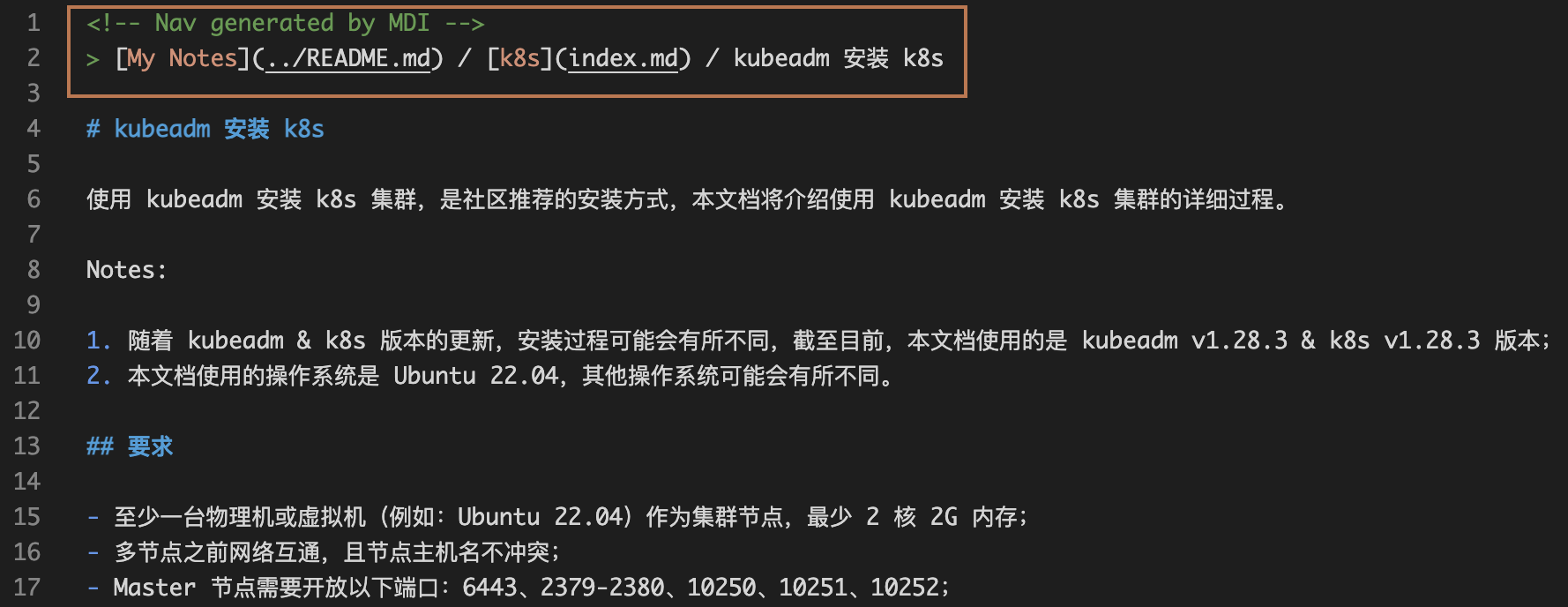
**Generate nav in markdown file**:
```bash
mdi gen -f README.md -t "My Notes" --nav
```
**Customize sub index title**:
You can customize the sub index title by modifying the first-level title of the sub markdown index file generated in the subdirectory.