https://github.com/pontasan/pterm
A blazing-fast, memory-efficient terminal for macOS built with Swift and Metal.
https://github.com/pontasan/pterm
agent ai cli command-line gpu llm macos macos-app metal mux performance pty swift terminal terminal-emulator tmux zsh
Last synced: 3 months ago
JSON representation
A blazing-fast, memory-efficient terminal for macOS built with Swift and Metal.
- Host: GitHub
- URL: https://github.com/pontasan/pterm
- Owner: pontasan
- License: mit
- Created: 2026-03-13T08:33:24.000Z (4 months ago)
- Default Branch: main
- Last Pushed: 2026-03-21T07:43:57.000Z (4 months ago)
- Last Synced: 2026-03-21T10:46:05.491Z (4 months ago)
- Topics: agent, ai, cli, command-line, gpu, llm, macos, macos-app, metal, mux, performance, pty, swift, terminal, terminal-emulator, tmux, zsh
- Language: Swift
- Homepage: https://github.com/pontasan/pterm
- Size: 44 MB
- Stars: 1
- Watchers: 1
- Forks: 1
- Open Issues: 0
-
Metadata Files:
- Readme: README.md
- License: LICENSE
Awesome Lists containing this project
README
# pterm
**A terminal built for the AI era — seamlessly integrated with AI, built entirely by AI.**
Analyze logs, get instant explanations, ask questions — all without leaving the terminal. pterm integrates with Claude Code, Codex, and Gemini so that AI assistance is always one right-click away.

## AI Integration
### Summarize Anything
Select any output — error logs, stack traces, command results — and let AI break it down instantly. Right-click, summarize, done.

### Ask AI with Full Context
Open a chat dialog and AI sees everything: your working directory, running process, and recent output. No copy-pasting into a separate window. Multi-turn conversation, right where you work.

### Clipboard File Pipeline
Paste or drop an image and pterm saves it to a managed store, inserting the file path inline — ready for AI tools that accept file references. Hover over the path to see a floating preview.
[](https://youtu.be/hHrQJYsN0gc)
### Works with Your AI Tools
- **Claude Code, Codex, Gemini** — choose your model in Settings > AI
- Responses in **40 languages** matching your macOS language
- All processing runs through your locally installed CLI — **no data leaves your machine through pterm**
### I/O Hooks — Tap Into Terminal Output
Hook into terminal I/O streams and pipe data to external processes in real time. Designed for TUI-based AI tools like Claude Code — capture responses for text-to-speech, completion detection, or audit logging without interfering with the terminal.

Three buffering modes for different use cases:
- **immediate** — raw PTY bytes for custom parsers and byte-level analysis
- **line** — clean text, line by line, for log files and grep
- **idle** — screen snapshots on output pause with **LCS-based line diff** — sends only changed lines, eliminating TUI redraw noise
**Example: Read AI responses aloud.** Configure an idle-mode hook matching `claude`, connect it to a TTS engine, and pterm streams only new response content — no duplicates from screen redraws, no prompt noise. Each chunk is NUL-delimited for easy parsing in shell scripts (`read -d ''`).
Zero overhead when disabled — the PTY read path is identical to a build without the hook feature.
### MCP Server
Built-in [Model Context Protocol](https://modelcontextprotocol.io/) server with 20+ tools. AI agents can list, read, and control terminals programmatically — enabling fully autonomous workflows.
## One Window, Every Session
See all running terminals at a glance in the overview grid. Click to focus, Shift-select to split. No more window juggling.


- **Overview grid** — every session, live-updating, in a single view
- **Split view** — Shift-click to select multiple terminals and work side by side
- **Auto-cleanup** — terminals disappear on exit. Close button to stop a process and remove it
## Bounded Memory — Stay Stable Under Heavy Output
pterm caps scrollback automatically — run `tail -F` for hours and memory stays flat. No bloat, no slowdown, no OOM surprises.

## Full IME Support
Native input method support for Japanese, Chinese, Korean, and other CJK languages. Inline composition, candidate windows, and cursor positioning all work correctly — even in split view.

## Performance
Metal-accelerated rendering. Apple Silicon optimizations. Zero external dependencies. Built to handle high-volume output without dropping frames.
All benchmarks on **Apple MacBook Pro M1 Max (2021, 16-inch), 64 GB RAM, macOS 26 Tahoe**.
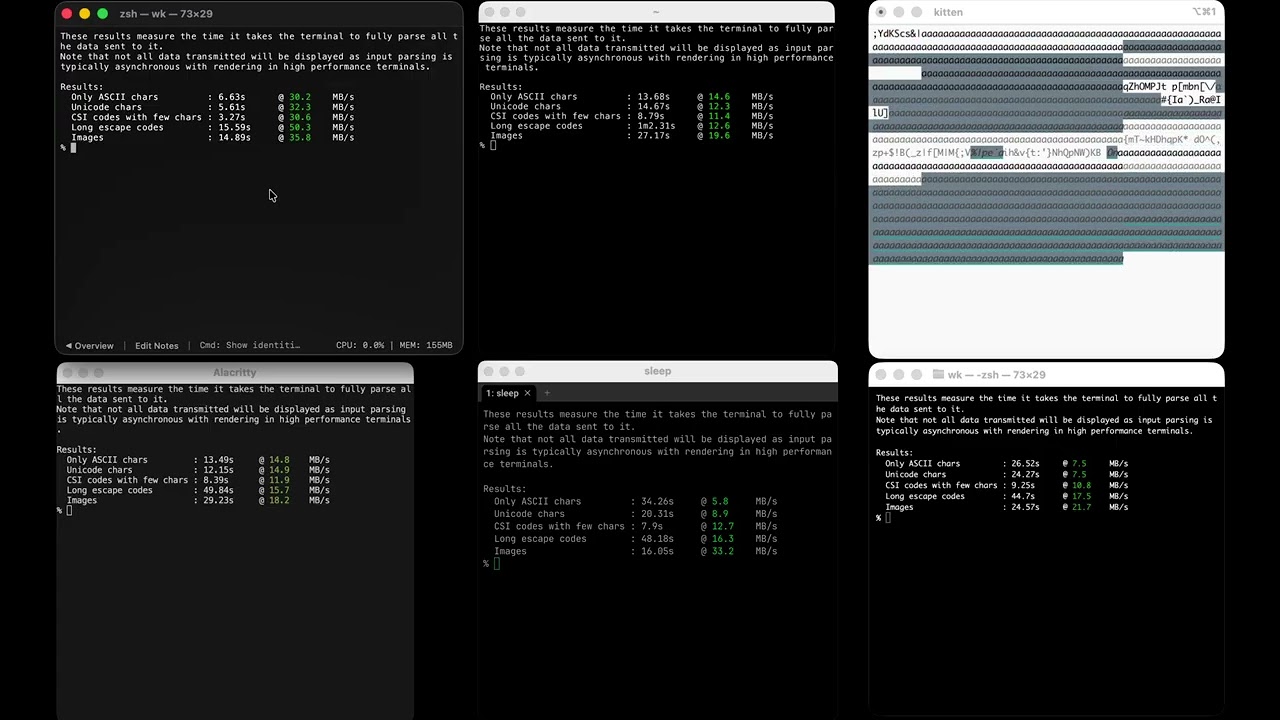
#### Throughput — [kitten Benchmark](https://sw.kovidgoyal.net/kitty/performance/)
```bash
kitten __benchmark__ --render --repetitions 100
```
| Terminal | ASCII | Unicode | CSI codes | Long escapes | Images | Average |
|---|---:|---:|---:|---:|---:|---:|
| **pterm (0.3.2)** | 🥇 **126.0 MB/s** | 🥇 **143.1 MB/s** | 🥇 **114.8 MB/s** | 🥇 **527.4 MB/s** | 🥇 **354.2 MB/s** | 🥇 **253.1 MB/s** |
| kitty (0.46.0) | 89.9 MB/s | 🥉 123.1 MB/s | 🥉 56.2 MB/s | 🥈 270.6 MB/s | 243.8 MB/s | 🥉 156.7 MB/s |
| Alacritty (0.16.1) | 🥈 113.2 MB/s | 🥈 142.2 MB/s | 🥈 72.1 MB/s | 171.1 MB/s | 🥈 315.1 MB/s | 🥈 162.7 MB/s |
| Ghostty (1.3.1) | 🥉 86.7 MB/s | 99.9 MB/s | 38.2 MB/s | 68.7 MB/s | 52.3 MB/s | 69.2 MB/s |
| WezTerm (20240203-110809-5046fc22) | 25.5 MB/s | 38.4 MB/s | 17.9 MB/s | 🥉 238.9 MB/s | 🥉 295.1 MB/s | 123.2 MB/s |
| macOS Terminal (2.15) | 27.5 MB/s | 41.1 MB/s | 30.4 MB/s | 93.5 MB/s | 62.3 MB/s | 50.9 MB/s |
| iTerm2 (3.6.9) | 11.6 MB/s | 6.6 MB/s | 1.4 MB/s | 22.5 MB/s | 9.8 MB/s | 10.4 MB/s |
#### `time seq 1 1000000`
| Terminal | Time |
|---|---:|
| **pterm (0.3.2)** | 🥇 **0.799s** |
| WezTerm (20240203-110809-5046fc22) | 🥈 0.839s |
| kitty (0.46.0) | 🥉 0.886s |
| Alacritty (0.16.1) | 1.016s |
| Ghostty (1.3.1) | 1.021s |
| macOS Terminal (2.15) | 1.158s |
| iTerm2 (3.6.9) | 1.212s |
[Watch the benchmark video on YouTube](https://www.youtube.com/watch?v=CV9ufPY-54A)
[](https://www.youtube.com/watch?v=CV9ufPY-54A)
## Terminal Search
Cmd+F with match highlighting, VS Code-style scrollbar minimap, and circular navigation. Find what you need in thousands of lines of output instantly.
## Terminal Compatibility
Full VT escape sequence support — synchronized updates, double-width/height lines, grapheme clusters, color emoji, inline images, ANSI/256/truecolor. Drop-in replacement for your current terminal.
## CLI Modes
- `--cli` — headless bridging for scripting and automation
- `--command` — launch a transient terminal that runs a single command
- `--user-data-dir` — isolated profiles for separate environments
## Security
Zero third-party dependencies. Every line of code is auditable. Code signed and notarized by Apple.
## Requirements
- macOS 26 (Tahoe) or later
## Install
Download the latest `pterm-darwin-arm64.zip` from [Releases](https://github.com/pontasan/pterm/releases), unzip, and move `pterm.app` to `/Applications`.
## Development
100% AI-coded. Not a single line was written by hand. Every feature, every optimization, every Metal shader — generated entirely by [Claude Code](https://claude.com/claude-code) and [Codex](https://openai.com/index/codex/). A terminal built by AI, for the AI era — pushing beyond what manual engineering can achieve.
## License
[MIT](LICENSE)