https://github.com/pontusab/workbench
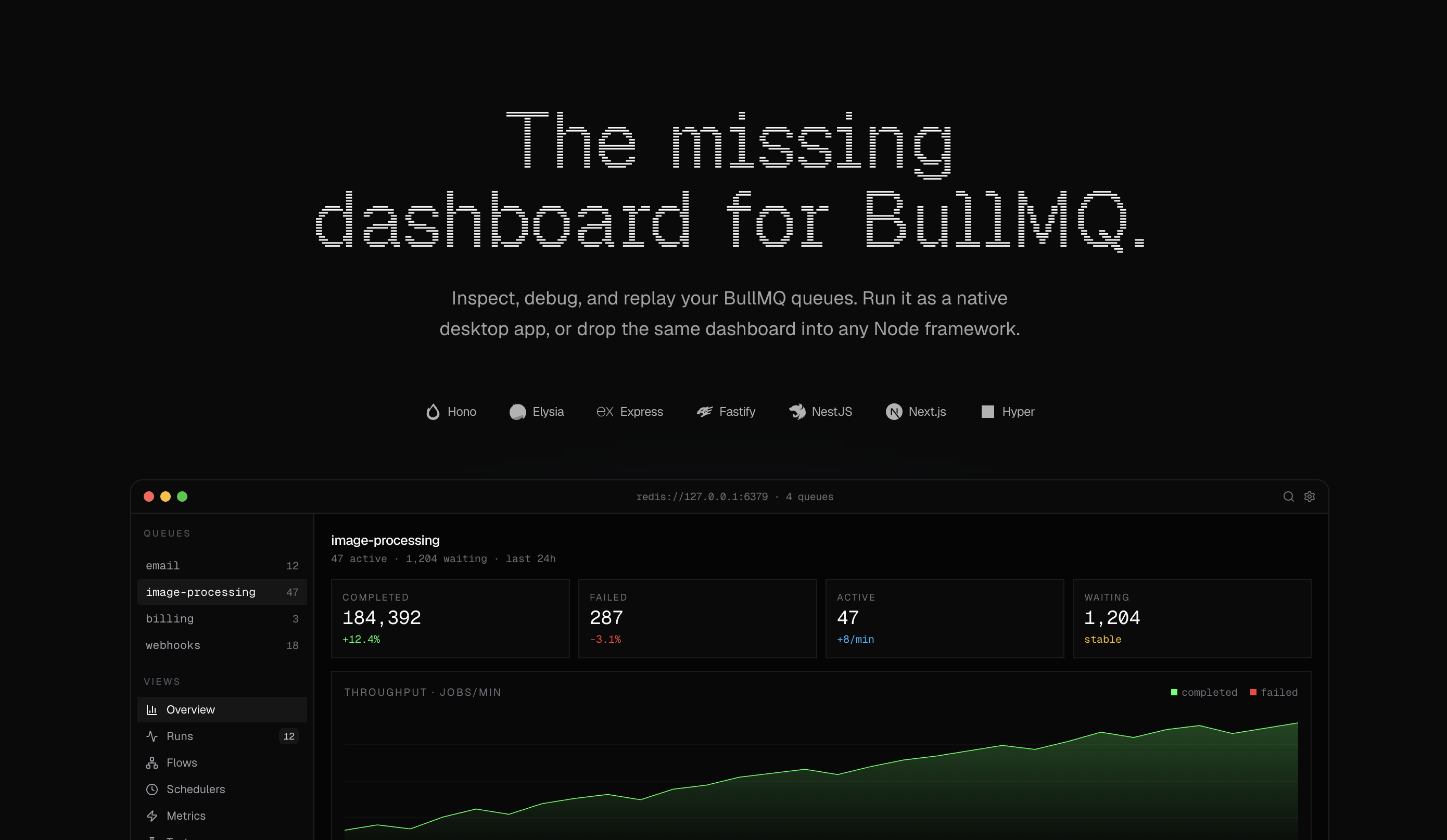
Open-source BullMQ dashboard — modern alternative to bull-board. 13 framework adapters, FlowProducer DAGs, schedulers, macOS app, Docker & MCP.
https://github.com/pontusab/workbench
background-jobs bull-board bullmq dashboard job-queue monitoring nodejs queue redis typescript workbench
Last synced: 21 days ago
JSON representation
Open-source BullMQ dashboard — modern alternative to bull-board. 13 framework adapters, FlowProducer DAGs, schedulers, macOS app, Docker & MCP.
- Host: GitHub
- URL: https://github.com/pontusab/workbench
- Owner: pontusab
- License: mit
- Created: 2026-04-21T11:19:32.000Z (3 months ago)
- Default Branch: main
- Last Pushed: 2026-06-01T12:20:23.000Z (about 2 months ago)
- Last Synced: 2026-06-13T11:34:11.052Z (about 1 month ago)
- Topics: background-jobs, bull-board, bullmq, dashboard, job-queue, monitoring, nodejs, queue, redis, typescript, workbench
- Language: TypeScript
- Homepage: https://getworkbench.dev
- Size: 2.51 MB
- Stars: 391
- Watchers: 0
- Forks: 33
- Open Issues: 12
-
Metadata Files:
- Readme: README.md
- Changelog: CHANGELOG.md
- Contributing: CONTRIBUTING.md
- License: LICENSE
- Security: SECURITY.md
Awesome Lists containing this project
README
# Workbench

Open-source BullMQ dashboard. Drop-in for any Node or Bun backend.

Workbench is a modern dashboard for [BullMQ](https://docs.bullmq.io/). Runs jobs, flows, schedulers and metrics, all served from your own backend behind your own auth.

- Zero infrastructure — mounts as a route in your existing app, or run as a standalone Docker container

- Adapters for Hono, Elysia, Express, Fastify, Koa, NestJS, AdonisJS, Next.js, TanStack Start, Astro, Nuxt, Bun.serve, and h3

- Standalone image on GHCR (`ghcr.io//workbench-standalone`) for Docker / Kubernetes deployments

- MCP server for Cursor, Claude Desktop, Zed, and Continue.dev — drive your queues from your editor's chat

- Flows & DAG view, metrics, schedulers, search

- Dark-mode UI, basic-auth-protected by default

- MIT licensed

Website: [getworkbench.dev](https://getworkbench.dev) · [Documentation](https://getworkbench.dev/docs)

## Migrating from bull-board?

Workbench is a drop-in alternative with thirteen first-party framework adapters, FlowProducer DAGs, error triage, and a keyboard-driven UI.

| bull-board | Workbench |

| --- | --- |

| `@bull-board/express` | `@getworkbench/express` |

| `@bull-board/fastify` | `@getworkbench/fastify` |

| `@bull-board/koa` | `@getworkbench/koa` |

| `@bull-board/nestjs` | `@getworkbench/nestjs` |

| `@bull-board/hono` | `@getworkbench/hono` |

| `@bull-board/h3` | `@getworkbench/h3` |

| `@bull-board/elysia` | `@getworkbench/elysia` |

Run `npx @getworkbench/cli init` to swap the mount in one command. Full comparison: [getworkbench.dev/blog/workbench-vs-bull-board](https://getworkbench.dev/blog/workbench-vs-bull-board)

## Quick start

```bash

npx @getworkbench/cli init

```

The CLI detects your framework, installs the matching `@getworkbench/` package, injects the mount (or scaffolds a route file for Next.js), writes `.env.example` entries, and optionally drops a `docker-compose.yml` for Redis.

## Manual setup

Pick the adapter that matches your stack:

Hono

```bash

npm i @getworkbench/hono bullmq hono

```

```ts

import { Hono } from "hono";

import { Queue } from "bullmq";

import { workbench } from "@getworkbench/hono";

const app = new Hono();

const emailQueue = new Queue("email", { connection: { url: process.env.REDIS_URL! } });

app.route("/jobs", workbench({ queues: [emailQueue] }));

export default app;

```

Elysia

```bash

bun add @getworkbench/elysia bullmq elysia

```

```ts

import { Elysia } from "elysia";

import { Queue } from "bullmq";

import { workbench } from "@getworkbench/elysia";

const emailQueue = new Queue("email", { connection: { url: process.env.REDIS_URL! } });

new Elysia()

  .mount("/jobs", workbench({ queues: [emailQueue], basePath: "/jobs" }))

  .listen(3000);

```

Express

```bash

npm i @getworkbench/express bullmq express

```

```ts

import express from "express";

import { Queue } from "bullmq";

import { workbench } from "@getworkbench/express";

const app = express();

const emailQueue = new Queue("email", { connection: { url: process.env.REDIS_URL! } });

app.use("/jobs", workbench({ queues: [emailQueue] }));

app.listen(3000);

```

Fastify

```bash

npm i @getworkbench/fastify bullmq fastify

```

```ts

import Fastify from "fastify";

import { Queue } from "bullmq";

import { workbench } from "@getworkbench/fastify";

const app = Fastify();

const emailQueue = new Queue("email", { connection: { url: process.env.REDIS_URL! } });

await app.register(workbench({ queues: [emailQueue] }), { prefix: "/jobs" });

await app.listen({ port: 3000 });

```

NestJS

```bash

npm i @getworkbench/nestjs bullmq

```

```ts

import { NestFactory } from "@nestjs/core";

import { Queue } from "bullmq";

import { workbench } from "@getworkbench/nestjs";

import { AppModule } from "./app.module";

async function bootstrap() {

  const app = await NestFactory.create(AppModule);

  const emailQueue = new Queue("email", { connection: { url: process.env.REDIS_URL! } });

  await workbench(app, "/jobs", { queues: [emailQueue] });

  await app.listen(3000);

}

bootstrap();

```

> Works on both the Express (default) and Fastify NestJS platforms.

AdonisJS

```bash

npm i @getworkbench/adonis bullmq @adonisjs/core

```

```ts

// start/routes.ts

import router from "@adonisjs/core/services/router";

import { Queue } from "bullmq";

import { mountWorkbench } from "@getworkbench/adonis";

const emailQueue = new Queue("email", { connection: { url: process.env.REDIS_URL! } });

mountWorkbench(router, "/jobs", { queues: [emailQueue] });

```

> Works with AdonisJS 6 and 7. See [examples/with-adonis](./examples/with-adonis/).

Next.js (App Router)

```bash

npm i @getworkbench/next bullmq

```

```ts

// app/jobs/[[...workbench]]/route.ts

import { Queue } from "bullmq";

import { workbench } from "@getworkbench/next";

const emailQueue = new Queue("email", { connection: { url: process.env.REDIS_URL! } });

export const { GET, POST, PUT, PATCH, DELETE } = workbench({

  queues: [emailQueue],

  basePath: "/jobs",

});

```

> Next doesn't host BullMQ workers itself — run them in a sibling process. See [examples/with-next](./examples/with-next/).

TanStack Start

```bash

npm i @getworkbench/tanstack-start bullmq @tanstack/react-start

```

```ts

// src/lib/workbench-handlers.ts

import { Queue } from "bullmq";

import { workbench } from "@getworkbench/tanstack-start";

const emailQueue = new Queue("email", { connection: { url: process.env.REDIS_URL! } });

export const workbenchHandlers = workbench({

  queues: [emailQueue],

  basePath: "/jobs",

});

```

```ts

// src/routes/jobs.ts

import { createFileRoute } from "@tanstack/react-router";

import { workbenchHandlers } from "../lib/workbench-handlers";

export const Route = createFileRoute("/jobs")({

  server: { handlers: workbenchHandlers },

});

```

```ts

// src/routes/jobs/$.ts

import { createFileRoute } from "@tanstack/react-router";

import { workbenchHandlers } from "../../lib/workbench-handlers";

export const Route = createFileRoute("/jobs/$")({

  server: { handlers: workbenchHandlers },

});

```

> Register handlers on both `/jobs` and `/jobs/$` so the bare mount and nested paths work.

> TanStack Start doesn't host BullMQ workers itself — run them in a sibling process.

> See [examples/with-tanstack-start](./examples/with-tanstack-start/).

Koa

```bash

npm i @getworkbench/koa bullmq koa

```

```ts

import Koa from "koa";

import { Queue } from "bullmq";

import { workbench } from "@getworkbench/koa";

const app = new Koa();

const emailQueue = new Queue("email", { connection: { url: process.env.REDIS_URL! } });

app.use(workbench({ queues: [emailQueue], basePath: "/jobs" }));

app.listen(3000);

```

> Koa has no built-in mount helper — pass `basePath` so the middleware can

> match its own prefix and forward everything else to the next middleware.

Astro

```bash

npm i @getworkbench/astro bullmq

```

```ts

// src/pages/jobs/[...workbench].ts

import { Queue } from "bullmq";

import { workbench } from "@getworkbench/astro";

const emailQueue = new Queue("email", { connection: { url: process.env.REDIS_URL! } });

export const { GET, POST, PUT, PATCH, DELETE, prerender } = workbench({

  queues: [emailQueue],

  basePath: "/jobs",

});

```

> Astro must be in server output mode (`output: "server"` or `"hybrid"`).

> Astro doesn't host BullMQ workers itself — run them in a sibling process.

> See [examples/with-astro](./examples/with-astro/).

Nuxt

```bash

npm i @getworkbench/nuxt bullmq

```

```ts

// server/routes/jobs/[...].ts

import { Queue } from "bullmq";

import { workbench } from "@getworkbench/nuxt";

const emailQueue = new Queue("email", { connection: { url: process.env.REDIS_URL! } });

export default workbench({

  queues: [emailQueue],

  basePath: "/jobs",

});

```

> Nuxt's server runtime (Nitro / h3) doesn't host BullMQ workers itself —

> run them in a sibling process. See [examples/with-nuxt](./examples/with-nuxt/).

Bun.serve

```bash

bun add @getworkbench/bun bullmq

```

```ts

import { Queue } from "bullmq";

import { workbench } from "@getworkbench/bun";

const emailQueue = new Queue("email", { connection: { url: process.env.REDIS_URL! } });

const handler = workbench({ queues: [emailQueue], basePath: "/jobs" });

Bun.serve({

  port: 3000,

  fetch(req) {

    return handler(req, () => new Response("home"));

  },

});

```

h3 (standalone — also for Nitro, SolidStart, Analog)

```bash

npm i @getworkbench/h3 bullmq h3

```

```ts

import { createServer } from "node:http";

import { createApp, createRouter, toNodeListener } from "h3";

import { Queue } from "bullmq";

import { workbench } from "@getworkbench/h3";

const emailQueue = new Queue("email", { connection: { url: process.env.REDIS_URL! } });

const handler = workbench({ queues: [emailQueue], basePath: "/jobs" });

const router = createRouter().use("/jobs", handler).use("/jobs/**", handler);

const app = createApp().use(router);

createServer(toNodeListener(app)).listen(3000);

```

> h3's `**` only matches one-or-more sub-segments, so register the handler

> at both `/jobs` and `/jobs/**`.

Visit `http://localhost:PORT/jobs`.

## Configuration

| Option     | Type                                | Description                                                |

| ---------- | ----------------------------------- | ---------------------------------------------------------- |

| `queues`   | `Queue[]`                           | BullMQ `Queue` instances to display. Required.             |

| `auth`     | `{ username, password }`            | Basic auth credentials. Strongly recommended in prod.      |

| `title`    | `string`                            | Dashboard title. Default: `"Workbench"`.                   |

| `logo`     | `string`                            | Logo URL to display in the nav.                            |

| `basePath` | `string`                            | Override base path detection. Required for `@getworkbench/elysia`, `@getworkbench/koa`, `@getworkbench/next`, `@getworkbench/tanstack-start`, `@getworkbench/astro`, `@getworkbench/nuxt`, and `@getworkbench/h3`. |

| `readonly` | `boolean`                           | Disable actions (retry, remove, promote).                  |

| `tags`     | `string[]`                          | Fields from `job.data` to extract as filterable tags.      |

| `alerts`   | `AlertsOptions`                     | Self-hosted Slack/Discord/webhook alerting via BullMQ QueueEvents. |

### Alerts

Alerts are on by default. Configure Slack, Discord, or webhook **contact points** and **rules** in the dashboard **Alerts** page — notifications are only sent after you set that up. The model follows Grafana-style contact points + rules (unlike Bull Board, which has no built-in alerting). See [`@getworkbench/core` README](./packages/core/README.md) for setup steps.

## Packages

| Package                                                                 | Description                  |

| ----------------------------------------------------------------------- | ---------------------------- |

| [`@getworkbench/core`](./packages/core)                                 | Core + API router + UI       |

| [`@getworkbench/hono`](./packages/hono)                                 | Hono adapter                 |

| [`@getworkbench/elysia`](./packages/elysia)                             | Elysia adapter               |

| [`@getworkbench/express`](./packages/express)                           | Express adapter              |

| [`@getworkbench/fastify`](./packages/fastify)                           | Fastify adapter               |

| [`@getworkbench/koa`](./packages/koa)                                   | Koa adapter                  |

| [`@getworkbench/nestjs`](./packages/nestjs)                             | NestJS adapter               |

| [`@getworkbench/adonis`](./packages/adonis)                             | AdonisJS adapter             |

| [`@getworkbench/next`](./packages/next)                                 | Next.js App Router adapter   |

| [`@getworkbench/tanstack-start`](./packages/tanstack-start)             | TanStack Start adapter       |

| [`@getworkbench/astro`](./packages/astro)                               | Astro adapter                |

| [`@getworkbench/nuxt`](./packages/nuxt)                                 | Nuxt (Nitro/h3) adapter      |

| [`@getworkbench/h3`](./packages/h3)                                     | h3 adapter (Nitro/SolidStart/Analog) |

| [`@getworkbench/bun`](./packages/bun)                                   | Bun.serve adapter            |

| [`@getworkbench/cli`](./packages/cli)                                   | `npx @getworkbench/cli init` |

| [`@getworkbench/mcp`](./packages/mcp)                                   | Model Context Protocol server — Cursor/Claude/Zed/Continue |

| [`apps/standalone`](./apps/standalone)                                  | Standalone Bun server + Docker image (`ghcr.io/pontusab/workbench-standalone`) |

[Hyper](https://hyperjs.ai) is distributed via a source-component registry, so its Workbench integration ships separately as a `hyper add @getworkbench` component in the [pontusab/hyper](https://github.com/pontusab/hyper) repo.

## Docker (standalone)

Run Workbench as its own container when you don't want to embed it in an app server. See [`apps/standalone`](./apps/standalone/README.md) for env vars and local dev.

```bash

docker run --rm -p 3000:3000 \

  -e REDIS_URL=redis://host.docker.internal:6379 \

  -e QUEUE_NAMES=email,image \

  ghcr.io/pontusab/workbench-standalone:latest

```

Tagged releases publish `ghcr.io/pontusab/workbench-standalone:` automatically.

## FAQ

**Is it BullMQ-only?** Yes. Bull (legacy) is not supported.

**What Node version?** 18+ (or Bun 1.1+ for the Elysia and Bun.serve adapters).

**What TypeScript version?** Any TypeScript 4.x or 5.x for the non-Hono adapters (Express, Fastify, NestJS, Next.js, Elysia) and `@getworkbench/core`. **`@getworkbench/hono` requires TypeScript 5.0+** because Hono 4's own bundled `.d.ts` uses `const` type parameters introduced in TS 5.0.

**Can I run it without auth?** Yes, omit the `auth` option. Don't do that in production.

**Does it require a separate service?** No for the embed path — it mounts as a route in your existing backend. Use the [standalone Docker image](./apps/standalone/README.md) when you want a separate container instead.

## Development

```bash

bun i

bun run build

bun run typecheck

# end-to-end smoke test against every example

docker compose up -d redis

bun run smoke

```

See [CONTRIBUTING.md](./CONTRIBUTING.md).

## License

MIT © [Pontus Abrahamsson](https://github.com/pontusab)