https://github.com/potcfdk/archiveorgautosaver
Auto-clicks "Save this url in the Wayback Machine" when a missing page was visited.
https://github.com/potcfdk/archiveorgautosaver
Last synced: about 1 year ago
JSON representation
Auto-clicks "Save this url in the Wayback Machine" when a missing page was visited.
- Host: GitHub
- URL: https://github.com/potcfdk/archiveorgautosaver
- Owner: PotcFdk
- License: apache-2.0
- Created: 2015-06-26T12:27:04.000Z (about 11 years ago)
- Default Branch: master
- Last Pushed: 2015-07-25T22:58:05.000Z (almost 11 years ago)
- Last Synced: 2024-12-25T11:38:12.779Z (over 1 year ago)
- Language: JavaScript
- Size: 195 KB
- Stars: 0
- Watchers: 3
- Forks: 0
- Open Issues: 0
-
Metadata Files:
- Readme: README.md
- License: LICENSE
Awesome Lists containing this project
README
# ArchiveOrgAutoSaver
Sometimes, while browsing archived pages on the [Internet Archive's Wayback Machine](https://archive.org),
you might encounter pages, that haven't been archived yet. In those cases, this page might show up:
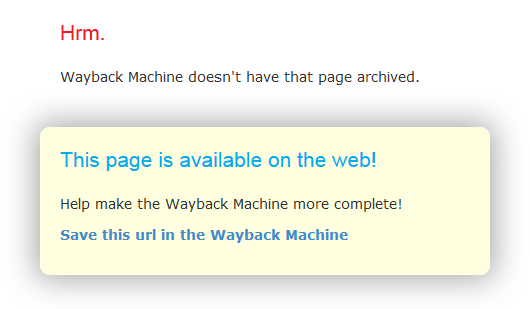
If you plan to add a bunch of pages, manually clicking the link can get pretty annoying.
This userscript auto-clicks "Save this url in the Wayback Machine" when a missing page was visited.
## Installation
1. Install [Greasemonkey](https://addons.mozilla.org/en-us/firefox/addon/greasemonkey/) (Firefox) or [Tampermonkey](https://chrome.google.com/webstore/detail/tampermonkey/dhdgffkkebhmkfjojejmpbldmpobfkfo) (Chrome) / [Tampermonkey Beta](https://addons.opera.com/en/extensions/details/tampermonkey-beta/) (Opera).
2. Open `https://github.com/PotcFdk/ArchiveOrgAutoSaver/raw/master/Archive.org_AutoSaver.user.js` or click [here](https://github.com/PotcFdk/ArchiveOrgAutoSaver/raw/master/Archive.org_AutoSaver.user.js).
3. Click `Install`.