https://github.com/potchangelo/express-feelfriends
ตัวอย่างโปรเจ็ค Express จากคลิป "สอน Express เบื้องต้น จนใช้ได้จริง #1" ของ Zinglecode
https://github.com/potchangelo/express-feelfriends
dayjs express expressjs handlebars hbs knex mysql nodejs
Last synced: 5 months ago
JSON representation
ตัวอย่างโปรเจ็ค Express จากคลิป "สอน Express เบื้องต้น จนใช้ได้จริง #1" ของ Zinglecode
- Host: GitHub
- URL: https://github.com/potchangelo/express-feelfriends
- Owner: potchangelo
- License: mit
- Created: 2022-01-20T09:46:17.000Z (over 4 years ago)
- Default Branch: main
- Last Pushed: 2022-09-30T09:15:20.000Z (almost 4 years ago)
- Last Synced: 2025-10-25T06:07:23.387Z (9 months ago)
- Topics: dayjs, express, expressjs, handlebars, hbs, knex, mysql, nodejs
- Language: JavaScript
- Homepage: https://express-feelfriends.alwaysdata.net/
- Size: 514 KB
- Stars: 4
- Watchers: 1
- Forks: 0
- Open Issues: 0
-
Metadata Files:
- Readme: README.md
- License: LICENSE
Awesome Lists containing this project
README
# Express FeelFriends
https://express-feelfriends.alwaysdata.net/
ตัวอย่างโปรเจ็ค Express จากคลิป "สอน Express เบื้องต้น จนใช้ได้จริง # 1" ของ Zinglecode
Note: ทำขึ้นมาเพื่อการศึกษาทางการเขียนโปรแกรมเท่านั้น เนื้อหาบนเว็บไม่ใช่สินค้าหรือบริการที่มีอยู่จริง
(Update 30/9/2022) ย้าย Hosting ของเว็บพรีวิว จาก Heroku ไปยัง alwaysdata เนื่องจาก Heroku ยกเลิก Free tier ครับ
## YouTube video
https://www.youtube.com/watch?v=FvhM986U1_8
## Setup database table
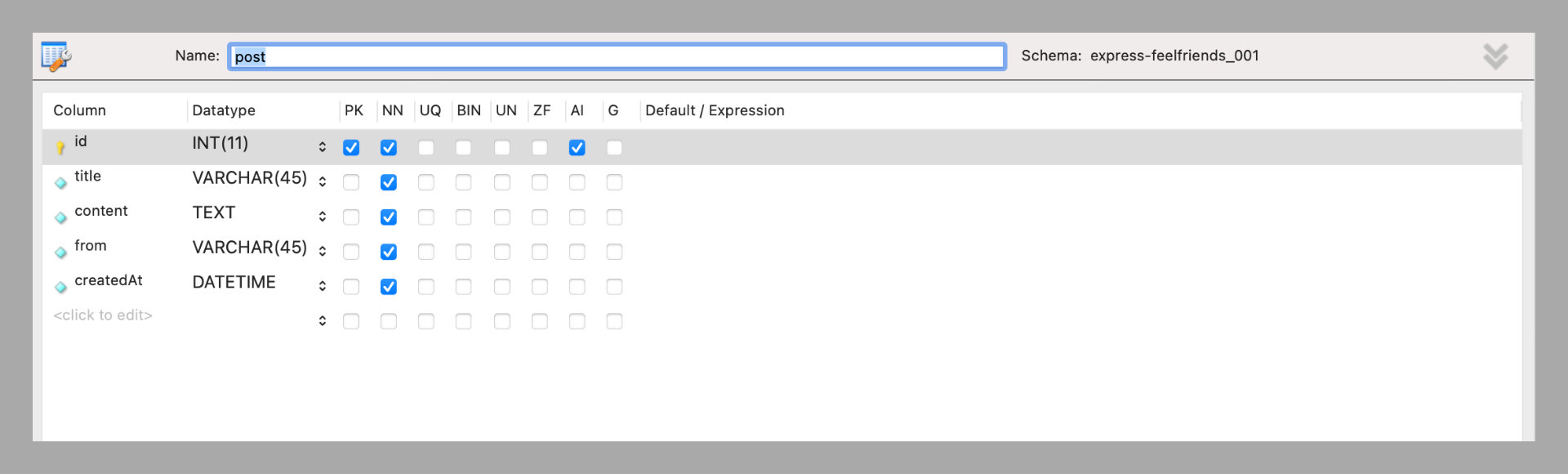
*post table structure*
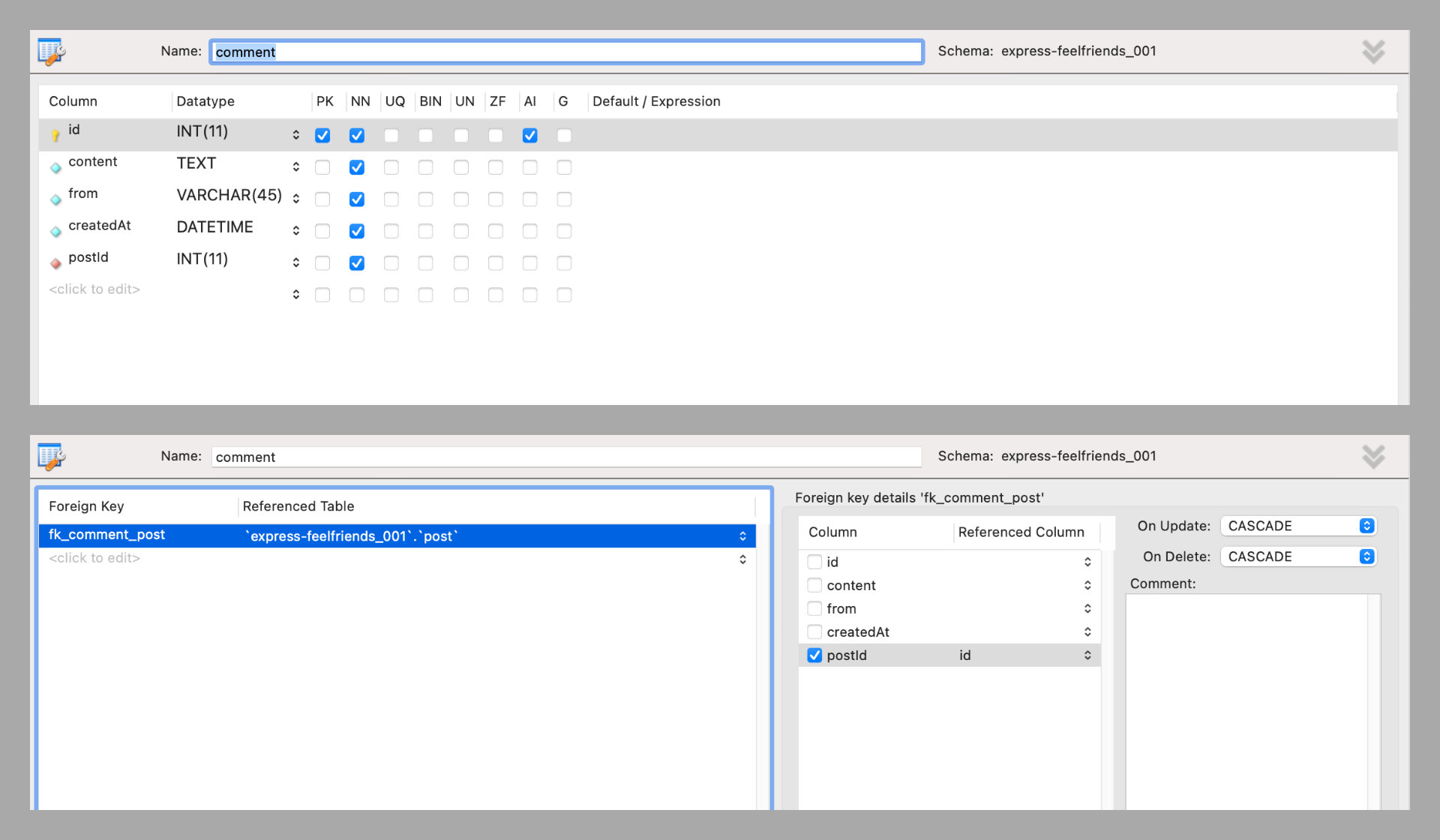
*comment table structure*
## Install and Run project by VSCode
0. ติดตั้ง Node.js, MySQL, MySQLWorkbench ลงเครื่องให้เรียบร้อยก่อน
1. ดาวน์โหลดโปรเจ็คนี้ลงเครื่อง
2. เปิดโฟลเดอร์โปรเจ็คใน VSCode
3. เปิดไฟล์ .env.sample แล้วเปลี่ยนชื่อเป็น .env จากนั้นให้เปลี่ยนการตั้งค่าให้สอดคล้องกับเครื่องของคุณ เสร็จแล้วบันทึกไฟล์ได้เลย
4. เปิด VSCode Terminal
5. ติดตั้ง Packages ของโปรเจ็ค
```
npm install
```
6. เปิดเว็บโปรเจ็คเพื่อ Development
```
npm run dev
```
## Github branches for each lessons
1. [Setup and Run](https://github.com/potchangelo/express-feelfriends/tree/01-setup)
2. [Routes](https://github.com/potchangelo/express-feelfriends/tree/02-routes)
3. [Templates](https://github.com/potchangelo/express-feelfriends/tree/03-templates)
4. [Handlebars](https://github.com/potchangelo/express-feelfriends/tree/04-handlebars)
5. [Routers](https://github.com/potchangelo/express-feelfriends/tree/05-routers)
6. [MySQL](https://github.com/potchangelo/express-feelfriends/tree/06-mysql)
7. [Forms](https://github.com/potchangelo/express-feelfriends/tree/07-forms)
8. [Static](https://github.com/potchangelo/express-feelfriends/tree/08-static)
9. [Dotenv](https://github.com/potchangelo/express-feelfriends/tree/09-dotenv)
10. [Deploy to Heroku](https://github.com/potchangelo/express-feelfriends/tree/10-deploy-heroku)
- [Branch ของเว็บพรีวิว](https://github.com/potchangelo/express-feelfriends/tree/preview) -> จะมีการปรับแต่งโค้ดนิดนึงให้ใช้งานบน Host อย่างเหมาะสม
## Credits
https://unsplash.com/photos/J85dU7QSdMc
https://www.iconfinder.com/icons/8708735/emoji_lol_teeth_smile_icon