https://github.com/pozgo/docker-bonnie
bonnie++ in a Docker (Alpine) Raspberry PI Ready
https://github.com/pozgo/docker-bonnie
alpine armhf bonnie docker raspberry-pi raspeberry
Last synced: 5 months ago
JSON representation
bonnie++ in a Docker (Alpine) Raspberry PI Ready
- Host: GitHub
- URL: https://github.com/pozgo/docker-bonnie
- Owner: pozgo
- License: mit
- Created: 2017-03-08T12:11:28.000Z (over 9 years ago)
- Default Branch: master
- Last Pushed: 2025-11-24T09:39:15.000Z (7 months ago)
- Last Synced: 2025-11-27T22:09:45.963Z (7 months ago)
- Topics: alpine, armhf, bonnie, docker, raspberry-pi, raspeberry
- Homepage:
- Size: 112 KB
- Stars: 3
- Watchers: 1
- Forks: 3
- Open Issues: 39
-
Metadata Files:
- Readme: README.md
- License: LICENSE
Awesome Lists containing this project
README
# Bonnie++ in a Docker (Alpine)
[](https://circleci.com/gh/pozgo/docker-bonnie)
[](https://github.com/pozgo/docker-bonnie/issues)
[](https://github.com/pozgo/docker-bonnie)
[](https://github.com/pozgo/docker-bonnie)
[](https://hub.docker.com/r/polinux/bonnie)
[](https://hub.docker.com/r/polinux/bonnie)
[](http://microbadger.com/images/polinux/bonnie)
[](http://microbadger.com/images/polinux/bonnie)
[](http://microbadger.com/images/polinux/bonnie)
[Docker Image]() with Bonnie++ benchamrk tool. This image is acting like `bonnie++` command and passes all arguments.
### Build
docker build -t polinux/bonnie .
### Basic Usage
docker run \
-ti \
--rm \
polinux/bonnie bonnie++ \
-d /tmp \
-m TEST \
-n 0 \
-r 128M \
-s 256M \
-x 1 \
-u 0:0 \
-f \
-b
Output:
Using uid:0, gid:0.
Writing intelligently...done
Rewriting...done
Reading intelligently...done
start 'em...done...done...done...
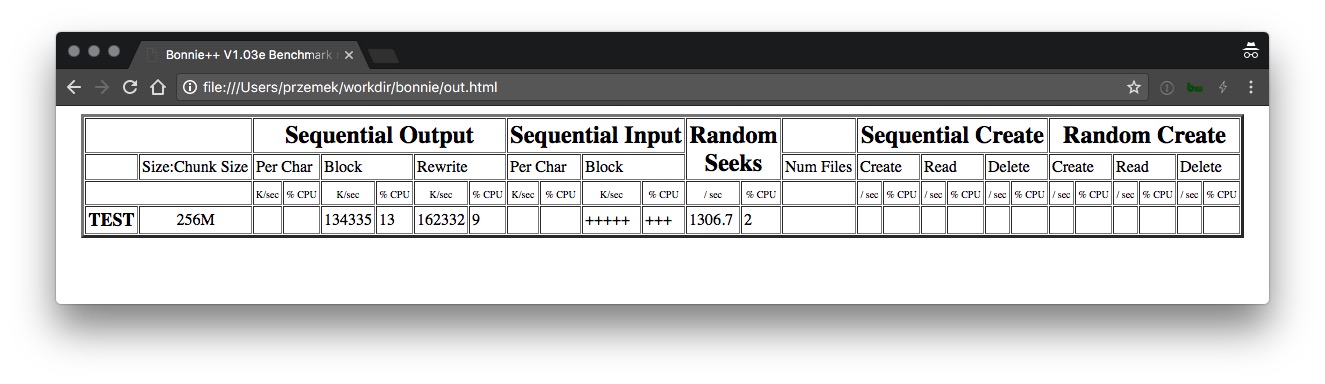
TEST,256M,,,134335,13,162332,9,,,+++++,+++,1306.7,2,,,,,,,,,,,,,
To generate `html` file with human readable format use the same docker image and run command below using last line of previous command.
example data: `TEST,256M,,,134335,13,162332,9,,,+++++,+++,1306.7,2,,,,,,,,,,,,,`
docker run \
-ti \
--rm \
-v ${PWD}:/workdir \
polinux/bonnie \
bash -c 'echo "[RESULT]" | bon_csv2html > /workdir/out.html'
Use file `out.html` and open it with any web-browser to see human readable output.
Example output
## Author
Przemyslaw Ozgo ()