https://github.com/ppvan/nautilus-open-in-blackbox
Open BlackBox from Nautilus.
https://github.com/ppvan/nautilus-open-in-blackbox
nautilus-extension
Last synced: about 1 year ago
JSON representation
Open BlackBox from Nautilus.
- Host: GitHub
- URL: https://github.com/ppvan/nautilus-open-in-blackbox
- Owner: ppvan
- License: gpl-3.0
- Created: 2022-07-10T14:41:18.000Z (almost 4 years ago)
- Default Branch: main
- Last Pushed: 2025-01-26T12:16:00.000Z (over 1 year ago)
- Last Synced: 2025-03-02T13:11:38.185Z (over 1 year ago)
- Topics: nautilus-extension
- Language: Python
- Homepage:
- Size: 130 KB
- Stars: 51
- Watchers: 1
- Forks: 17
- Open Issues: 0
-
Metadata Files:
- Readme: README.md
- License: LICENSE
Awesome Lists containing this project
README
# OpenInBlackBox
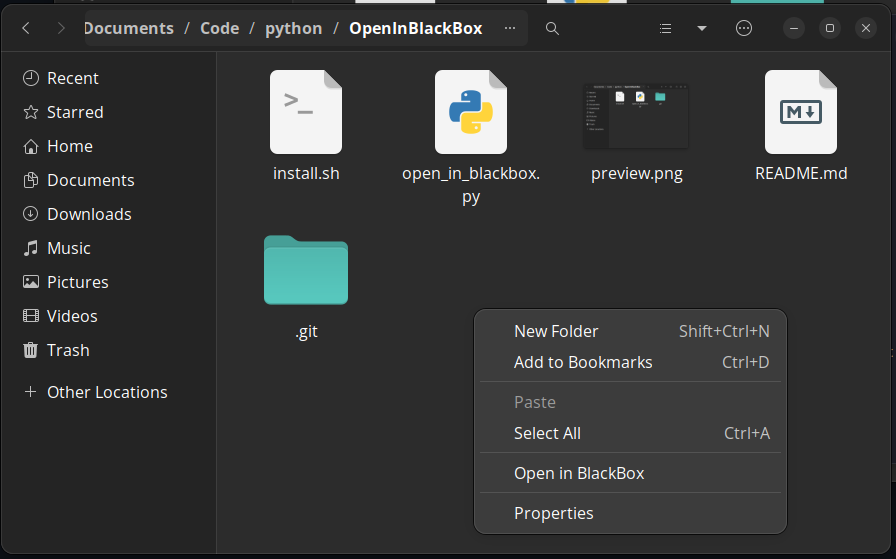
Simple script to open my favorite terminal Black Box from Nautilus (Gnome Files) Menu
## Installation
1. Install `nautilus-python >=4.0`
#### Ubuntu
```sh
sudo apt install python3-nautilus
```
#### Fedora
```sh
sudo dnf install nautilus-python
```
### Arch
```sh
sudo pacman -S nautilus-python
```
2. Copy `nautilus-open-in-blackbox.py` to `$XDG_DATA_HOME/nautilus-python/extensions` (default to `$HOME/.local/share/nautilus-python/extensions`) if `XDG_DATA_HOME` not set.
> [!NOTE]
> If the latest version don't work, you can try the stable version 0.1.2 [nautilus-open-in-blackbox.py](https://github.com/ppvan/nautilus-open-in-blackbox/blob/v0.1.2/nautilus-open-in-blackbox.py)
```sh
mkdir -p $HOME/.local/share/nautilus-python/extensions
cp nautilus-open-in-blackbox.py $HOME/.local/share/nautilus-python/extensions
nautilus -q # restart nautilus
```
## Stability Note
The script stability mostly depend on the Nautilus-Python API and system python so there is no version pin here. I'll note the API version here tested on my machine so it's more future proof:
- `nautilus-python` 4.0.1: [Docs](https://gnome.pages.gitlab.gnome.org/nautilus-python/)
- Python 3.12+ (But it should work for any Python 3.7+ infer from module usage)